Select your country to view prices and course dates.

x

Recent Searches
Category

Microsoft Copilot Courses

Category

Microsoft Power BI

Category

AI for Business

Category

Microsoft Excel

Category

Professional Development

Category

Microsoft Office 365

Category

Excel Specialist

Category

Microsoft Project

Category

R Programming

Category

Python

Category

SQL

Category

Power Apps

Category

SharePoint

Category

Power Automate

Category

Microsoft Teams

Category

Microsoft Visio

Category

Microsoft PowerPoint

Category

Microsoft Word

Category

Microsoft Outlook

Category

Adobe InDesign Courses

Category

Adobe Photoshop Courses

Category

Adobe Illustrator Courses

Category

Adobe Premiere Pro Training

Category

Adobe After Effects Training

Category

Adobe Acrobat Courses

Category

Adobe Captivate Training

Category

Adobe Animate Training

Category

HTML Courses

Category

WordPress

Category

Canva Courses

Category

Microsoft Access

Category

Webinars

Course

Copilot for M365

Course

Power BI Beginner

Course

ChatGPT Beginner

Course

Excel Beginner

Course

Achieving Leadership & Success

Course

Microsoft 365 Beginner

Course

Financial Modelling

Course

Project Beginner

Course

R Programming Beginner

Course

Python Beginner

Course

SQL Beginner

Course

Power Apps Beginner

Course

SharePoint Beginner

Course

Teams Essentials

Course

Visio Essentials

Course

PowerPoint Level 1

Course

Word Beginner

Course

Microsoft Outlook Beginner

Course

InDesign Lite

Course

Photoshop Training Intro

Course

Illustrator Training Intro

Course

Premiere Training Intro

Course

After Effects Training Intro

Course

Acrobat Essentials

Course

Captivate Training

Course

Animate Training Intro

Course

HTML Training Intro

Course

WordPress Essentials

Course

Canva Beginners

Course

Microsoft Access Essentials

Course

Copilot for Word

Course

Power BI Intermediate

Course

Excel Intermediate

Course

Microsoft 365 Intermediate

Course

Analysis and Dashboards

Course

Project Intermediate

Course

R Programming Intermediate

Course

Python Intermediate

Course

SQL Intermediate

Course

Power Apps Intermediate

Course

SharePoint Intermediate

Course

PowerPoint Level 2

Course

Word Intermediate

Course

InDesign Training Intro

Course

Photoshop Lite

Course

Illustrator Training Advanced

Course

Premiere Basics Training

Course

Acrobat Forms

Course

Canva Intermediate

Course

Microsoft Access Advanced

Course

Copilot for Excel

Course

Power BI Advanced

Course

Excel Advanced

Course

Microsoft 365 Advanced

Course

Excel VBA

Course

Project Advanced

Course

R Programming Advanced

Course

Python Advanced

Course

SQL Advanced

Course

Power Apps Advanced

Course

SharePoint Advanced (Site Owner)

Course

Word Advanced

Course

InDesign Training Advanced

Course

Photoshop Training Advanced

Course

Advanced Premiere Training

Course

Advanced After Effects Training

Course

Canva Advanced

Course

Copilot for PowerPoint

Course

Power BI DAX

Course

Excel Expert

Course

Machine Learning in R

Course

SharePoint Advanced (Document Governance)

Course

InDesign Interactivity Training

Course

Copilot for Outlook and Teams

Course

InDesign Accessibility Training

Course

Power Automate Beginner

Course

Power Automate Intermediate

Course

Microsoft Outlook Advanced

Course

AI Prompting Fundamentals

Course

Power Automate Advanced

Course

Excel Tables and Pivot Tables

Course

Data Transformation with Power Query

Course

Excel Macro Mastery

Course

Power BI Desktop Advanced Reporting

Course

AI for Business Leaders and Managers

Course

Data Visualisation with Power BI Desktop

Course

Anger Management & Negotiation Skills

Course

Assertiveness & Confidence

Course

Building Resilience

Course

Coaching and Mentoring

Course

Communications

Course

Communications & Quality Client Service Training

Course

Critical Thinking and Problem Solving

Course

Cultural Diversity in the Workplace

Course

Embracing Change

Course

Growing Emotional Intelligence

Course

Minute Taking

Course

Persuasion and Negotiation Skills

Course

Presentation Skills and Public Speaking

Course

Practical Project Management

Course

Respect, Equity and Diversity (RED)

Course

Resumé Writing and Interview Skills

Course

Stress Management

Course

Team Leadership, Management and Development

Course

Time Management Intensive

Course

Train the Trainer

Course

Write Effective Business Documents

Course

Dealing with Difficult People

Course

Managing Difficult Conversations

Course

Managing the Virtual Workplace

All courses available in-class or remotely. 
To attend remotely, select "Remote Online" as your location on book now.

Our expert-led courses will ensure you are confident in building your own models and have worked examples to refer back to that follow our Best Practice Modelling Guidelines.

We show you how to build smart models and avoid potential pitfalls, working through real scenarios so you can apply your learning directly to your work. Excel financial modelling involves designing and building calculations to aide decision making. This is a Beginner Level Modelling course. Learning how to build models with complexity in an accurate, robust and transparent way is an essential skill in the modern workplace. See full course outline here.

By the end of this course, participants will be able to:

  • Apply best practice techniques for building effective financial models 
  • Use essential Excel functions and features for model development
  • Protect models from unwanted changes and errors
  • Apply modelling skills to real-world business scenarios

Prerequisite:

This course is for users with advanced Excel skills who regularly work with complex spreadsheets. It’s not suitable for beginners or those new to functions like VLOOKUP or SUMIF. If unsure, please contact us on 1300 886 190 to discuss your suitability.

Upcoming Courses

Scheduled
Taking enrollments.
Confirmed
Taking enrollments.
Few Seats left
Book Now.
Sold Out
Try another date.

Excel Specialist Training Courses

Course Icon Analysis & Dashboards

Analyse your data in Excel with Power Pivot and build effective dashboards. Led by our experienced trainers.

download course pdf
Course Icon Excel Macros/VBA 2 Day

Learn to build solutions to automate tasks. Record macros, write procedures, work with functions and more.

download course pdf

Excel Financial Modelling for Beginners Course Content

Expand All | Collapse All

Modelling Techniques

Tips for best practice structure and design

Separation of inputs, calculations and outputs

Avoiding hard coding

How to best include adjustments

Effective styling to purpose

Indicators of risk and mitigating the risk of error

Using reconciliations and zero checks

Tips for effective reporting

Projects

Business case model build #1 - Create a Feasibility Study

Business case model build #2 - Forecast Cashflows for investment

Business case model build #3 - Assess viability of a Development Proposal

Business case model build #4 - Create a Management Dashboard and Sensitivity Analysis

Business case model build #5 - Create an Automated Pricing Tool

Business case model build #6 - Automate payout calculation for investors

Defined Names

Understanding Defined Names

Defining Names From Worksheet Labels

Using Names in Typed Formulas

Applying Names to Existing Formulas

Creating Names Using the Name Box

Using Names to Select Ranges

Pasting Defined Names Into Formulas

Defining Names for Constant Values

Creating Names From a Selection

Scoping Names to a Worksheet

Validating Data

Understanding Data Validation

Creating a Number Range Validation

Testing a Validation

Creating an Input Message

Creating an Error Message

Creating a Drop Down List

Using Formulas as Validation Criteria

Circling Invalid Data

Removing Invalid Circles

Copying Validation Settings

Absolute Versus Relative Referencing

Relative Formulas

Problems With Relative Formulas

Creating Absolute References

Creating Mixed References

Logical Functions

Understanding Logical Functions

Using IF With Text

Using IF With Numbers

Nesting IF Functions

Using IFERROR

Using TRUE and FALSE

Using AND

Using OR

Using NOT

Financial Functions

Understanding Financial Functions

Using PMT

Using FV

Using NPV

Using PV

Using RATE

Using EFFECT

Using NOMINAL

Date and Time Functions

Understanding Date and Time Functions

Using NOW

Using HOUR and MINUTE

Using TODAY

Calculating Future Dates

Using DATE

Using Calendar Functions

Using WEEKDAY

Using WEEKNUM

Using WORKDAY

Using EOMONTH

Lookup Functions

Understanding Data Lookup Functions

Using VLOOKUP

Using VLOOKUP for Exact Matches

Using HLOOKUP

Using INDEX

Using Match

Complex Formulas

Scoping a Formula

Long-Hand Formulas

Preparing for Complex Formulas

Creating the Base Formula

Adding More Operations

Editing a Complex Formula

Adding More Complexity

Copying Nested Functions

Switching to Manual Recalculation

Pasting Values From Formulas

Documenting Formulas

Protecting Data

Understanding Data Protection

Providing Total Access to Cells

Protecting a Worksheet

Working With a Protected Worksheet

Disabling Worksheet Protection

Providing Restricted Access to Cells

Password Protecting a Workbook

Opening a Password Protected Workbook

Removing a Password From a Workbook

Frequently Asked Questions

Which Excel Course is right for me?

Everyone uses Excel differently but as Excel consultants, we are aware of the core concepts relevant to all workplaces. Our Excel Specialist courses focus on different aspects of Excel and how it is used across different roles. The Financial Modelling course introduces building models in excel in line with best practices. Analysis and Dashboards concentrates on building more advanced visuals and introducing Power Query. For those seeking to automate tasks in Excel, our VBA course will be the best fit.

How many students are typically in an Excel Specialist Training Course?

While this varies from session to session, we typically have 4 - 6 students in our Excel Specialist classes. We cap our classes at 10 students. This is to ensure the quality of training remains high and that all students can ask questions and engage in discussion.

What is Remote Training?

Remote training at Nexacu means our team of experienced trainers will deliver your training virtually. Students can access our usual classroom training courses via video conferencing, ask questions, participate in discussions, and share their screen with the trainer if they need help at any point in the course. Students have the same level of participation and access to the trainer as they would in classroom training sessions. 

What should I do to prepare for my online course?

You need to install the latest version of Excel and ensure you have the appropriate license to use it. 

The Browser you use is very important. It is recommended you use Chrome, Edge, or Firefox. The latest version must also be installed. Note that Internet Explorer is not compatible with our delivery technologies. 

Windows 10 is highly recommended as the operating system you use. Apple devices and macOS are not suitable for this course. 

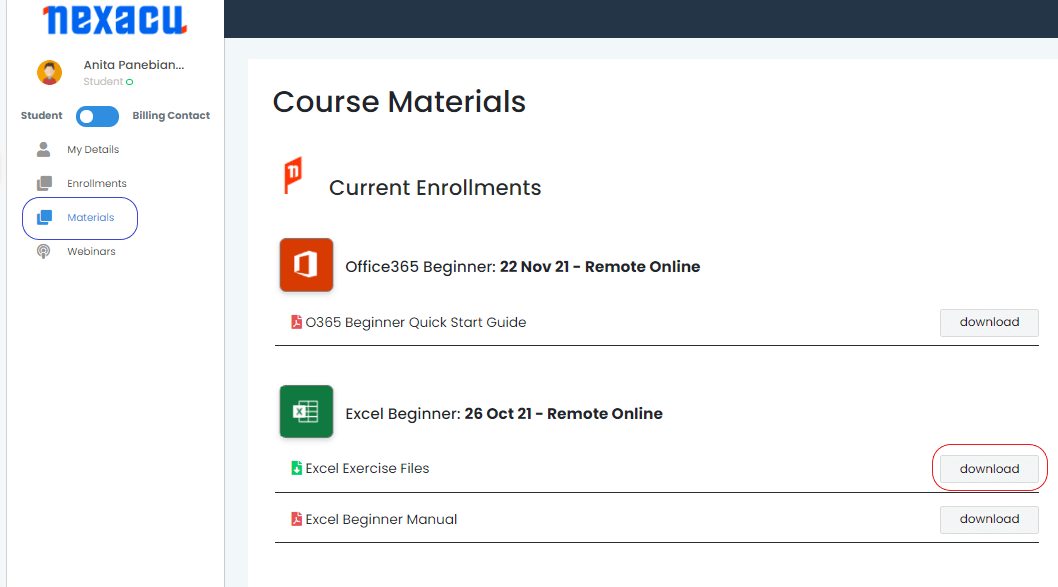
To download and unzip files, log in to your student portal. Click on the "Materials" tab and download your exercise files. 

materials tab Nexacu Hub

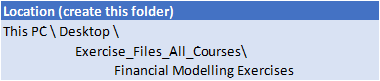
Extract your Exercise Files to the folder specific to your course, as seen below. You will need to create this folder. 


exercise files

exercise files

exercise files

skills test nexacu

Skills Test

Try our short skills test and find out which course is right for you.

 skills test


Locations In-Person & Online

Find the nearest location and date that works for you

Locations In-Person & Online

Find the nearest location and date that works for you

Related Training Courses

Course Icon Analysis & Dashboards

Analyse your data in Excel with Power Pivot and build effective dashboards. Led by our experienced trainers.

download course pdf
Course Icon Excel Macros/VBA 2 Day

Learn to build solutions to automate tasks. Record macros, write procedures, work with functions and more.

download course pdf

Locations In-Person & Online

Find the nearest location and date that works for you

Locations In-Person & Online

Find the nearest location and date that works for you

Trusted Globally by Leading Organisations

At Nexacu, we are proud to be the trusted training partner for hundreds of leading organisations across Australia, New Zealand, and around the world. From government agencies to multinational corporations, we help teams build practical skills and achieve real outcomes through expert-led training.

  • 400+ companies rely on Nexacu for workforce development
  • Trusted by government agencies at all levels
  • Delivering training across 9 countries and growing

Why Nexacu? 

step by step courseware

Step by Step Courseware

Custom workbook included with a step by step exercises

Facility Image 2
Facility Image 3
Facility Image 1

Interactive real time training

Interactive, Real-Time Training

Learn with expert instructors, wherever you are

Trusted by Business

Trusted by Business

Procured by Government

Procured by Goverment

Reviews Not Found

Valued by Individuals