Select your country to view prices and course dates.

x

Recent Searches
Category

Microsoft Copilot Courses

Category

Microsoft Power BI

Category

AI for Business

Category

Microsoft Excel

Category

Professional Development

Category

Microsoft Office 365

Category

Excel Specialist

Category

Microsoft Project

Category

R Programming

Category

Python

Category

SQL

Category

Power Apps

Category

SharePoint

Category

Power Automate

Category

Microsoft Teams

Category

Microsoft Visio

Category

Microsoft PowerPoint

Category

Microsoft Word

Category

Microsoft Outlook

Category

Adobe InDesign Courses

Category

Adobe Photoshop Courses

Category

Adobe Illustrator Courses

Category

Adobe Premiere Pro Training

Category

Adobe After Effects Training

Category

Adobe Acrobat Courses

Category

Adobe Captivate Training

Category

Adobe Animate Training

Category

HTML Courses

Category

WordPress

Category

Canva Courses

Category

Microsoft Access

Category

Webinars

Course

Copilot for M365

Course

Power BI Beginner

Course

ChatGPT Beginner

Course

Excel Beginner

Course

Achieving Leadership & Success

Course

Microsoft 365 Beginner

Course

Financial Modelling

Course

Project Beginner

Course

R Programming Beginner

Course

Python Beginner

Course

SQL Beginner

Course

Power Apps Beginner

Course

SharePoint Beginner

Course

Teams Essentials

Course

Visio Essentials

Course

PowerPoint Level 1

Course

Word Beginner

Course

Microsoft Outlook Beginner

Course

InDesign Lite

Course

Photoshop Training Intro

Course

Illustrator Training Intro

Course

Premiere Training Intro

Course

After Effects Training Intro

Course

Acrobat Essentials

Course

Captivate Training

Course

Animate Training Intro

Course

HTML Training Intro

Course

WordPress Essentials

Course

Canva Beginners

Course

Microsoft Access Essentials

Course

Copilot for Word

Course

Power BI Intermediate

Course

Excel Intermediate

Course

Microsoft 365 Intermediate

Course

Analysis and Dashboards

Course

Project Intermediate

Course

R Programming Intermediate

Course

Python Intermediate

Course

SQL Intermediate

Course

Power Apps Intermediate

Course

SharePoint Intermediate

Course

PowerPoint Level 2

Course

Word Intermediate

Course

InDesign Training Intro

Course

Photoshop Lite

Course

Illustrator Training Advanced

Course

Premiere Basics Training

Course

Acrobat Forms

Course

Canva Intermediate

Course

Microsoft Access Advanced

Course

Copilot for Excel

Course

Power BI Advanced

Course

Excel Advanced

Course

Microsoft 365 Advanced

Course

Excel VBA

Course

Project Advanced

Course

R Programming Advanced

Course

Python Advanced

Course

SQL Advanced

Course

Power Apps Advanced

Course

SharePoint Advanced (Site Owner)

Course

Word Advanced

Course

InDesign Training Advanced

Course

Photoshop Training Advanced

Course

Advanced Premiere Training

Course

Advanced After Effects Training

Course

Canva Advanced

Course

Copilot for PowerPoint

Course

Power BI DAX

Course

Excel Expert

Course

Machine Learning in R

Course

SharePoint Advanced (Document Governance)

Course

InDesign Interactivity Training

Course

Copilot for Outlook and Teams

Course

InDesign Accessibility Training

Course

Power Automate Beginner

Course

Power Automate Intermediate

Course

Microsoft Outlook Advanced

Course

AI Prompting Fundamentals

Course

Power Automate Advanced

Course

Excel Tables and Pivot Tables

Course

Data Transformation with Power Query

Course

Excel Macro Mastery

Course

Power BI Desktop Advanced Reporting

Course

AI for Business Leaders and Managers

Course

Data Visualisation with Power BI Desktop

Course

Anger Management & Negotiation Skills

Course

Assertiveness & Confidence

Course

Building Resilience

Course

Coaching and Mentoring

Course

Communications

Course

Communications & Quality Client Service Training

Course

Critical Thinking and Problem Solving

Course

Cultural Diversity in the Workplace

Course

Embracing Change

Course

Growing Emotional Intelligence

Course

Minute Taking

Course

Persuasion and Negotiation Skills

Course

Presentation Skills and Public Speaking

Course

Practical Project Management

Course

Respect, Equity and Diversity (RED)

Course

Resumé Writing and Interview Skills

Course

Stress Management

Course

Team Leadership, Management and Development

Course

Time Management Intensive

Course

Train the Trainer

Course

Write Effective Business Documents

Course

Dealing with Difficult People

Course

Managing Difficult Conversations

Course

Managing the Virtual Workplace

3 Power Apps Success Stories

Hannah Pearson | Sep 28, 2021
power apps image

Since it’s introduction in 2015, Power Apps has streamlined dozens of organisations spanning almost every industry. The app gives businesses the power to easily create their own apps through easy-to-use, low-code software. The app can be used for many purposes and has been utilised by major companies internationally to simplify and centralise operations.
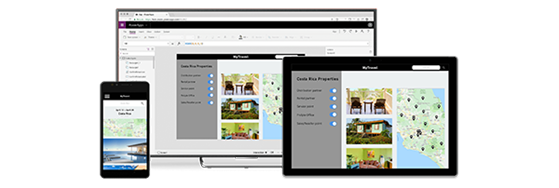
Power Apps Intro

Priceline Pharmacies


Popular health and beauty brand Priceline is one of many Power Apps success stories. Business Leaders within the organisation require key metrics for analysis and interpretation to gauge the success of campaigns. Their previous system of reports being run from a physical location with data being held in multiple places proved inefficient and resulted in reports looking different from store to store. There was also a time delay, with managers having to wait overnight for data to be compiled. By the time the reports were put together, the data was no longer up-to-date or relevant.


Power Apps Priceline Logo

Priceline decided to embrace Power Apps as a solution to their time-consuming process. The Heart in Hand app developed using Power Apps streamlined the reporting process and solved many of the issues with the previous system. Data is pulled from each individual store and centralised to the app in real time. Key performance indicators are then easy to access and analyse. Priceline Business Leader James Matson is persuaded that “Power Apps had a lot to offer even to the most experienced developers.”


Heathrow Airport

The infamous Heathrow is one of the busiest airports in the world and employs an astounding 76,000 people. Many of these are front line workers whose job makes the difference between an easy flying experience and a hard one. Employees such as Samit Saini can recognise where problems occur and have a unique perspective on how best to solve them.

At the introduction of Office365 to Heathrow, Samit saw an opportunity to use Power Apps to streamline the security process. He had previously used a ‘language book’ that identified items that are and are not allowed on planes in various languages. With Power Apps easy-to-use interface, he created an app that did the work of the ‘language book’ – but better, faster, and cheaper.

Heathrow Plane Power Apps

After the success of the app, Samit was promoted to a position created especially for him, in which he oversees IT solutions. Since, 30 apps have been released to streamline almost every aspect of airport operations. Not only have these apps saved an approximate 950 working hours and 75,000 sheets of paper but they have also led to promotions.

Samit has high praise for Power Apps and how easy it is to use, saying that “With Power Apps, it doesn’t matter what your skill levels are.”


Toyota

One of the most obvious benefits of Power Apps is that it’s easy-to-use interface empowers employees to create apps themselves, with no need for third-party developers. Not only does this allow problems to be addressed pointedly by someone with a singular perspective, but it is also a cost saver. This was an upside for Toyota when they introduced Power Apps to their team.

Toyota understood that generally the best person to solve is problem is the person experiencing it; they have fostered a culture of creative problem solving that has led to the development of over 400 apps - with no sign of slowing down. Although there are controls so that the company avoids unnecessary development, Toyota’s support for their employee’s use of Power Apps has saved hours and increased efficiency.

Power Apps Toyota Car


All three companies serve as models for how Power Apps can fundamentally transform how an organisation runs and operates. Power Apps empowers employees to use their unique perspective to solve problems – cutting down on third-party costs in the process.

This post is adapted from articles originally posted to the Microsoft blog, accessible here. Learn how to use Power Apps on our courses running nationwide.


Trusted Globally by Leading Organisations

At Nexacu, we are proud to be the trusted training partner for hundreds of leading organisations across Australia, New Zealand, and around the world. From government agencies to multinational corporations, we help teams build practical skills and achieve real outcomes through expert-led training.

  • 400+ companies rely on Nexacu for workforce development
  • Trusted by government agencies at all levels
  • Delivering training across 9 countries and growing

Why Nexacu? 

step by step courseware

Step by Step Courseware

Custom workbook included with a step by step exercises

Facility Image 2
Facility Image 3
Facility Image 1

Interactive real time training

Interactive, Real-Time Training

Learn with expert instructors, wherever you are

Trusted by Business

Trusted by Business

Procured by Government

Procured by Goverment

Reviews Not Found

Valued by Individuals