Select your country to view prices and course dates.

x

Recent Searches
Category

Microsoft Copilot Courses

Category

Microsoft Power BI

Category

AI for Business

Category

Microsoft Excel

Category

Professional Development

Category

Microsoft Office 365

Category

Excel Specialist

Category

Microsoft Project

Category

R Programming

Category

Python

Category

SQL

Category

Power Apps

Category

SharePoint

Category

Power Automate

Category

Microsoft Teams

Category

Microsoft Visio

Category

Microsoft PowerPoint

Category

Microsoft Word

Category

Microsoft Outlook

Category

Adobe InDesign Courses

Category

Adobe Photoshop Courses

Category

Adobe Illustrator Courses

Category

Adobe Premiere Pro Training

Category

Adobe After Effects Training

Category

Adobe Acrobat Courses

Category

Adobe Captivate Training

Category

Adobe Animate Training

Category

HTML Courses

Category

WordPress

Category

Canva Courses

Category

Microsoft Access

Category

Webinars

Course

Copilot for M365

Course

Power BI Beginner

Course

ChatGPT Beginner

Course

Excel Beginner

Course

Achieving Leadership & Success

Course

Microsoft 365 Beginner

Course

Financial Modelling

Course

Project Beginner

Course

R Programming Beginner

Course

Python Beginner

Course

SQL Beginner

Course

Power Apps Beginner

Course

SharePoint Beginner

Course

Teams Essentials

Course

Visio Essentials

Course

PowerPoint Level 1

Course

Word Beginner

Course

Microsoft Outlook Beginner

Course

InDesign Lite

Course

Photoshop Training Intro

Course

Illustrator Training Intro

Course

Premiere Training Intro

Course

After Effects Training Intro

Course

Acrobat Essentials

Course

Captivate Training

Course

Animate Training Intro

Course

HTML Training Intro

Course

WordPress Essentials

Course

Canva Beginners

Course

Microsoft Access Essentials

Course

Copilot for Word

Course

Power BI Intermediate

Course

Excel Intermediate

Course

Microsoft 365 Intermediate

Course

Analysis and Dashboards

Course

Project Intermediate

Course

R Programming Intermediate

Course

Python Intermediate

Course

SQL Intermediate

Course

Power Apps Intermediate

Course

SharePoint Intermediate

Course

PowerPoint Level 2

Course

Word Intermediate

Course

InDesign Training Intro

Course

Photoshop Lite

Course

Illustrator Training Advanced

Course

Premiere Basics Training

Course

Acrobat Forms

Course

Canva Intermediate

Course

Microsoft Access Advanced

Course

Copilot for Excel

Course

Power BI Advanced

Course

Excel Advanced

Course

Microsoft 365 Advanced

Course

Excel VBA

Course

Project Advanced

Course

R Programming Advanced

Course

Python Advanced

Course

SQL Advanced

Course

Power Apps Advanced

Course

SharePoint Advanced (Site Owner)

Course

Word Advanced

Course

InDesign Training Advanced

Course

Photoshop Training Advanced

Course

Advanced Premiere Training

Course

Advanced After Effects Training

Course

Canva Advanced

Course

Copilot for PowerPoint

Course

Power BI DAX

Course

Excel Expert

Course

Machine Learning in R

Course

SharePoint Advanced (Document Governance)

Course

InDesign Interactivity Training

Course

Copilot for Outlook and Teams

Course

InDesign Accessibility Training

Course

Power Automate Beginner

Course

Power Automate Intermediate

Course

Microsoft Outlook Advanced

Course

AI Prompting Fundamentals

Course

Power Automate Advanced

Course

Excel Tables and Pivot Tables

Course

Data Transformation with Power Query

Course

Excel Macro Mastery

Course

Power BI Desktop Advanced Reporting

Course

AI for Business Leaders and Managers

Course

Data Visualisation with Power BI Desktop

Course

Anger Management & Negotiation Skills

Course

Assertiveness & Confidence

Course

Building Resilience

Course

Coaching and Mentoring

Course

Communications

Course

Communications & Quality Client Service Training

Course

Critical Thinking and Problem Solving

Course

Cultural Diversity in the Workplace

Course

Embracing Change

Course

Growing Emotional Intelligence

Course

Minute Taking

Course

Persuasion and Negotiation Skills

Course

Presentation Skills and Public Speaking

Course

Practical Project Management

Course

Respect, Equity and Diversity (RED)

Course

Resumé Writing and Interview Skills

Course

Stress Management

Course

Team Leadership, Management and Development

Course

Time Management Intensive

Course

Train the Trainer

Course

Write Effective Business Documents

Course

Dealing with Difficult People

Course

Managing Difficult Conversations

Course

Managing the Virtual Workplace

Office 365 Insights

How to organize a party with Microsoft

Microsoft forms is a dynamic tool for anybody and everybody. Learn how to use Microsoft forms to make planning group events a breeze.

How to use Microsoft Planner

Microsoft's 365 platform has been put to the limit in the past year and a half with the onset of the pandemic. One of the most useful apps in the platform is Microsoft Planner.
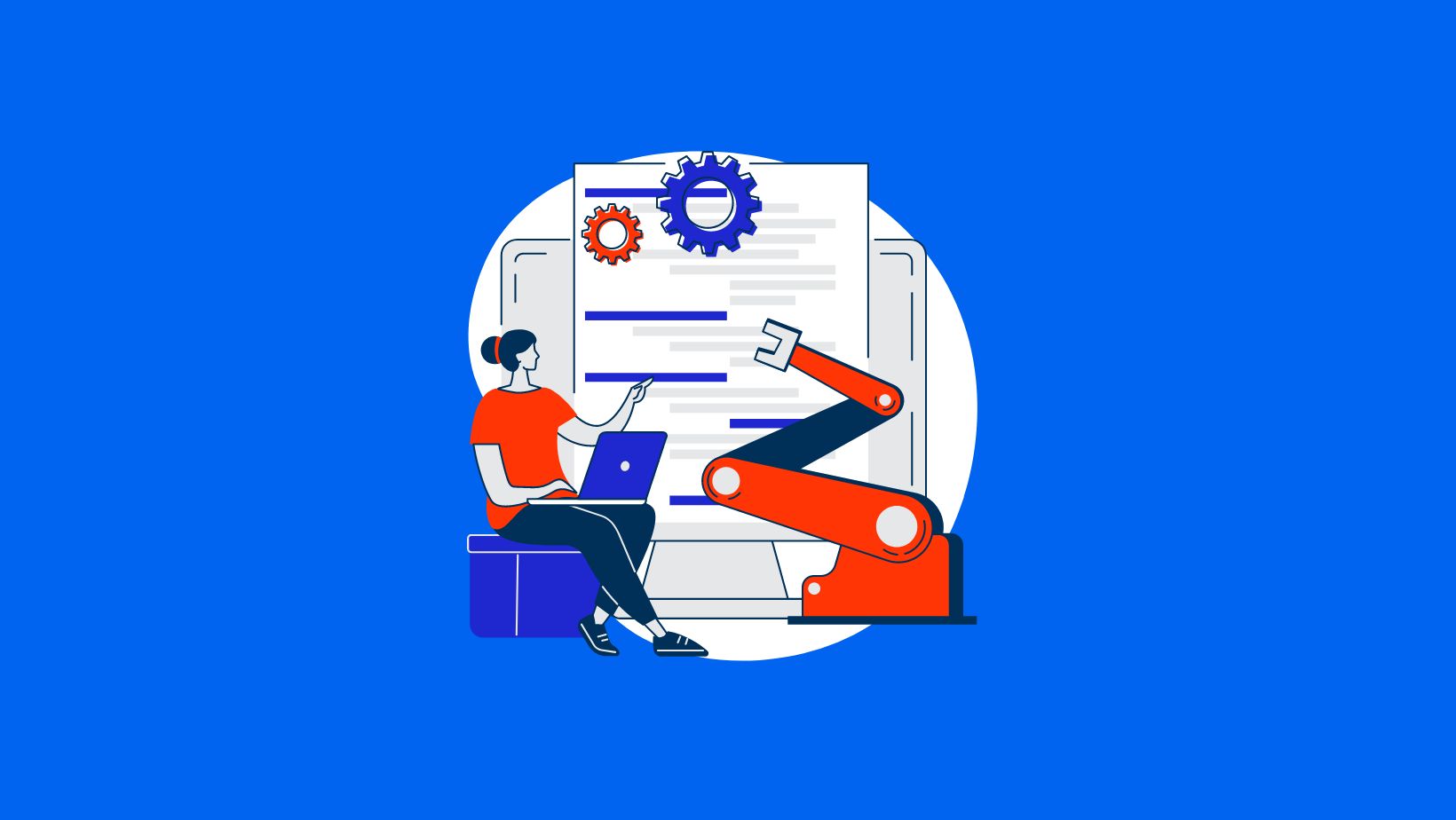
4 Templates to use in Power Automate

Over 350,000 organisations around the globe use Power Automate to easily create automated workflows, to streamline tasks and processes so that users can focus on more important things. 
Enter and shift enter in Word

Ever wondered why you can't get rid of the gap between text in Word? The answer is probably shift-enter!

Nexacu 2021 Review
2021 Wrap Up | Course Updates

Just like the applications we teach people how to use, our operations are perpetually innovating and improving – and 2021 was no exception.

Water NSW
WaterNSW & Microsoft Cloud Services

Looking to the future WaterNSW's sought to ensure processes and information systems could carry across the whole of the organisation to ensure seamless operation as they grew. With Microsoft's cloud products they achieved this and improved experiences for employees and customers alike.

Virtual Learning Blog Banner
UNSW's Teams Success: Teaching and Tech

In 21st Century students require 21st century learning strategies. Dr Kellerman of UNSW provided just that, on a massive scale for his engineering students, all with Microsoft Teams.

Microsoft Accessibility Blog Image
Microsoft Accessibility Services
A look at Microsoft's approach to assistive technology & accessibility and how Microsoft's products can assist those with learning difficulties.
What is Sway and what does it do?

We have all dabbled in creating PowerPoint presentations and know how intimidating the first blank screen can be. Enter Sway, PowerPoint’s smaller, more articulate brother who provides a cloud-only application that is easy to use and tells a story rather than slides of bullet points.

delve training courses nexacu
Learn about Microsoft Delve

You'd be forgiven for not having heard of Microsoft Delve. Delve is a cloud-based solution that displays personal content and helps you find documents you or your team are working on.


new office app nexacu blog
The new Office App is now available
You can now access Microsoft Word, Excel and PowerPoint all in a single app! Requiring less storage with the same and some new capabilities - the new Office App pushes the boundaries on what can be produced on a mobile device. 
when to use planner
When to use Project, Planner & To-Do
 Is this your own project or part of a team? Are there many deliverables or very few? Find out what task management software is right for your project.
Power Platform in practice
What is the 'Power Platform'?

Is this your own project or part of a team? Are there many deliverables or very few? These are critical factors in determining the right task management software.

loreal using office 365
L’Oréal Embracing Change with O365

Through their adoption of Office 365 global beauty brand L’Oréal Paris has laid the foundation for ongoing collaboration and innovation.

Office 365 October Updates
What’s new in Microsoft Office 365?

Microsoft has introduced a range of updates and features over the past two months designed to help you work more efficiently, collaborate with your teammates with ease and be more proactive about your data security.  

Desk with coffee and laptop
Beginner level Flows to kick-start your work

If you’ve never used Microsoft Flow or even heard of it before, you’ve come to the right place.  The program is an incredibly versatile tool, and provides users with automation solutions in order to make complex business tasks more efficient and straight forward. 
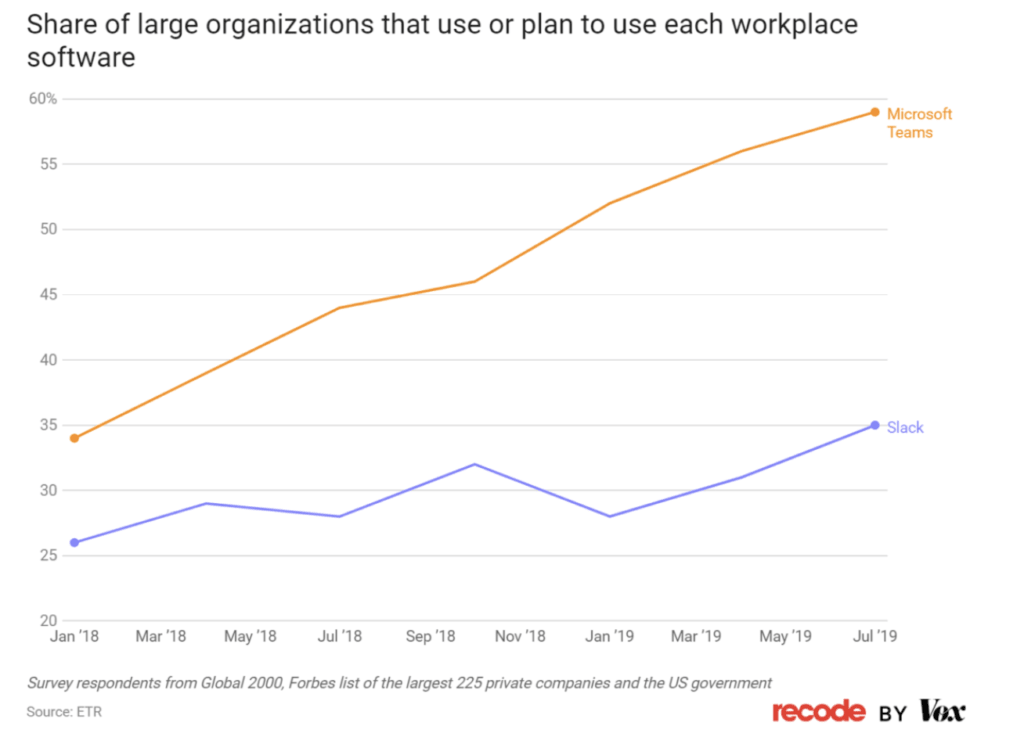
Chart showing Teams growth beating Slack
Microsoft Teams overtakes Slack

With the introduction of Microsoft Teams into workspaces, customers have had their workplace collaboration transformed, business processes streamlined and critical information protected. The report by market research firm ETR shows that Teams is in fact surpassing Slack in daily use.

Person holding phone and paper with charts
Office 365 – the productivity powerhouse

The team at Microsoft is always implementing new tools to make sure your important data is properly integrated into your digital systems. Read on for three simple, yet smart features that help make this happen.
Microsoft Teams benefit
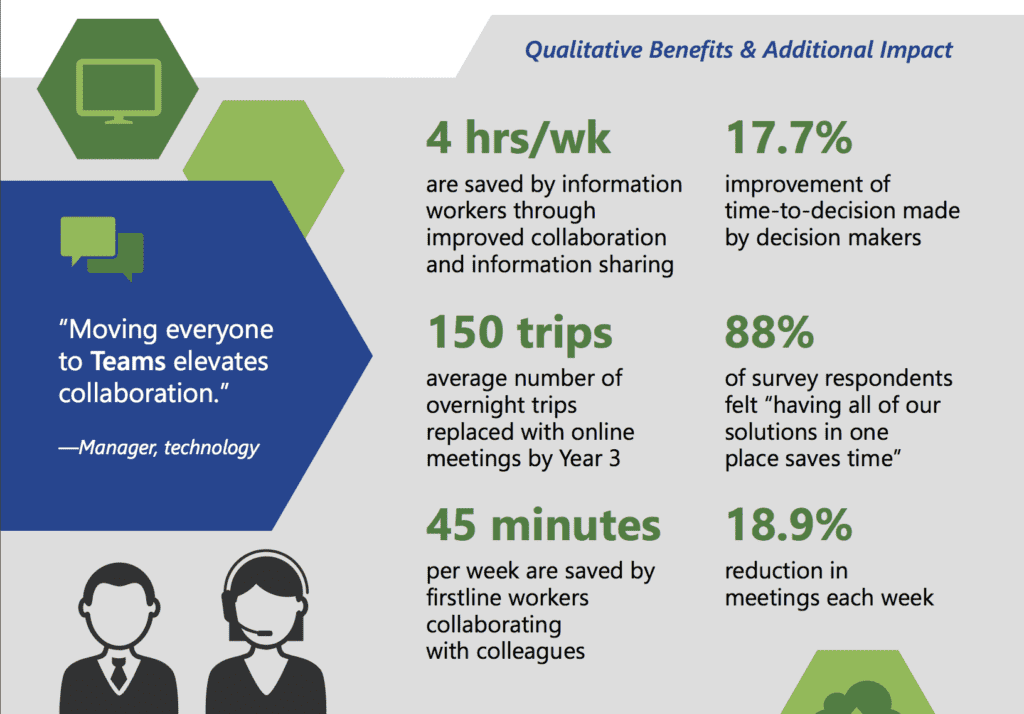
Economic impact of Microsoft Teams

The implementation of business collaboration tools such as Microsoft Teams can be invaluable for a business.  Microsoft Teams touts itself as a business solution tool, helping to increase employee productivity, improve efficiency and save businesses time and money while doing so.  Teams can improve collaboration across an entire organisation, and provides an online space which fosters innovation within a well-informed and empowered workforce.


Topics

SQL
css

Trusted Globally by Leading Organisations

At Nexacu, we are proud to be the trusted training partner for hundreds of leading organisations across Australia, New Zealand, and around the world. From government agencies to multinational corporations, we help teams build practical skills and achieve real outcomes through expert-led training.


  • 400+ companies rely on Nexacu for workforce development
  • Trusted by government agencies at all levels
  • Delivering training across 9 countries and growing

Why Nexacu? 

step by step courseware

Step by Step Courseware

Custom workbook included with a step by step exercises

Facility Image 2
Facility Image 3
Facility Image 1

Interactive real time training

Interactive, Real-Time Training

Learn with expert instructors, wherever you are

Trusted by Business

Trusted by Business

Procured by Government

Procured by Goverment

Reviews Not Found

Valued by Individuals