Select your country to view prices and course dates.

x

Recent Searches
Category

Microsoft Copilot Courses

Category

Microsoft Power BI

Category

AI for Business

Category

Microsoft Excel

Category

Professional Development

Category

Microsoft Office 365

Category

Excel Specialist

Category

Microsoft Project

Category

R Programming

Category

Python

Category

SQL

Category

Power Apps

Category

SharePoint

Category

Power Automate

Category

Microsoft Teams

Category

Microsoft Visio

Category

Microsoft PowerPoint

Category

Microsoft Word

Category

Microsoft Outlook

Category

Adobe InDesign Courses

Category

Adobe Photoshop Courses

Category

Adobe Illustrator Courses

Category

Adobe Premiere Pro Training

Category

Adobe After Effects Training

Category

Adobe Acrobat Courses

Category

Adobe Captivate Training

Category

Adobe Animate Training

Category

HTML Courses

Category

WordPress

Category

Canva Courses

Category

Microsoft Access

Category

Webinars

Course

Copilot for M365

Course

Power BI Beginner

Course

ChatGPT Beginner

Course

Excel Beginner

Course

Achieving Leadership & Success

Course

Microsoft 365 Beginner

Course

Financial Modelling

Course

Project Beginner

Course

R Programming Beginner

Course

Python Beginner

Course

SQL Beginner

Course

Power Apps Beginner

Course

SharePoint Beginner

Course

Teams Essentials

Course

Visio Essentials

Course

PowerPoint Level 1

Course

Word Beginner

Course

Microsoft Outlook Beginner

Course

InDesign Lite

Course

Photoshop Training Intro

Course

Illustrator Training Intro

Course

Premiere Training Intro

Course

After Effects Training Intro

Course

Acrobat Essentials

Course

Captivate Training

Course

Animate Training Intro

Course

HTML Training Intro

Course

WordPress Essentials

Course

Canva Beginners

Course

Microsoft Access Essentials

Course

Copilot for Word

Course

Power BI Intermediate

Course

Excel Intermediate

Course

Microsoft 365 Intermediate

Course

Analysis and Dashboards

Course

Project Intermediate

Course

R Programming Intermediate

Course

Python Intermediate

Course

SQL Intermediate

Course

Power Apps Intermediate

Course

SharePoint Intermediate

Course

PowerPoint Level 2

Course

Word Intermediate

Course

InDesign Training Intro

Course

Photoshop Lite

Course

Illustrator Training Advanced

Course

Premiere Basics Training

Course

Acrobat Forms

Course

Canva Intermediate

Course

Microsoft Access Advanced

Course

Copilot for Excel

Course

Power BI Advanced

Course

Excel Advanced

Course

Microsoft 365 Advanced

Course

Excel VBA

Course

Project Advanced

Course

R Programming Advanced

Course

Python Advanced

Course

SQL Advanced

Course

Power Apps Advanced

Course

SharePoint Advanced (Site Owner)

Course

Word Advanced

Course

InDesign Training Advanced

Course

Photoshop Training Advanced

Course

Advanced Premiere Training

Course

Advanced After Effects Training

Course

Canva Advanced

Course

Copilot for PowerPoint

Course

Power BI DAX

Course

Excel Expert

Course

Machine Learning in R

Course

SharePoint Advanced (Document Governance)

Course

InDesign Interactivity Training

Course

Copilot for Outlook and Teams

Course

InDesign Accessibility Training

Course

Power Automate Beginner

Course

Power Automate Intermediate

Course

Microsoft Outlook Advanced

Course

AI Prompting Fundamentals

Course

Power Automate Advanced

Course

Excel Tables and Pivot Tables

Course

Data Transformation with Power Query

Course

Excel Macro Mastery

Course

Power BI Desktop Advanced Reporting

Course

AI for Business Leaders and Managers

Course

Data Visualisation with Power BI Desktop

Course

Anger Management & Negotiation Skills

Course

Assertiveness & Confidence

Course

Building Resilience

Course

Coaching and Mentoring

Course

Communications

Course

Communications & Quality Client Service Training

Course

Critical Thinking and Problem Solving

Course

Cultural Diversity in the Workplace

Course

Embracing Change

Course

Growing Emotional Intelligence

Course

Minute Taking

Course

Persuasion and Negotiation Skills

Course

Presentation Skills and Public Speaking

Course

Practical Project Management

Course

Respect, Equity and Diversity (RED)

Course

Resumé Writing and Interview Skills

Course

Stress Management

Course

Team Leadership, Management and Development

Course

Time Management Intensive

Course

Train the Trainer

Course

Write Effective Business Documents

Course

Dealing with Difficult People

Course

Managing Difficult Conversations

Course

Managing the Virtual Workplace

Microsoft Teams

Simple Hacks for Making the Most of Microsoft Teams

Microsoft Teams has become an integral part of modern workplace collaboration, but mastering its advanced features can truly elevate your productivity and efficiency. As a power user, you're already familiar with the basics; now let's delve into the advanced tips and tricks that will take your Teams experience to the next level.


Advanced Tips and Tricks for Microsoft Teams Power Users

Dive into MS Teams' advanced features for communication, meetings, collaboration, efficiency boosters, and more. Whether you're streamlining communication, optimising meetings, or ensuring security and privacy, these tips will transform you into a Microsoft Teams power user.

Microsoft Teams' Role in the Post-Pandemic Workplace

From the revolutionary transition in the post-pandemic workplace landscape to Microsoft Teams' role as a collaborative hub and its enhanced features for hybrid work, this blog navigates this journey towards a more connected, efficient, and future-ready workplace.

person holding phone looking at Microsoft Teams
8 Microsoft Teams Features to Explore

Microsoft has introduced a range of exciting new features in MS Teams, transforming the way teams collaborate and boosting overall productivity.

nexacu microsoft teams
What is New Microsoft Teams

Microsoft is constantly updating and innovating their products – including Teams, the collaboration application that skyrocketed in popularity during the Coronavirus pandemic.

Virtual Learning Blog Banner
UNSW Teams Success: AI in Education

In 21st Century students require 21st century learning strategies. Dr Kellerman of UNSW provided just that, on a massive scale for his engineering students, all with Microsoft Teams.

Virtual Learning Blog Banner
UNSW's Teams Success: Teaching and Tech

In 21st Century students require 21st century learning strategies. Dr Kellerman of UNSW provided just that, on a massive scale for his engineering students, all with Microsoft Teams.

Thoughtful African American Businessman Using Laptop Pondering Project Business Strategy
Teams and the Power Platform

Microsoft has recently embedded Power Platform capabilities in Microsoft Teams, meaning customers can now make personal apps, chat bots and more using low-code tools at no additional cost.

nexacu software training
Keeping Up With Technology in 2020

The past decade has seen technology radically change almost every aspect of business management and development strategy. So it's crucial for companies looking to progress in 2020 to aim to be just as dynamic and adaptable as the technology they utilise. Making progress in the three key areas below will support you and your team in reaching your goals for 2020.

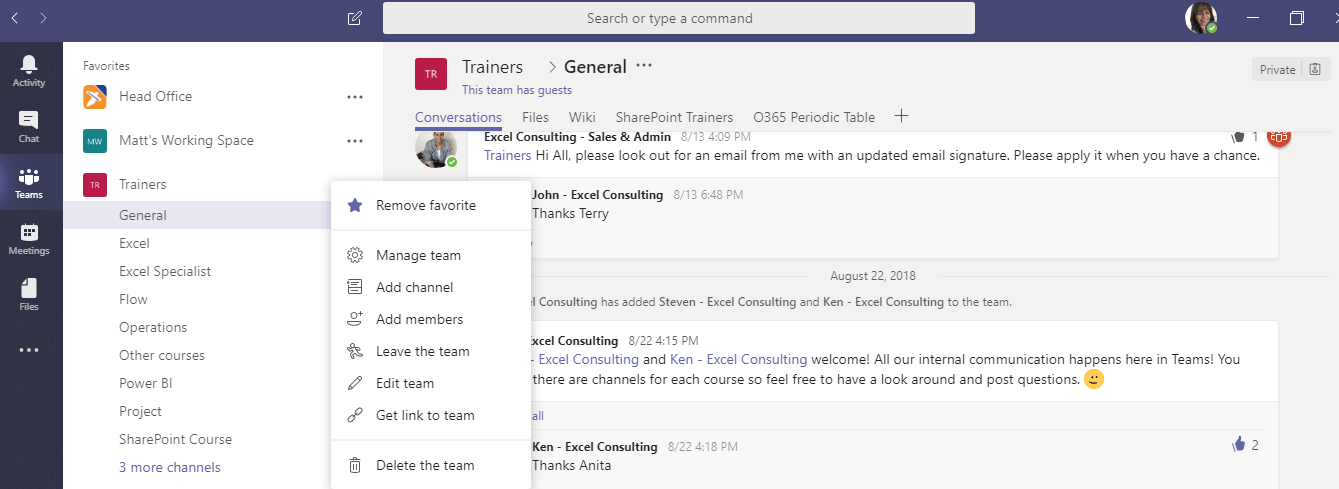
Groups and Channels in Microsoft Teams

Understanding how teams, groups and channels all interact with each other in the Office 365 environment is at the very least confusing and often times frustrating. Check out our rundown below to get a better idea how all the pieces are meant to fit together.


Topics

SQL
css

Trusted Globally by Leading Organisations

At Nexacu, we are proud to be the trusted training partner for hundreds of leading organisations across Australia, New Zealand, and around the world. From government agencies to multinational corporations, we help teams build practical skills and achieve real outcomes through expert-led training.

  • 400+ companies rely on Nexacu for workforce development
  • Trusted by government agencies at all levels
  • Delivering training across 9 countries and growing

Why Nexacu? 

step by step courseware

Step by Step Courseware

Custom workbook included with a step by step exercises

Facility Image 2
Facility Image 3
Facility Image 1

Interactive real time training

Interactive, Real-Time Training

Learn with expert instructors, wherever you are

Trusted by Business

Trusted by Business

Procured by Government

Procured by Goverment

Reviews Not Found

Valued by Individuals