 Australia
 New Zealand
 Singapore
 Hong Kong
 Malaysia
 Philippines
 Thailand
 Indonesia
Introduction:
Becoming proficient in Excel VBA can almost guarantee you a leg up in your career. Not only will you outshine your competitors, but your work performance will also increase. Although it will take time to learn how to use Excel VBA properly, the payoff will be worth it.
Excel VBA is a feature of Excel that has been available since 1993 in Excel V5. It is not a different version of Excel, it is included.
Excel VBA is frequently mistaken for a standard edition of Microsoft Excel. However, upon more investigation, Excel VBA is an exciting recent Excel feature. It is included in the standard Microsoft Office package, but it takes some getting used to before you can jump into using it. This article will explain Excel VBA, its value, and the available resources to learn Excel VBA in Australia. This article will also discuss Excel macros, their limitations, and why Excel VBA is superior to macros.
What is VBA?
Microsoft's Visual Basic for Applications (VBA) is a programming language within Microsoft Office. All components of Office (such as Word, Excel, Outlook, PowerPoint, Access) have VBA.
Microsoft's Visual Basic for Applications (VBA) is a programming language within Excel. Visual Basic for Applications is abbreviated as VBA, which is built into several Microsoft Office apps. Everyone is aware of the importance of Microsoft Office in the workplace. Workplaces would not be able to operate without using Microsoft Office products. When VBA is used in conjunction with Microsoft Office, the user's performance dramatically improves. It is regarded as a crucial tool for maximizing your work output in today's business environment.
VBA can be used to automate repetitive tasks that would otherwise be boring and/or time consuming.
What is Excel VBA?
Excel VBA (Visual Basic for Applications) is a programming language intended to function within Microsoft Excel. It's a common misconception that Excel is only about spreadsheets. However, when properly used, Excel is beyond numbers and spreadsheets. It is more about recording, managing, analyzing, and displaying the data. Managing a large volume of data is a difficult task.
On the other hand, Excel VBA makes developing and managing data and models simple. If a user understands how VBA works, they may automate various tasks, such as creating charts, models, calculations, and reports. It spares the user from having to repeat everyday tasks. It offers efficient and better macros to the user. Knowing how to use Excel VBA properly is the knowledge that is crucial for any professional handling a massive amount of data.
What are macros in Excel?
Macros were originally a means of recording the menu options in a program to allow for them to be played back at a later time.
The user can give that action a name and save it for later use. Macros are a set of commands that can automate repeated tasks. It improves time efficiency and allows users to complete more assignments promptly.
Imagine that you wanted to copy specific data from a number of worksheets into a master sheet. Instead of having to manually locate the data then manually copy it and paste it into a master sheet, a macro can be created that will do this automatically. Every time you need to perform a certain task you can just run the macro. This will save on time and eliminate human errors in the selecting and copying of data.
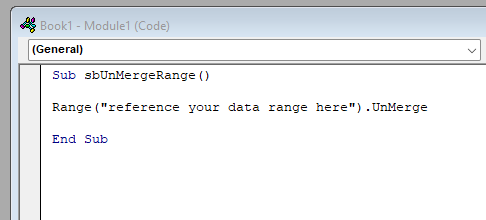
For example, pretend that you are working on a worksheet with merged cells. Merging many cells and forming one large cell is a common practice. However, because the data cannot be sorted with the merged cells, you will need to unmerge the cells. Here the user can use macros to unmerge the cells. Every time you perform the required operations, you will need a code. That code unmerges all of the combined cells at the same time. The user will be able to unmerge as many times as required using a macro.
Difference between VBA (Visual Basic application) and macros:
In general terms, the macro is the script that you run. VBA is the programming language that allows you to create and enhance that script.
Since version 5 of Excel, when you record a macro, it creates a VBA program (script). Using the VBA editor, you can edit and enhance the script to include options that cannot be recorded from the Excel menu.
VBA and macros are frequently confused as the same thing, although they are not. VBA is a computer language that allows you to create macros. On the other hand, macros are programming scripts that run on the Microsoft Excel application to automate the process.
VBA is a more extensive term that includes macros. Without mastering VBA, macros can be readily created or recorded. However, if you get the Excel VBA tutorial, you will be able to design superior macros.
Advantages of Excel VBA over simple macros:
Compared to VBA, Excel users regard macros to be straightforward and user-friendly. It does, however, have some restrictions. Those restrictions are linked to the level of control a person has. This is not really true anymore, except in Access which has its own macro language as well as VBA.
When the features of macros become limited, VBA (Visual Basic Application) is used. VBA provides a wealth of complex traits and functions that would be impossible to achieve with macros. In addition, VBA can effectively track errors, allowing the user to correct them in a short amount of time. Furthermore, VBA enables connectivity between the two apps. Information can also be made available to other users using VBA.
Common mistakes Excel users make:
Excel includes a variety of features, with VBA being the most difficult to master.
The most typical error an Excel user makes is trying to self-learn macros, automation, and VBA. Without a thorough understanding of and grounding in the basic concept you will spend hundreds of hours running experiments and trying to self-learn concepts that a professional trainer can explain to you much more easily. Often you can be shown what to do, but not why you are doing it. As a result, your time is often wasted trying to understand concepts and techniques that a professional trainer can show you. So instead, one should invest in a VBA course training to know precisely what VBA is and how it functions.
One of the more common misconceptions about Excel is that it is a tool only for accountants and finance managers. Anywhere you need to quickly and easily record and analyze data, Excel should be your go to program. Whether your profession is a doctor, engineer, teacher, or sole proprietor, you can benefit from using Microsoft Excel. So, considering it a tool only for accountants is a misconception that can cost you time, money, and results.
Need for Excel VBA training:
Excel VBA (Visual Basic application) is a tool that requires its users to get professional training. Technology is continuously evolving, and Microsoft Excel releases updates with every iteration of its software. To stay updated with the rapidly changing technology, it is essential to constantly learn. Learning from an expert in VBA will give you the tools needed to keep current with quickly evolving technology. Rather than struggle to learn the basics on your own, you could soon grasp control over VBA by enrolling in an Excel VBA training course.
Excel VBA course training:
Excel VBA course training includes the following points:
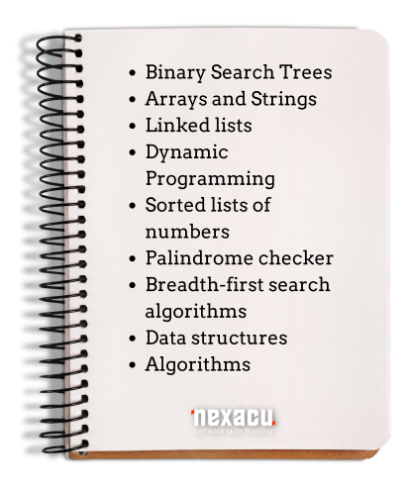
This is not a comprehensive list of all topics covered during an Excel VBA training course. You can also choose whether you would like to enroll in the beginner, or the advanced version of the VBA training courses.
Is Excel VBA worth learning?
The short answer to this question is yes. There are numerous reasons to learn how to properly use Excel VBA (Visual Basic for Applications) in your day-to-day life. You can easily automate tasks in Excel, your work will be error-free, and you can cut down on the amount of time spent on boring and repetitive work. Although VBA is a challenging Excel feature to master, knowing how to use it comes with many advantages.
Excel VBA training Manila:
To become proficient in the use of VBA, it is highly recommended that you undertake professional training. Over a two-day Excel VBA online course, a professional trainer will teach you how to record macros, write procedures, work with functions, objects and more. In this time, you will become confident in creating a variety of macros to automate repetitive tasks, create customized forms, code in visual basics, and understand program solutions in Excel.
More course specific learning objectives include:
- Recorded macros
- Recorder workshop
- Understanding Excel VBA
- VBA Editor
- Procedures, variables & defined functions
- Excel objects
- Custom Forms
- Programming techniques & user forms
- Automatic setup
- Error handling
FAQs:
1. Is VBA easy to learn?
It depends on your previous knowledge regarding Ms. Office and Excel. If you have experience in any programming, it will be easy for you. The right trainer will also make it much easier to master.
2. How long does it take to learn VBA?
You will take at least two months if you devote two hours daily to learning VBA. Additionally, you will need to dedicate time to practicing using VBA to become an expert.
3. What is the best way to learn Excel VBA?
The best way to learn VBA is to enroll in an Excel VBA training course and learn from an Excel VBA expert.
4. How can I practice VBA?
The best way to practice is to replicate all the manual work done in Excel into VBA code.
5. Is learning macros complex?
Macros are pretty easy to pick up if you have a background related to coding.
The Excel VBA online course offered by Nexacu can help you go a long way. It doesn't matter where you are - whether you live in Manila or anywhere in the world, you can benefit from VBA training or other Excel specialist training.
























