Select your country to view prices and course dates.

x

Recent Searches
Category

Microsoft Copilot Courses

Category

Microsoft Power BI

Category

AI for Business

Category

Microsoft Excel

Category

Professional Development

Category

Microsoft Office 365

Category

Excel Specialist

Category

Microsoft Project

Category

R Programming

Category

Python

Category

SQL

Category

Power Apps

Category

SharePoint

Category

Power Automate

Category

Microsoft Teams

Category

Microsoft Visio

Category

Microsoft PowerPoint

Category

Microsoft Word

Category

Microsoft Outlook

Category

Adobe InDesign Courses

Category

Adobe Photoshop Courses

Category

Adobe Illustrator Courses

Category

Adobe Premiere Pro Training

Category

Adobe After Effects Training

Category

Adobe Acrobat Courses

Category

Adobe Captivate Training

Category

Adobe Animate Training

Category

HTML Courses

Category

WordPress

Category

Canva Courses

Category

Microsoft Access

Category

Webinars

Course

Copilot for M365

Course

Power BI Beginner

Course

ChatGPT Beginner

Course

Excel Beginner

Course

Achieving Leadership & Success

Course

Microsoft 365 Beginner

Course

Financial Modelling

Course

Project Beginner

Course

R Programming Beginner

Course

Python Beginner

Course

SQL Beginner

Course

Power Apps Beginner

Course

SharePoint Beginner

Course

Teams Essentials

Course

Visio Essentials

Course

PowerPoint Level 1

Course

Word Beginner

Course

Microsoft Outlook Beginner

Course

InDesign Lite

Course

Photoshop Training Intro

Course

Illustrator Training Intro

Course

Premiere Training Intro

Course

After Effects Training Intro

Course

Acrobat Essentials

Course

Captivate Training

Course

Animate Training Intro

Course

HTML Training Intro

Course

WordPress Essentials

Course

Canva Beginners

Course

Microsoft Access Essentials

Course

Copilot for Word

Course

Power BI Intermediate

Course

Excel Intermediate

Course

Microsoft 365 Intermediate

Course

Analysis and Dashboards

Course

Project Intermediate

Course

R Programming Intermediate

Course

Python Intermediate

Course

SQL Intermediate

Course

Power Apps Intermediate

Course

SharePoint Intermediate

Course

PowerPoint Level 2

Course

Word Intermediate

Course

InDesign Training Intro

Course

Photoshop Lite

Course

Illustrator Training Advanced

Course

Premiere Basics Training

Course

Acrobat Forms

Course

Canva Intermediate

Course

Microsoft Access Advanced

Course

Copilot for Excel

Course

Power BI Advanced

Course

Excel Advanced

Course

Microsoft 365 Advanced

Course

Excel VBA

Course

Project Advanced

Course

R Programming Advanced

Course

Python Advanced

Course

SQL Advanced

Course

Power Apps Advanced

Course

SharePoint Advanced (Site Owner)

Course

Word Advanced

Course

InDesign Training Advanced

Course

Photoshop Training Advanced

Course

Advanced Premiere Training

Course

Advanced After Effects Training

Course

Canva Advanced

Course

Copilot for PowerPoint

Course

Power BI DAX

Course

Excel Expert

Course

Machine Learning in R

Course

SharePoint Advanced (Document Governance)

Course

InDesign Interactivity Training

Course

Copilot for Outlook and Teams

Course

InDesign Accessibility Training

Course

Power Automate Beginner

Course

Power Automate Intermediate

Course

Microsoft Outlook Advanced

Course

AI Prompting Fundamentals

Course

Power Automate Advanced

Course

Excel Tables and Pivot Tables

Course

Data Transformation with Power Query

Course

Excel Macro Mastery

Course

Power BI Desktop Advanced Reporting

Course

AI for Business Leaders and Managers

Course

Data Visualisation with Power BI Desktop

Course

Anger Management & Negotiation Skills

Course

Assertiveness & Confidence

Course

Building Resilience

Course

Coaching and Mentoring

Course

Communications

Course

Communications & Quality Client Service Training

Course

Critical Thinking and Problem Solving

Course

Cultural Diversity in the Workplace

Course

Embracing Change

Course

Growing Emotional Intelligence

Course

Minute Taking

Course

Persuasion and Negotiation Skills

Course

Presentation Skills and Public Speaking

Course

Practical Project Management

Course

Respect, Equity and Diversity (RED)

Course

Resumé Writing and Interview Skills

Course

Stress Management

Course

Team Leadership, Management and Development

Course

Time Management Intensive

Course

Train the Trainer

Course

Write Effective Business Documents

Course

Dealing with Difficult People

Course

Managing Difficult Conversations

Course

Managing the Virtual Workplace

Forms is the sneaky tool you are yet to use

| Oct 16, 2018
Creating a Microsoft Forms

Haven't heard of it? Don't worry we're here to help!

There’s no secret that Microsoft has a lot of applications within the Office 365 suite. However, Microsoft Forms allows you to accomplish things that other apps don’t such as quizzes, data recording and creating workflows. Forms becomes a really handy tool when it comes to improving your work processes and developing new ideas. The data you can collect makes it easier to apply, since it’s an easy to understand format. Keep reading to see why you should start using Forms.


Ditch the Paper 

If you are still using paper forms to collect data, this will be music to your ears. Creating forms is EASIER and FASTER than creating any other form in Word, Excel or writing it down with pen and paper. If one of your organisational goals is to go paperless, Microsoft Forms has you covered.


Get relatively quick insights

Microsoft Forms is probably the quickest way to allow individuals to input data, request a service, or kick off a workflow within your system. Almost every platform has a form-based interface of some kind, and I’ve used quite a few of them. However, very rarely do you find one that is as simple as Microsoft Forms in Office 365. Despite the simplicity, you still get clear and powerful analytics. Each response within the Office 365 Forms interface has associated analytics. It’s also possible to see the responses, time to complete for each user or entry in the form.

 
Forms also allows you to gather data outside of your organisation. You can copy and and send the link to anyone you wish to complete the Form and Forms will still provide analytics. If you’re creating a Form for within your organisation you can either create private Forms, public Forms or Forms for a specific group within your organisation.

Note* You cannot copy and paste Forms between your individual Forms and Group Forms.


Once you’ve collected the data you need it’s a simple process to export your data to an Excel spreadsheet to keep as a record.


Integrations add power to Forms 

Forms is fairly flexible when it comes to its sharing options. You can send an open Public Link, Private organisational link or embed them into an existing internal or external location such as your website.

You can also add a Flow integration into your Forms to trigger certain events depending on an answer to your Form and from there use Microsoft Flow integrations, of which there are a heap!


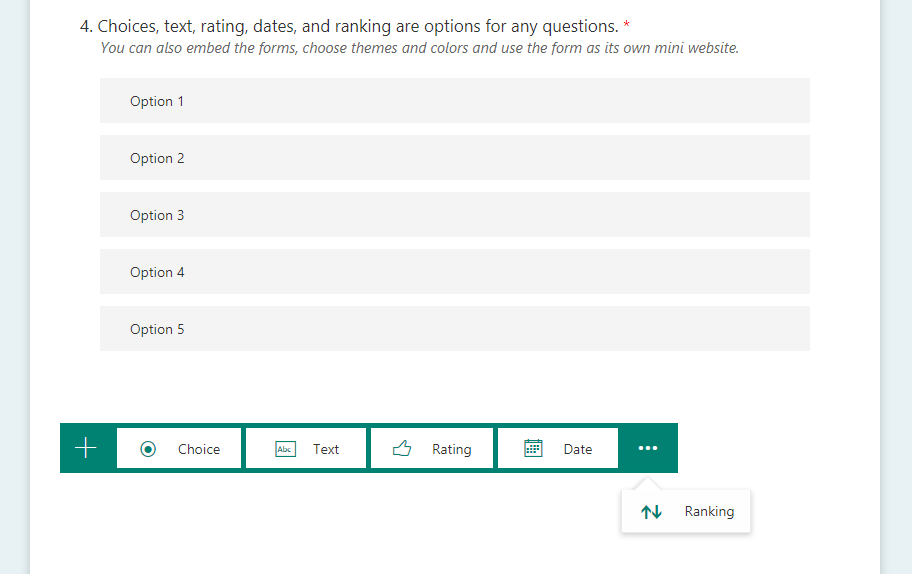
Microsoft Forms Integrations

I created a form in a matter of minutes and shared it with my workspace and got real time analytics. It’s such a nifty, easy to use but powerful tool. Leave a comment below and let us know how you might use Microsoft Forms in your workspace or if there are options you would like to see more blogs on?

Forms sits in the broader Microsoft 365 suite. To get the most out of what Microsoft offers, join our Microsoft 365 course

Trusted Globally by Leading Organisations

At Nexacu, we are proud to be the trusted training partner for hundreds of leading organisations across Australia, New Zealand, and around the world. From government agencies to multinational corporations, we help teams build practical skills and achieve real outcomes through expert-led training.

  • 400+ companies rely on Nexacu for workforce development
  • Trusted by government agencies at all levels
  • Delivering training across 9 countries and growing

Why Nexacu? 

step by step courseware

Step by Step Courseware

Custom workbook included with a step by step exercises

Facility Image 2
Facility Image 3
Facility Image 1

Interactive real time training

Interactive, Real-Time Training

Learn with expert instructors, wherever you are

Trusted by Business

Trusted by Business

Procured by Government

Procured by Goverment

Reviews Not Found

Valued by Individuals