Select your country to view prices and course dates.

x

Recent Searches
Category

Microsoft Copilot Courses

Category

Microsoft Power BI

Category

AI for Business

Category

Microsoft Excel

Category

Professional Development

Category

Microsoft Office 365

Category

Excel Specialist

Category

Microsoft Project

Category

R Programming

Category

Python

Category

SQL

Category

Power Apps

Category

SharePoint

Category

Power Automate

Category

Microsoft Teams

Category

Microsoft Visio

Category

Microsoft PowerPoint

Category

Microsoft Word

Category

Microsoft Outlook

Category

Adobe InDesign Courses

Category

Adobe Photoshop Courses

Category

Adobe Illustrator Courses

Category

Adobe Premiere Pro Training

Category

Adobe After Effects Training

Category

Adobe Acrobat Courses

Category

Adobe Captivate Training

Category

Adobe Animate Training

Category

HTML Courses

Category

WordPress

Category

Canva Courses

Category

Microsoft Access

Category

Webinars

Course

Copilot for M365

Course

Power BI Beginner

Course

ChatGPT Beginner

Course

Excel Beginner

Course

Achieving Leadership & Success

Course

Microsoft 365 Beginner

Course

Financial Modelling

Course

Project Beginner

Course

R Programming Beginner

Course

Python Beginner

Course

SQL Beginner

Course

Power Apps Beginner

Course

SharePoint Beginner

Course

Teams Essentials

Course

Visio Essentials

Course

PowerPoint Level 1

Course

Word Beginner

Course

Microsoft Outlook Beginner

Course

InDesign Lite

Course

Photoshop Training Intro

Course

Illustrator Training Intro

Course

Premiere Training Intro

Course

After Effects Training Intro

Course

Acrobat Essentials

Course

Captivate Training

Course

Animate Training Intro

Course

HTML Training Intro

Course

WordPress Essentials

Course

Canva Beginners

Course

Microsoft Access Essentials

Course

Copilot for Word

Course

Power BI Intermediate

Course

Excel Intermediate

Course

Microsoft 365 Intermediate

Course

Analysis and Dashboards

Course

Project Intermediate

Course

R Programming Intermediate

Course

Python Intermediate

Course

SQL Intermediate

Course

Power Apps Intermediate

Course

SharePoint Intermediate

Course

PowerPoint Level 2

Course

Word Intermediate

Course

InDesign Training Intro

Course

Photoshop Lite

Course

Illustrator Training Advanced

Course

Premiere Basics Training

Course

Acrobat Forms

Course

Canva Intermediate

Course

Microsoft Access Advanced

Course

Copilot for Excel

Course

Power BI Advanced

Course

Excel Advanced

Course

Microsoft 365 Advanced

Course

Excel VBA

Course

Project Advanced

Course

R Programming Advanced

Course

Python Advanced

Course

SQL Advanced

Course

Power Apps Advanced

Course

SharePoint Advanced (Site Owner)

Course

Word Advanced

Course

InDesign Training Advanced

Course

Photoshop Training Advanced

Course

Advanced Premiere Training

Course

Advanced After Effects Training

Course

Canva Advanced

Course

Copilot for PowerPoint

Course

Power BI DAX

Course

Excel Expert

Course

Machine Learning in R

Course

SharePoint Advanced (Document Governance)

Course

InDesign Interactivity Training

Course

Copilot for Outlook and Teams

Course

InDesign Accessibility Training

Course

Power Automate Beginner

Course

Power Automate Intermediate

Course

Microsoft Outlook Advanced

Course

AI Prompting Fundamentals

Course

Power Automate Advanced

Course

Excel Tables and Pivot Tables

Course

Data Transformation with Power Query

Course

Excel Macro Mastery

Course

Power BI Desktop Advanced Reporting

Course

AI for Business Leaders and Managers

Course

Data Visualisation with Power BI Desktop

Course

Anger Management & Negotiation Skills

Course

Assertiveness & Confidence

Course

Building Resilience

Course

Coaching and Mentoring

Course

Communications

Course

Communications & Quality Client Service Training

Course

Critical Thinking and Problem Solving

Course

Cultural Diversity in the Workplace

Course

Embracing Change

Course

Growing Emotional Intelligence

Course

Minute Taking

Course

Persuasion and Negotiation Skills

Course

Presentation Skills and Public Speaking

Course

Practical Project Management

Course

Respect, Equity and Diversity (RED)

Course

Resumé Writing and Interview Skills

Course

Stress Management

Course

Team Leadership, Management and Development

Course

Time Management Intensive

Course

Train the Trainer

Course

Write Effective Business Documents

Course

Dealing with Difficult People

Course

Managing Difficult Conversations

Course

Managing the Virtual Workplace

Getting started in Power Apps

Hannah Pearson | Apr 20, 2022

What is Power Apps?

Power Apps is an application produced by Microsoft that allows users to create apps using low-code software. The software is apart of the Microsoft Power Platform, which also houses Power BI and Power Automate. If used correctly, Power Apps can but out the role of developers (app, professional and software), saving you money and time.

Power Apps works by connecting to data sources.

Before the Power Platform
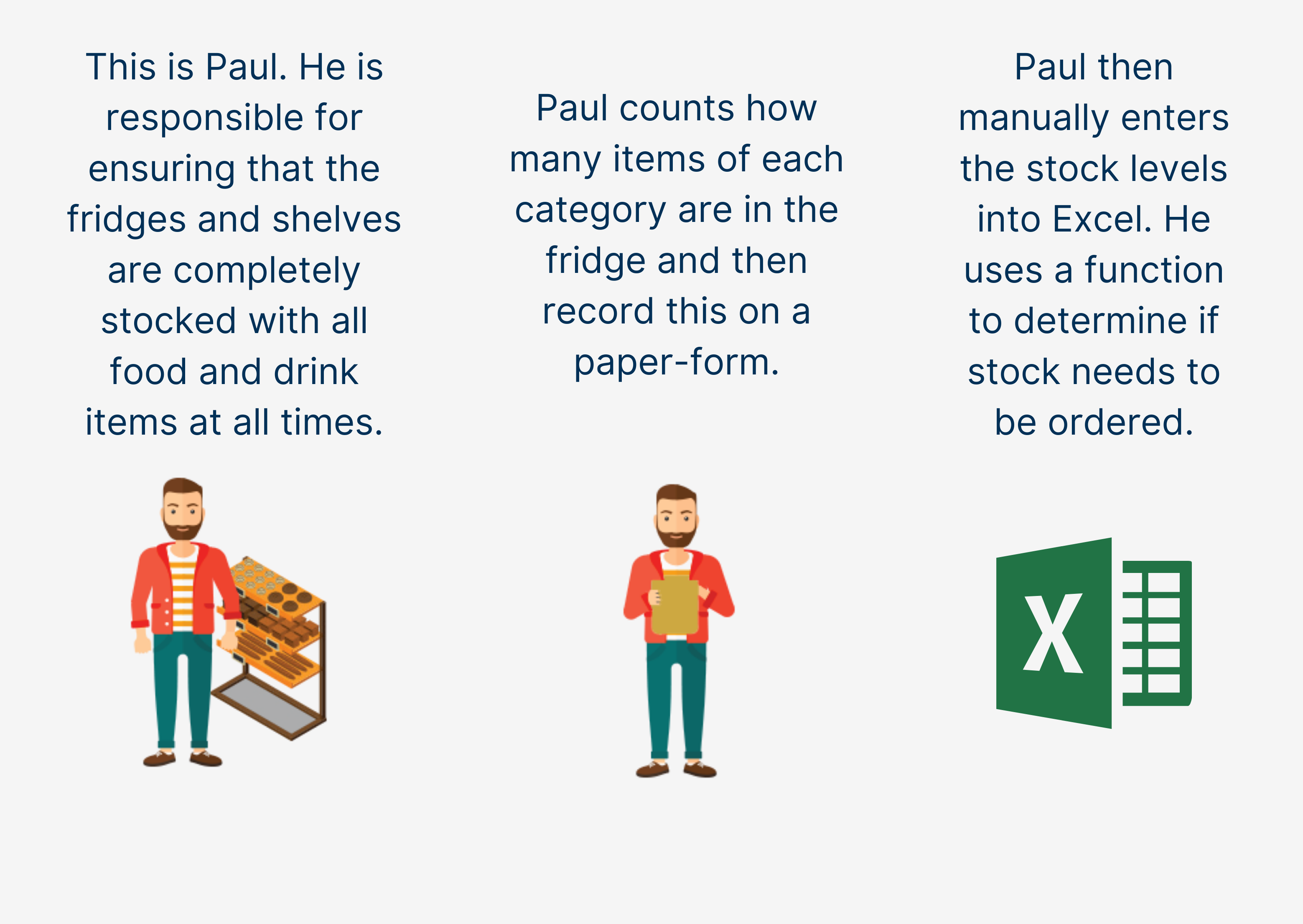
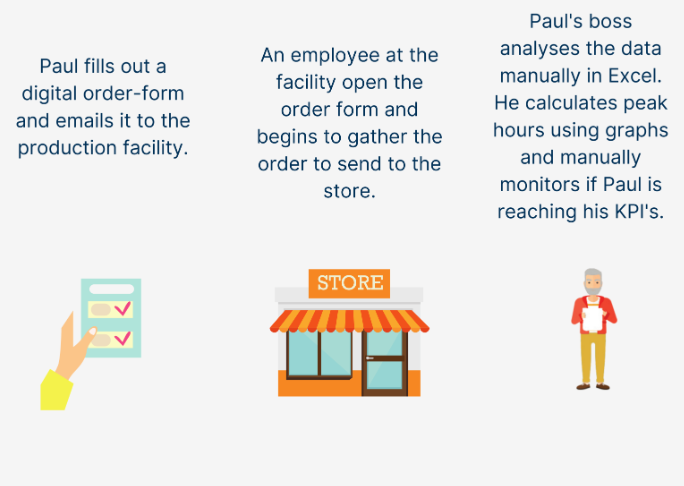
power platform before

power platform before

After the Power Platform

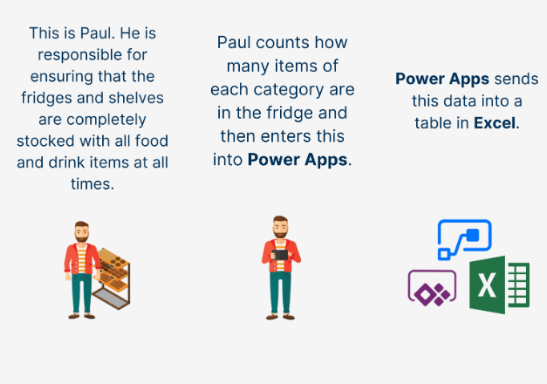
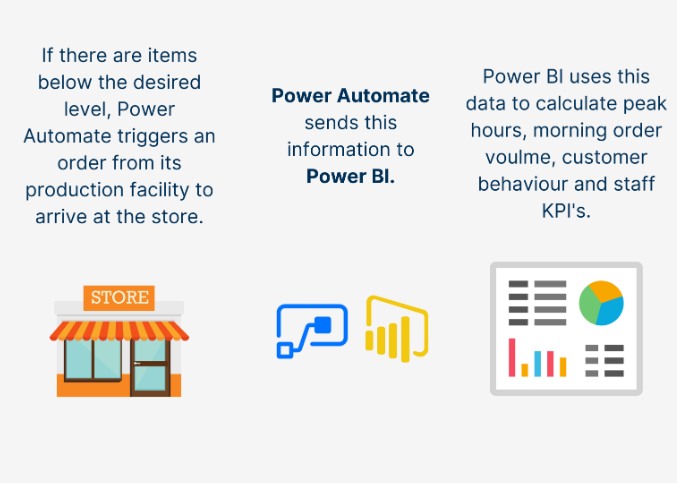
power platform after

power platform after

What does Power Apps connect to?

Power Apps can connect to over 200 data sources, the most well-known between the rest of the Microsoft 365 suite and popular applications such as twitter.

As apart of the Power platform, Power Apps can connect to Power BI and Power Automate. The three apps are often used in conjunction with one another to make the most of data.

As a tool for business and data analytics, Power Apps can also connect to an SQL server.

What is Power Apps used for? What are the main uses for Microsoft PowerApps?

Power Apps is used to build custom low-code apps. There are many examples of where Power Apps has been used. The application has been used by companies of varying sizes, but the stories have one thing in common: how being able to develop the ideas from within, they were able to build apps that added value and shaved off time.

Coca-Cola United found that they had experienced a period of high growth, and the manual processes they had previously relied on were no longer sufficient. A recent shift to Azure opened the doors for Coca-Cola United to take full advantage of the Microsoft Platform. The adoption of the new tech made an almost immediate impact; the number of apps pitched grew exponentially. The firm used Power Apps to create a sales and inventory data repository, make order processing more efficient, integrate suppliers better, and move into new markets.

When Should I use Power Apps? Is Microsoft Power Apps even any good?

Power Apps is a great resource, but you must ask yourself if you have a legitimate use for an app. The stories on the Microsoft blog are needs-driven and solve problems. To determine if you have a use for an app, research data connectors and see whether you could use any. Keep your mind on simpler ideas, especially as a beginner.

Power Apps will also be easiest for those who already utilize the Microsoft 365 suite. Not only will you be more familiar with the interface, but you will likely already have data stored in an easy-to-use data connector. Power Apps represents an opportunity to customize and extend office 365 and to further integrate into Microsoft 365 to drive productivity gains.

Is Microsoft Power Apps free?

Sadly, no. To access Microsoft Power Apps, you require a Microsoft Power Apps License which can be purchased through Microsoft. Alternatively, your workplace or educational institution may provide you with a license depending on your field of work/study.

Should I hire a professional developer?

If you are a manager deciding whether to implement Power Apps, consider the topics covered under When Should I use power apps? If you are going to start using Power Apps within your organization, we highly recommend Power Apps training. A greater understanding of the application will enable immediate productivity gains as well as more value in the long term.

You can hire a power apps developer, however, the greatest value from Power Apps comes from ideas proposed by those ‘on the frontline’. There’s no point in developing an app to make an action more efficient if the app doesn’t actually drive that efficiency. You risk important and incredibly helpful insights by skipping over those who will make use of the app.

It can be seen as a trade-off: train your employees to use Power Apps, and lose out on some of the expertise of a professional developer. But if you hire a professional developer, you can lose out on valuable, action-driven insights that create apps that people need.

We are a little bit biased, but training seems like the better option. Book Power Apps Training Courses with Nexacu today, starting with our Power Apps beginner course.


Trusted Globally by Leading Organisations

At Nexacu, we are proud to be the trusted training partner for hundreds of leading organisations across Australia, New Zealand, and around the world. From government agencies to multinational corporations, we help teams build practical skills and achieve real outcomes through expert-led training.

  • 400+ companies rely on Nexacu for workforce development
  • Trusted by government agencies at all levels
  • Delivering training across 9 countries and growing

Why Nexacu? 

step by step courseware

Step by Step Courseware

Custom workbook included with a step by step exercises

Facility Image 2
Facility Image 3
Facility Image 1

Interactive real time training

Interactive, Real-Time Training

Learn with expert instructors, wherever you are

Trusted by Business

Trusted by Business

Procured by Government

Procured by Goverment

Reviews Not Found

Valued by Individuals