Select your country to view prices and course dates.

x

Recent Searches
Category

Microsoft Copilot Courses

Category

Microsoft Power BI

Category

AI for Business

Category

Microsoft Excel

Category

Professional Development

Category

Microsoft Office 365

Category

Excel Specialist

Category

Microsoft Project

Category

R Programming

Category

Python

Category

SQL

Category

Power Apps

Category

SharePoint

Category

Power Automate

Category

Microsoft Teams

Category

Microsoft Visio

Category

Microsoft PowerPoint

Category

Microsoft Word

Category

Microsoft Outlook

Category

Adobe InDesign Courses

Category

Adobe Photoshop Courses

Category

Adobe Illustrator Courses

Category

Adobe Premiere Pro Training

Category

Adobe After Effects Training

Category

Adobe Acrobat Courses

Category

Adobe Captivate Training

Category

Adobe Animate Training

Category

HTML Courses

Category

WordPress

Category

Canva Courses

Category

Microsoft Access

Category

Webinars

Course

Copilot for M365

Course

Power BI Beginner

Course

ChatGPT Beginner

Course

Excel Beginner

Course

Achieving Leadership & Success

Course

Microsoft 365 Beginner

Course

Financial Modelling

Course

Project Beginner

Course

R Programming Beginner

Course

Python Beginner

Course

SQL Beginner

Course

Power Apps Beginner

Course

SharePoint Beginner

Course

Teams Essentials

Course

Visio Essentials

Course

PowerPoint Level 1

Course

Word Beginner

Course

Microsoft Outlook Beginner

Course

InDesign Lite

Course

Photoshop Training Intro

Course

Illustrator Training Intro

Course

Premiere Training Intro

Course

After Effects Training Intro

Course

Acrobat Essentials

Course

Captivate Training

Course

Animate Training Intro

Course

HTML Training Intro

Course

WordPress Essentials

Course

Canva Beginners

Course

Microsoft Access Essentials

Course

Copilot for Word

Course

Power BI Intermediate

Course

Excel Intermediate

Course

Microsoft 365 Intermediate

Course

Analysis and Dashboards

Course

Project Intermediate

Course

R Programming Intermediate

Course

Python Intermediate

Course

SQL Intermediate

Course

Power Apps Intermediate

Course

SharePoint Intermediate

Course

PowerPoint Level 2

Course

Word Intermediate

Course

InDesign Training Intro

Course

Photoshop Lite

Course

Illustrator Training Advanced

Course

Premiere Basics Training

Course

Acrobat Forms

Course

Canva Intermediate

Course

Microsoft Access Advanced

Course

Copilot for Excel

Course

Power BI Advanced

Course

Excel Advanced

Course

Microsoft 365 Advanced

Course

Excel VBA

Course

Project Advanced

Course

R Programming Advanced

Course

Python Advanced

Course

SQL Advanced

Course

Power Apps Advanced

Course

SharePoint Advanced (Site Owner)

Course

Word Advanced

Course

InDesign Training Advanced

Course

Photoshop Training Advanced

Course

Advanced Premiere Training

Course

Advanced After Effects Training

Course

Canva Advanced

Course

Copilot for PowerPoint

Course

Power BI DAX

Course

Excel Expert

Course

Machine Learning in R

Course

SharePoint Advanced (Document Governance)

Course

InDesign Interactivity Training

Course

Copilot for Outlook and Teams

Course

InDesign Accessibility Training

Course

Power Automate Beginner

Course

Power Automate Intermediate

Course

Microsoft Outlook Advanced

Course

AI Prompting Fundamentals

Course

Power Automate Advanced

Course

Excel Tables and Pivot Tables

Course

Data Transformation with Power Query

Course

Excel Macro Mastery

Course

Power BI Desktop Advanced Reporting

Course

AI for Business Leaders and Managers

Course

Data Visualisation with Power BI Desktop

Course

Anger Management & Negotiation Skills

Course

Assertiveness & Confidence

Course

Building Resilience

Course

Coaching and Mentoring

Course

Communications

Course

Communications & Quality Client Service Training

Course

Critical Thinking and Problem Solving

Course

Cultural Diversity in the Workplace

Course

Embracing Change

Course

Growing Emotional Intelligence

Course

Minute Taking

Course

Persuasion and Negotiation Skills

Course

Presentation Skills and Public Speaking

Course

Practical Project Management

Course

Respect, Equity and Diversity (RED)

Course

Resumé Writing and Interview Skills

Course

Stress Management

Course

Team Leadership, Management and Development

Course

Time Management Intensive

Course

Train the Trainer

Course

Write Effective Business Documents

Course

Dealing with Difficult People

Course

Managing Difficult Conversations

Course

Managing the Virtual Workplace

How To Publish Power BI Reports to Azure

Brianna Higgins | Jul 18, 2022

Why connect Azure to Power BI?

We need an Azure Power BI connection to turn data processing efforts into analytics and reports. Those will provide real-time insights into our business using Azure DevOps and Power BI reporting. Now it doesn't matter if the data Processing is cloud-based or on-premises, straightforward or complex, single-sourced, or massively scaled, warehoused, or real-time. Azure and Power BI can deal with this with the built-in connectivity and integration to make the best of our BI efforts.
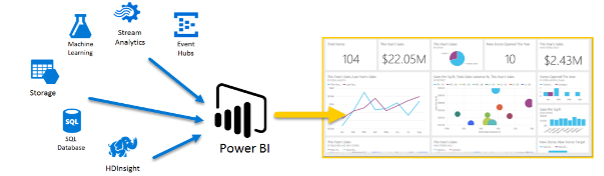
connecting azure to power bi

Source

What can you do with Azure - Power BI Combo?

Power BI has multiple Azure connections and services available. The business intelligence solutions we can create with these services are unique. We can connect one Azure data source or many and shape and refine data to build customized reports.

Azure Analytics and Power BI allow us to visualize data and share valuable insights across the organization, embedding them in apps or websites. They provide insights at a large scale, allowing us to develop the data-driven culture required to thrive in a fast-paced, fast-changing, and competitive environment.

Prerequisites

Skills Required 

1. Good knowledge of 

    • Statistics
    • Data visualization
    • Data modelling
    • Mathematical measures

2. Ability to extract data from the web and other sources

3. Ability to build a dashboard

4. Basic coding knowledge

    • Linux (bash)
    • Python

How Long Does It Take to Learn Power BI?

Power BI is easy to use and can be learned in a month. Here is a possible breakdown for you:

  • Download and install Power BI Desktop tool - 1 day
  • Learning Getting data from different sources 2-3 days
  • Data transformation, add calculated column, measure and quick measure - 3 to 4 days
  • Model the Data including Relationships - 2 to 3 days
  • Visualization - 3 to 4 days
  • DAX Functions (Daily 2 DAX Functions) - at least 12 days
  • Power BI Service - 2 to 3 days
  • Gateway - 1 day

Prior to Power BI Report Deployment to Azure

Before we deploy Power BI reports to Azure, here are some things we need to ensure:

  1. Azure account.
  2. Connection to Azure. Click here to learn more.
  3. Database on your Azure server.
  4. Read permission on the database.
  5. Install Power BI from here. Check out some fantastic power BI courses here.


Publishing Power BI Desktop File to Azure

To publish a Power BI Desktop dataset and reports

1. In Power BI Desktop > File > Publish > Publish to Power BI or click Publish on the ribbon

power bi ribbon

2. Sign in to Power BI.

3. Select the destination.
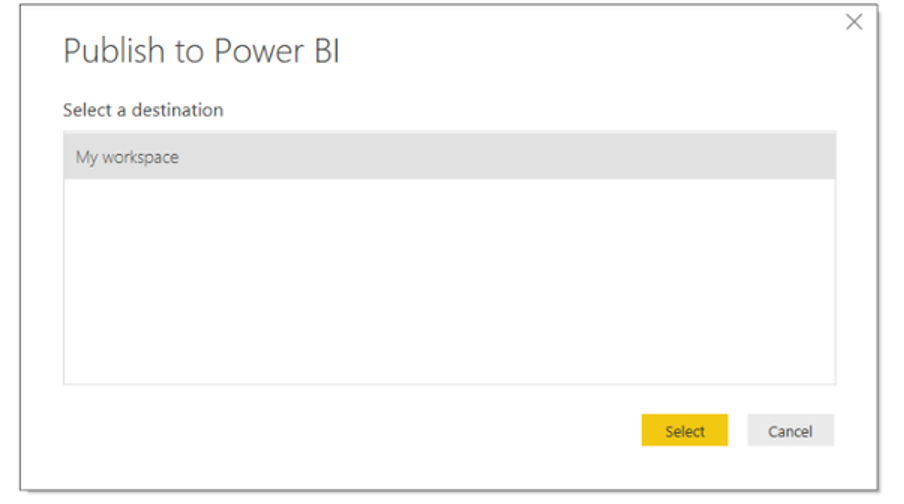
publish to power bi

When complete, you receive a link to your report. Click the link to open the report on your Power BI site.
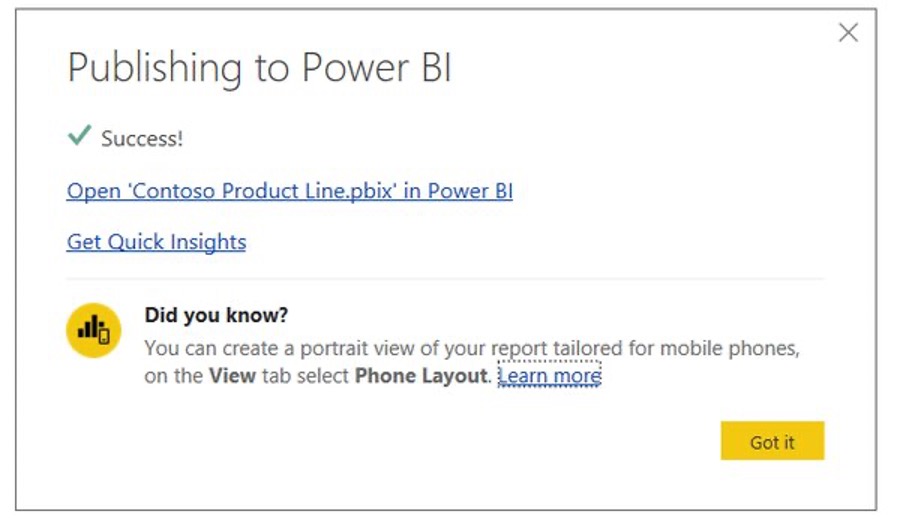
publishing to power bi

When publishing a Power BI Desktop file to Azure Power BI server or any Power BI service, the data in the model and the reports created in the Report view will be published to your Power BI workspace. A new dataset of the same name will appear along with any reports in the Workspace navigator.

Power of Azure DevOps & Power BI Reporting

Azure Power BI reporting can be scaled up. We can use multi-source data processing, substantial real-time systems, Stream Analytics, Event Hubs, etc. You can later combine various SaaS services into business intelligence reports to provide your company with competitive insights.

Power BI Embedded Analytics

Power BI with Embedded Analytics helps us move from data insights to actions. You can take advantage of big data, embedded interactive visualizations in your applications, websites, etc. By embedding reports and dashboards with Power BI Embedded on Azure, you give the users an insightful experience across all devices. 

Azure Power BI Certification

There are thousands of courses out there online. To avoid being caught in the “course loop,” you need the best guide and mentorship. We provide amazing courses on MS Power BI. Click here to learn more.

DA-100 is Microsoft’s Associate Certification for Data Analysts which covers everything from topics like how to create Power BI reports in Azure, Azure DevOps, Azure Power BI Server setup, Power BI reporting on Azure, etc. Check out our course and DA-100 certification here.

Conclusion

Microsoft has some of the most incredible data analysis solutions like MS Excel and Power BI. But as a Data Analyst for a large-scale corporation, you’ll need the skill to deploy reports on the cloud for easy and secure access throughout the company. This is where the Microsoft Azure cloud platform comes into play.

To learn more, check out our other blogs here.



Trusted Globally by Leading Organisations

At Nexacu, we are proud to be the trusted training partner for hundreds of leading organisations across Australia, New Zealand, and around the world. From government agencies to multinational corporations, we help teams build practical skills and achieve real outcomes through expert-led training.

  • 400+ companies rely on Nexacu for workforce development
  • Trusted by government agencies at all levels
  • Delivering training across 9 countries and growing

Why Nexacu? 

step by step courseware

Step by Step Courseware

Custom workbook included with a step by step exercises

Facility Image 2
Facility Image 3
Facility Image 1

Interactive real time training

Interactive, Real-Time Training

Learn with expert instructors, wherever you are

Trusted by Business

Trusted by Business

Procured by Government

Procured by Goverment

Reviews Not Found

Valued by Individuals