Select your country to view prices and course dates.

x

Recent Searches
Category

Microsoft Copilot Courses

Category

Microsoft Power BI

Category

AI for Business

Category

Microsoft Excel

Category

Professional Development

Category

Microsoft Office 365

Category

Excel Specialist

Category

Microsoft Project

Category

R Programming

Category

Python

Category

SQL

Category

Power Apps

Category

SharePoint

Category

Power Automate

Category

Microsoft Teams

Category

Microsoft Visio

Category

Microsoft PowerPoint

Category

Microsoft Word

Category

Microsoft Outlook

Category

Adobe InDesign Courses

Category

Adobe Photoshop Courses

Category

Adobe Illustrator Courses

Category

Adobe Premiere Pro Training

Category

Adobe After Effects Training

Category

Adobe Acrobat Courses

Category

Adobe Captivate Training

Category

Adobe Animate Training

Category

HTML Courses

Category

WordPress

Category

Canva Courses

Category

Microsoft Access

Category

Webinars

Course

Copilot for M365

Course

Power BI Beginner

Course

ChatGPT Beginner

Course

Excel Beginner

Course

Achieving Leadership & Success

Course

Microsoft 365 Beginner

Course

Financial Modelling

Course

Project Beginner

Course

R Programming Beginner

Course

Python Beginner

Course

SQL Beginner

Course

Power Apps Beginner

Course

SharePoint Beginner

Course

Teams Essentials

Course

Visio Essentials

Course

PowerPoint Level 1

Course

Word Beginner

Course

Microsoft Outlook Beginner

Course

InDesign Lite

Course

Photoshop Training Intro

Course

Illustrator Training Intro

Course

Premiere Training Intro

Course

After Effects Training Intro

Course

Acrobat Essentials

Course

Captivate Training

Course

Animate Training Intro

Course

HTML Training Intro

Course

WordPress Essentials

Course

Canva Beginners

Course

Microsoft Access Essentials

Course

Copilot for Word

Course

Power BI Intermediate

Course

Excel Intermediate

Course

Microsoft 365 Intermediate

Course

Analysis and Dashboards

Course

Project Intermediate

Course

R Programming Intermediate

Course

Python Intermediate

Course

SQL Intermediate

Course

Power Apps Intermediate

Course

SharePoint Intermediate

Course

PowerPoint Level 2

Course

Word Intermediate

Course

InDesign Training Intro

Course

Photoshop Lite

Course

Illustrator Training Advanced

Course

Premiere Basics Training

Course

Acrobat Forms

Course

Canva Intermediate

Course

Microsoft Access Advanced

Course

Copilot for Excel

Course

Power BI Advanced

Course

Excel Advanced

Course

Microsoft 365 Advanced

Course

Excel VBA

Course

Project Advanced

Course

R Programming Advanced

Course

Python Advanced

Course

SQL Advanced

Course

Power Apps Advanced

Course

SharePoint Advanced (Site Owner)

Course

Word Advanced

Course

InDesign Training Advanced

Course

Photoshop Training Advanced

Course

Advanced Premiere Training

Course

Advanced After Effects Training

Course

Canva Advanced

Course

Copilot for PowerPoint

Course

Power BI DAX

Course

Excel Expert

Course

Machine Learning in R

Course

SharePoint Advanced (Document Governance)

Course

InDesign Interactivity Training

Course

Copilot for Outlook and Teams

Course

InDesign Accessibility Training

Course

Power Automate Beginner

Course

Power Automate Intermediate

Course

Microsoft Outlook Advanced

Course

AI Prompting Fundamentals

Course

Power Automate Advanced

Course

Excel Tables and Pivot Tables

Course

Data Transformation with Power Query

Course

Excel Macro Mastery

Course

Power BI Desktop Advanced Reporting

Course

AI for Business Leaders and Managers

Course

Data Visualisation with Power BI Desktop

Course

Anger Management & Negotiation Skills

Course

Assertiveness & Confidence

Course

Building Resilience

Course

Coaching and Mentoring

Course

Communications

Course

Communications & Quality Client Service Training

Course

Critical Thinking and Problem Solving

Course

Cultural Diversity in the Workplace

Course

Embracing Change

Course

Growing Emotional Intelligence

Course

Minute Taking

Course

Persuasion and Negotiation Skills

Course

Presentation Skills and Public Speaking

Course

Practical Project Management

Course

Respect, Equity and Diversity (RED)

Course

Resumé Writing and Interview Skills

Course

Stress Management

Course

Team Leadership, Management and Development

Course

Time Management Intensive

Course

Train the Trainer

Course

Write Effective Business Documents

Course

Dealing with Difficult People

Course

Managing Difficult Conversations

Course

Managing the Virtual Workplace

Microsoft Power BI Alternatives exploration

Brianna Higgins | Nov 17, 2022

Introduction

Power BI is the world's leading data analytics and business intelligence reporting platform. 

Power BI takes large datasets and data logs and analyses and processes them to gain meaningful insights. Not only is Power BI good with analytics, but it also provides a plethora of charts/graphs/visual constructs to depict the information in an intuitive and easily digestible manner.  
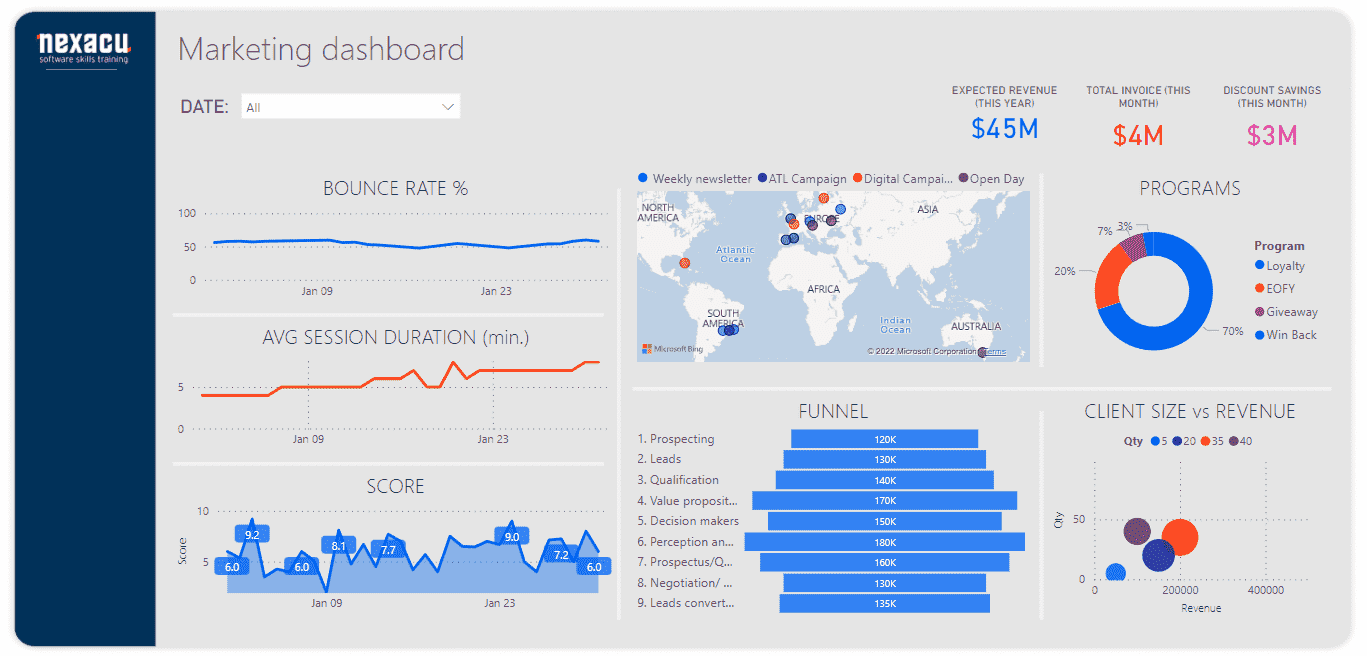
power bi dashboard

Power BI allows you to share reports and sub-reports with other users. You can allow/disallow other users to edit reports based on their hierarchy. Users can view parts of a report on a need-to-know basis. Learning Power BI can enhance your career prospects and enhance your understanding of data insights. As everyone cannot attend a class physically due to timing and location constraints, some selected institutes including Nexacu provide remote online Power BI Learning services. 

So how does Power BI compare to QlikView or Tableau? To find out, let's do a short comparative study.   This will help in understanding the primary differences between the most popular BI tools.

All business intelligence tools available these days can aggregate data from many disparate sources and create data warehouses. They also let you process your data, apply mathematical and statistical functions to your data, gain insights and identify trends and possibilities. A good BI tool is a big help in your business intelligence process, and lets you make decisions backed by facts and logic, rather than intuition. 


Power BI vs Tableau vs QlikView comparison

Features

Power BI

Tableau

QlikView

Querying Data

Allows to edit the underlying SQL queries, so you can fine-tune and optimize your queries (compared to being limited to what underlying SQL or some other drag and drop generate internally.

Provides a visual query language VizQL, but also allows you to edit the generated queries. 

No prerequisite to know any SQL, you can easily drag and drop data fields and related filters, Qlik will create your queries in the background.
Does not allow editing/optimizing of internal queries 

PMML support

Power BI does not support PMML hence exchange of predictive models is not possible. 

Tableau also does not support the exchange of predictive models. 

Qlik does support import-export/exchange of AI/ML predictive models by integrating with the KNIME Analytics Platform. 

Animations

Animations are supported but only with end-user customization

Strong support for animations, you can use Out-of-the-box animations provided by Tableau or use animations built by the user community. 

Only a few animations are possible.

Interoperability

Integrates seamlessly with most other popular Microsoft tools like Power Automate, Office, Teams etc.
Highly interoperable. 

Tableau lags in third-party integrations but supports a few. 

Supports a few with its inbuilt connectors. 

Support for integrations with accounting, e-Commerce and Payment processing platforms. 

Most versatile; supports the greatest number of accounting, e-Commerce, and Payment processing platforms. 

Many pre-built integrations with accounting, e-Commerce, and Payment processing platforms. 

 Limited pre-built integrations with e-Commerce and Payment processing platforms. 

Versioning and Sharing 

Strongest built-in versioning and subscription-based report delivery.
Role-based sharing with your teammates in SharePoint/Yammer/Teams/OneDrive etc. groups

Good built-in versioning and subscription-based report delivery. 

Supports versioning but only with third-party integrations, automatic report delivery needs a Qlik NPrinting tool for it. 

Mobile support

Strong support for creating and sharing them, irrespective of where the data resides.
Strong collaborative and editing features.

Allows sharing of reports but mobile support is not available with Tableau Public. 
Collaboration is possible in the form of comments only. 

Good support for sharing reports and collaborative features. But works only on the Windows platform.


OS support 

Windows, Mac, and Linux

Windows, Mac, and Linux 

Only Windows 

**PMML - Predictive Model Markup Language (PMML) is an XML-based predictive model interchange format that enables the import/export of predictive models.  


Benefits of Power BI training

  • Power BI training can open up new vistas of growth in your career and open up new opportunities which were hitherto inaccessible. 
  • Learning Power BI can improve your business intelligence processes, fuel growth by uncovering hidden facts, and ease information sharing. 
  • Stakeholders in a company should consider getting their employees to undergo Power BI course/training with the aim to improve their business processes.

    power bi training

Benefits of taking a Power BI course online

  •  Learn one of the most popular BI tools and its intricacies  
  •  Get to learn from industry experts and competent faculty 
  •  Take the course from anywhere you like, at your preferred time 
  •  Some critical aspects of Power BI SAAS offering, can be understood easily online 
  •  You get to collaborate and discuss with a much larger audience
  •  Economical and timesaving, with no transportation and logistics costs 


Conclusion

To conclude, we have compared some popular Data Analytics tools and the benefits of learning them.  Power BI is one of the most versatile and popular tools available and its user base is the fastest growing. 

Trusted Globally by Leading Organisations

At Nexacu, we are proud to be the trusted training partner for hundreds of leading organisations across Australia, New Zealand, and around the world. From government agencies to multinational corporations, we help teams build practical skills and achieve real outcomes through expert-led training.

  • 400+ companies rely on Nexacu for workforce development
  • Trusted by government agencies at all levels
  • Delivering training across 9 countries and growing

Why Nexacu? 

step by step courseware

Step by Step Courseware

Custom workbook included with a step by step exercises

Facility Image 2
Facility Image 3
Facility Image 1

Interactive real time training

Interactive, Real-Time Training

Learn with expert instructors, wherever you are

Trusted by Business

Trusted by Business

Procured by Government

Procured by Goverment

Reviews Not Found

Valued by Individuals