Select your country to view prices and course dates.

x

Recent Searches
Category

Microsoft Copilot Courses

Category

Microsoft Power BI

Category

AI for Business

Category

Microsoft Excel

Category

Professional Development

Category

Microsoft Office 365

Category

Excel Specialist

Category

Microsoft Project

Category

R Programming

Category

Python

Category

SQL

Category

Power Apps

Category

SharePoint

Category

Power Automate

Category

Microsoft Teams

Category

Microsoft Visio

Category

Microsoft PowerPoint

Category

Microsoft Word

Category

Microsoft Outlook

Category

Adobe InDesign Courses

Category

Adobe Photoshop Courses

Category

Adobe Illustrator Courses

Category

Adobe Premiere Pro Training

Category

Adobe After Effects Training

Category

Adobe Acrobat Courses

Category

Adobe Captivate Training

Category

Adobe Animate Training

Category

HTML Courses

Category

WordPress

Category

Canva Courses

Category

Microsoft Access

Category

Webinars

Course

Copilot for M365

Course

Power BI Beginner

Course

ChatGPT Beginner

Course

Excel Beginner

Course

Achieving Leadership & Success

Course

Microsoft 365 Beginner

Course

Financial Modelling

Course

Project Beginner

Course

R Programming Beginner

Course

Python Beginner

Course

SQL Beginner

Course

Power Apps Beginner

Course

SharePoint Beginner

Course

Teams Essentials

Course

Visio Essentials

Course

PowerPoint Level 1

Course

Word Beginner

Course

Microsoft Outlook Beginner

Course

InDesign Lite

Course

Photoshop Training Intro

Course

Illustrator Training Intro

Course

Premiere Training Intro

Course

After Effects Training Intro

Course

Acrobat Essentials

Course

Captivate Training

Course

Animate Training Intro

Course

HTML Training Intro

Course

WordPress Essentials

Course

Canva Beginners

Course

Microsoft Access Essentials

Course

Copilot for Word

Course

Power BI Intermediate

Course

Excel Intermediate

Course

Microsoft 365 Intermediate

Course

Analysis and Dashboards

Course

Project Intermediate

Course

R Programming Intermediate

Course

Python Intermediate

Course

SQL Intermediate

Course

Power Apps Intermediate

Course

SharePoint Intermediate

Course

PowerPoint Level 2

Course

Word Intermediate

Course

InDesign Training Intro

Course

Photoshop Lite

Course

Illustrator Training Advanced

Course

Premiere Basics Training

Course

Acrobat Forms

Course

Canva Intermediate

Course

Microsoft Access Advanced

Course

Copilot for Excel

Course

Power BI Advanced

Course

Excel Advanced

Course

Microsoft 365 Advanced

Course

Excel VBA

Course

Project Advanced

Course

R Programming Advanced

Course

Python Advanced

Course

SQL Advanced

Course

Power Apps Advanced

Course

SharePoint Advanced (Site Owner)

Course

Word Advanced

Course

InDesign Training Advanced

Course

Photoshop Training Advanced

Course

Advanced Premiere Training

Course

Advanced After Effects Training

Course

Canva Advanced

Course

Copilot for PowerPoint

Course

Power BI DAX

Course

Excel Expert

Course

Machine Learning in R

Course

SharePoint Advanced (Document Governance)

Course

InDesign Interactivity Training

Course

Copilot for Outlook and Teams

Course

InDesign Accessibility Training

Course

Power Automate Beginner

Course

Power Automate Intermediate

Course

Microsoft Outlook Advanced

Course

AI Prompting Fundamentals

Course

Power Automate Advanced

Course

Excel Tables and Pivot Tables

Course

Data Transformation with Power Query

Course

Excel Macro Mastery

Course

Power BI Desktop Advanced Reporting

Course

AI for Business Leaders and Managers

Course

Data Visualisation with Power BI Desktop

Course

Anger Management & Negotiation Skills

Course

Assertiveness & Confidence

Course

Building Resilience

Course

Coaching and Mentoring

Course

Communications

Course

Communications & Quality Client Service Training

Course

Critical Thinking and Problem Solving

Course

Cultural Diversity in the Workplace

Course

Embracing Change

Course

Growing Emotional Intelligence

Course

Minute Taking

Course

Persuasion and Negotiation Skills

Course

Presentation Skills and Public Speaking

Course

Practical Project Management

Course

Respect, Equity and Diversity (RED)

Course

Resumé Writing and Interview Skills

Course

Stress Management

Course

Team Leadership, Management and Development

Course

Time Management Intensive

Course

Train the Trainer

Course

Write Effective Business Documents

Course

Dealing with Difficult People

Course

Managing Difficult Conversations

Course

Managing the Virtual Workplace

All courses are available in-person or remotely. 
To attend remotely, select "Remote East" or "Remote West" as your location on book now.


Learn how to create flowcharts, network diagrams, org charts, floor plans, engineering designs, and more on our one-day course. Our Visio Essentials training course includes working with stencils, working with shapes, formatting shapes, working with connectors, containers, working with text, working with pages, outputting drawings, organisation charts, Gantt charts and cross-functional flowcharts.

By the end of this course, you will be able to:

  • Navigate the Microsoft Visio interface and workspace
  • Create and work with stencils, shapes, connectors and containers
  • Format shapes, add and edit text, and manage multiple pages
  • Build organisation charts, Gantt charts and cross-functional flowcharts

Prerequisite:

No prior experience with Microsoft Visio is required. This course is ideal for beginners or those with limited exposure, with all concepts introduced step by step.

Upcoming Courses

Scheduled
Taking enrollments.
Confirmed
Taking enrollments.
Few Seats left
Book Now.
Sold Out
Try another date.

Visio Training Courses

Visio Essentials Course Content

Expand All | Collapse All

Basics

Understanding The Start Screen

Creating A New Drawing From A Template

The Visio Screen

How Microsoft Visio 2013 Works

Understanding The Status Bar

Customising The Status Bar

Working With Stencils

Understanding Stencils

The Shapes Window

Quick Shapes

Using Quick Shapes

Creating A Custom Stencil

Opening A Stencil

Editing A Stencil

Closing A Stencil

Working With Shapes

Placing Shapes From A Stencil

Selecting Shapes

Resizing Shapes

Moving Shapes

Copying, Cutting And Pasting Shapes

Duplicating Shapes

Rotating And Flipping Shapes

Ordering Shapes

Merging Shapes To Create New Shapes

Grouping And Ungrouping Shapes

Aligning Shapes

Aligning Shapes Using The Dynamic Grid

Distributing Shapes

Changing Shapes

Using Snap And Glue

Formatting Shapes

Applying Quick Styles

Formatting The Fill

Formatting Lines

Applying Effects

Using The Format Painter

Using Undo And Redo

Protecting Shapes

Working With Connectors

Connecting Shapes

Automatically Adding Connected Shapes

Connecting Existing Shapes

Inserting And Deleting Shapes

Adding Text To Connectors

Changing Connectors

Working With Connection Points

Formatting Connectors

Containers

Adding Containers

Adding Shapes To A Container

Formatting Containers

Deleting Containers

Working With Text

Adding Text To Shapes

Formatting Text

Adding Text To The Page

Editing Text

Using Find And Replace

Aligning Text

Moving Text

Creating Bulleted Lists

Creating Tables

Spell Checking Text

Working With Pages

Inserting Pages

Naming Pages

Duplicating Pages

Changing Page Order

Deleting Pages

Applying A Background Style

Adding Headers And Footers

Inserting A Logo

Assigning A Background Page To Other Pages

Page Size And Orientation

Outputting Drawings

Using Print Preview

Fitting A Drawing To Printer Pages

Printing A Drawing

Emailing Drawings

Organisation Charts

Creating An Organisation Chart From Scratch

Adding Multiple Shapes

Changing A Position Type

Changing The Layout Of Shapes

Changing The Spacing Of Shapes

Creating A Team

Changing The Order Of Shapes

Adding A Title

Inserting Pictures

Formatting An Organisation Chart

Adding Shape Data

Creating Shape Data Fields

Creating A Custom Shape And Stencil

Creating Master Shape Data Fields

Gantt Charts

Understanding Gantt Charts

Understanding Gantt Chart Options

Creating A Gantt Chart

Entering Task Details

Creating Subtasks

Linking And Unlinking Tasks

Adding And Deleting Tasks

Adding Milestones

Adding And Hiding Columns

Navigating A Gantt Chart

Formatting Task Bars

Managing The Timescale

Exporting From A Gantt Chart

Importing Data Into A Gantt Chart

Printing Gantt Charts

Cross Functional Flow Charts

Understanding Cross Functional Flowcharts

Creating A Cross Functional Flowchart

Adding Swimlanes

Adding Swimlane Labels

Adding Phases

Adding Shapes

Adjusting Swimlanes And Phases

Formatting Cross Functional Charts

Frequently Asked Questions

What is Remote Training?

Remote training at Nexacu means our team of experienced trainers will deliver your training virtually. With remote learning students can access our usual classroom training courses via video conferencing, ask questions, participate in discussion and share their screen with the trainer if they need help at any point in the course. Students have the same level of participation and access to the trainer as they would in classroom training sessions.

Which courses are available remotely?

Currently all of our Public Courses are available to be delivered remotely. Book any course as normal and you will receive login details and instructions the evening before your course.

How can I prepare if I am taking an online course?

Install the Microsoft Visio desktop application, note this is only available on Windows. Apple devices and macOS are not suitable for this course. Click here for instructions for installing the subscription version. 

Ensure you have a valid license, preferably Visio Plan 2. 

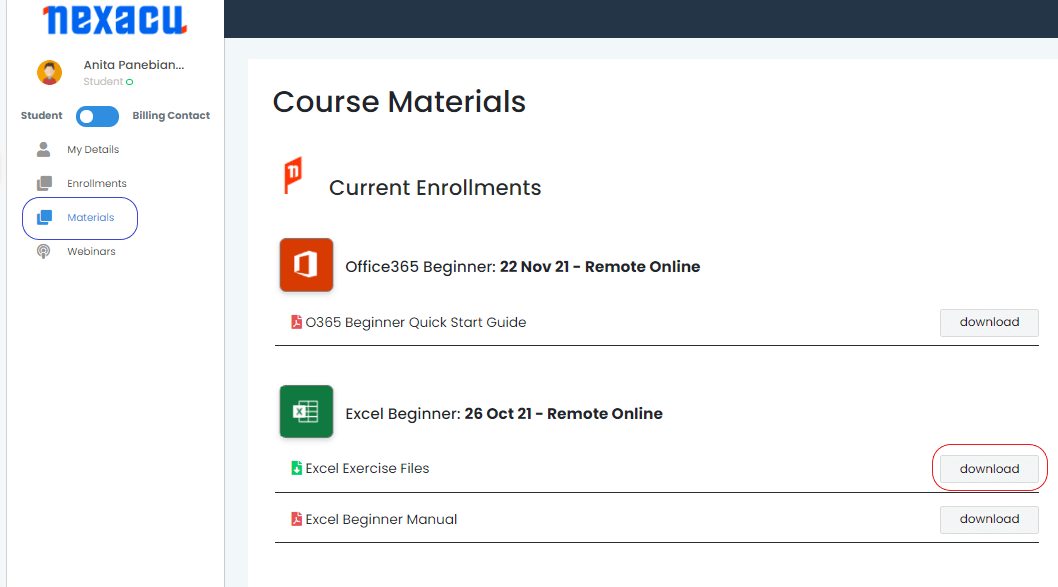
To download and unzip files, log in to your Student Portal and click on the "Materials" tab.

materials tab Nexacu Hub

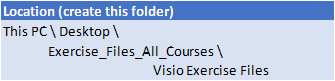
Download your exercise files and extract them to the specified folder below. Note you will first have to create this folder. 

file location

skills test nexacu

Skills Test

Try our short skills test and find out which course is right for you.

 skills test


Locations In-Person & Online

Find the nearest location and date that works for you

Locations In-Person & Online

Find the nearest location and date that works for you

Related Training Courses

Locations In-Person & Online

Find the nearest location and date that works for you

Locations In-Person & Online

Find the nearest location and date that works for you

Trusted Globally by Leading Organisations

At Nexacu, we are proud to be the trusted training partner for hundreds of leading organisations across Australia, New Zealand, and around the world. From government agencies to multinational corporations, we help teams build practical skills and achieve real outcomes through expert-led training.

  • 400+ companies rely on Nexacu for workforce development
  • Trusted by government agencies at all levels
  • Delivering training across 9 countries and growing

Why Nexacu? 

step by step courseware

Step by Step Courseware

Custom workbook included with a step by step exercises

Facility Image 2
Facility Image 3
Facility Image 1

Interactive real time training

Interactive, Real-Time Training

Learn with expert instructors, wherever you are

Trusted by Business

Trusted by Business

Procured by Government

Procured by Goverment

Reviews Not Found

Valued by Individuals