
Recent Searches
Category

Microsoft Power BI

Category

Microsoft Copilot Courses

Category

AI for Business

Category

Microsoft Windows 11 Courses

Category

Microsoft 365

Category

Microsoft Excel

Category

Excel Specialist

Category

Microsoft Project

Category

R Programming

Category

Python

Category

Power Apps

Category

SQL

Category

SharePoint

Category

Microsoft Teams

Category

Power Automate

Category

Microsoft Visio

Category

Microsoft PowerPoint

Category

Microsoft Word

Category

Microsoft Outlook

Category

Adobe InDesign Courses

Category

Adobe Photoshop Courses

Category

Adobe Illustrator Courses

Category

Adobe Premiere Pro Training

Category

Adobe After Effects Training

Category

Adobe Acrobat Courses

Category

Adobe Captivate Training

Category

Adobe Animate Training

Category

Canva Courses

Category

HTML Courses

Category

WordPress

Category

Professional Development

Category

Microsoft Access

Category

Webinars

Course

Power BI Beginner

Course

Copilot for M365

Course

Windows 11 End User Course

Course

Excel Beginner

Course

Financial Modelling

Course

Project Beginner

Course

R Programming Beginner

Course

Python Beginner

Course

Power Apps Beginner

Course

SQL Beginner

Course

SharePoint Beginner

Course

Teams Essentials

Course

Visio Essentials

Course

PowerPoint Level 1

Course

Word Intermediate

Course

Word Beginner

Course

Word Advanced

Course

Microsoft Outlook Beginner to Intermediate

Course

InDesign Lite

Course

Photoshop Lite

Course

Illustrator Training Intro

Course

Premiere Training Intro

Course

After Effects Training Intro

Course

Acrobat Essentials

Course

Captivate Training

Course

Animate Training Intro

Course

Canva AI

Course

HTML Training Intro

Course

Achieving Leadership & Success

Course

Microsoft Access Essentials

Course

Copilot for M365 On Demand

Course

Power BI Intermediate

Course

Copilot for Word

Course

ChatGPT Beginner

Course

Microsoft 365 Beginner

Course

Excel Intermediate

Course

Analysis and Dashboards

Course

Project Intermediate

Course

R Programming Intermediate

Course

Python Intermediate

Course

Power Apps Intermediate

Course

SQL Intermediate

Course

SharePoint Intermediate

Course

PowerPoint Level 2

Course

InDesign Training Intro

Course

Photoshop Training Intro

Course

Acrobat Forms

Course

Anger Management & Negotiation Skills

Course

Copilot for M365 Live Online

Course

Power BI Advanced

Course

Copilot for Excel

Course

AI Prompting Fundamentals

Course

Microsoft 365 Intermediate

Course

Excel Advanced

Course

Excel VBA

Course

Project Advanced

Course

R Programming Advanced

Course

Python Advanced

Course

Power Apps Intermediate | Power Automate + Power BI Integration

Course

SharePoint Advanced (Site Owner)

Course

InDesign Training Advanced

Course

Assertiveness & Confidence

Course

Microsoft Access Advanced

Course

Power BI DAX

Course

Copilot for PowerPoint

Course

Excel Expert

Course

Machine Learning in R

Course

Power Apps Advanced

Course

SharePoint Advanced (Document Governance)

Course

Building Resilience

Course

Copilot for Outlook and Teams

Course

Coaching and Mentoring

Course

Illustrator Training Advanced

Course

Premiere Basics Training

Course

Advanced After Effects Training

Course

Canva Beginners

Course

WordPress Essentials

Course

Communications

Course

AI for Business Leaders and Managers

Course

Photoshop Training Advanced

Course

Advanced Premiere Training

Course

Canva Intermediate

Course

Communications & Quality Client Service Training

Course

InDesign Interactivity Training

Course

Canva Advanced

Course

Critical Thinking and Problem Solving

Course

InDesign Accessibility Training

Course

Cultural Diversity in the Workplace

Course

Microsoft Outlook Advanced

Course

Embracing Change

Course

SQL Advanced

Course

Growing Emotional Intelligence

Course

Planner Premium

Course

Minute Taking

Course

Excel Tables and Pivot Tables

Course

Power Automate Beginner

Course

Performance Management

Course

Data Transformation with Power Query

Course

Excel Macro Mastery

Course

Power Automate Intermediate

Course

Persuasion and Negotiation Skills

Course

Power BI Desktop Advanced Reporting

Course

Presentation Skills and Public Speaking

Course

Data Visualisation with Power BI Desktop

Course

Practical Project Management

Course

Respect, Equity and Diversity (RED)

Course

Resumé Writing and Interview Skills

Course

Stress Management

Course

Team Leadership, Management and Development

Course

Time Management Intensive

Course

Train the Trainer

Course

Write Effective Business Documents

Course

Dealing with Difficult People

Course

Managing Difficult Conversations

Course

Managing the Virtual Workplace

Course

Customer Service Training

Course

Technical Writing

7 Reasons to use Power BI

Hannah Pearson | Nov 18, 2021

Data has always been a rich source of knowledge. Organisations are constantly refining how they analyse their data to draw insights that create effective action. In comes Microsoft’s Power BI; an application designed to simplify the analytical process to help organisations meet (and surpass) their goals.

Power BI is a powerful tool that will enhance workplaces for many reasons, some of which are outlined below. A good grasp of how the application works is a valuable skill across many industries.


1. Power BI integrates with other Microsoft 365 applications

Microsoft’s plethora of Office365 applications integrate seamlessly with Power BI, creating an easy to use and interconnected system. By connecting all aspects of your workplace, you can streamline activity to improve efficiency and access. In a workplace already familiar with the functionality of Microsoft 365, the introduction of Power BI will be smooth with tools employees will already be accustomed to. This not only encourages effective collaboration, but also drives a data culture. Your contribution to your workplace could be greatly improved with an effective understanding of how to optimise your use of Power BI. 

2. Microsoft Power Platform

Organisations are constantly questioning how they can innovate their analytical process to get the most out of their data. It is a big undertaking to collect, analyse, and present data on the scale required. With Power BI, what could’ve been a time-consuming project is simplified.

Power BI will yield the best results through the integration of The Microsoft Power Platform. Both Power Apps and Power Automate are powerful and useful applications that can further enhance your use of Power BI. 
Power Apps is a user-friendly, low code way to create apps that reflect real time data (see here for how companies have used Power Apps). Power Automate connects apps to trigger flows when a particular action happens, for example a flow can be set up to save any email attachments to Dropbox. Power Virtual Agent is Microsoft's version of a chat bot. 

Microsoft says of the Power Platform that the apps are powerful alone but better together. Consider the following scenario: the company you work for mandates regular stocktakes to see how much inventory they need to order. Instead of each individual store taking inventory and manually ordering new items, the power platform could be used. When the stocktake occurs, each store could use a specially built Power App to input their data. This information is then uploaded to the cloud and sent to a Power BI report that displays how much inventory each store has. When a store dips below a certain threshold for an item, a flow set up in Power Automate could automatically place an order. What was once a time consuming and lengthy process become simple and easy. 

Another example could be the use of the Microsoft Power Virtual Agent. When a customer speaks to the agent, it could be pre-programmed to answer common questions. If the agent is asked a query that it cannot answer, a flow could trigger the escalation of the issue to a customer help agent. 

Although the capabilities and use of the power platform may feel overwhelming, Microsoft has built their applications in a user-friendly way.
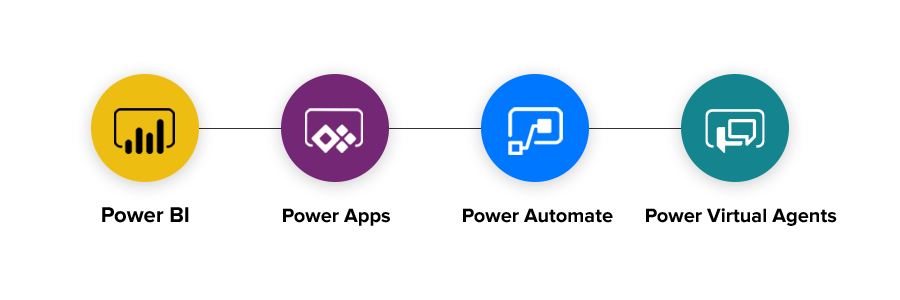

power bi platform integration automate apps virtual agent

3. Security is never in Doubt

Extensive investment by Microsoft has created a secure data environment. The program is constantly monitoring and mitigating threats to protect the confidentiality of your organisation and your potential clients. Even within your organisation, the functional permissions interface makes governance easy.


4. Machine Learning Enhances an already exceptional Product

The AI associated with Power BI is industry standard. The automated insights help you through each step of data analysis and presentation. Azure Machine Learning can help you go further with the built-in trend forecaster. Power BI also has an incredibly advanced natural language query capability and also offers native natural language generation (NLG) visuals. 


5. Strong Mobile Platform

For those on the go, Power BI offers a strong, functional mobile platform. Up to date and accurate reports are accessible on any device anywhere. With the help of Power Automate and Power Apps, stay up to date when something changes in a dataset.
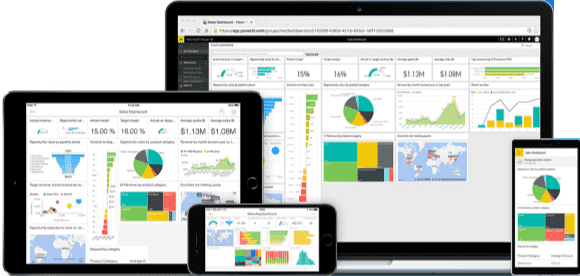
Power BI devices integration


6. User-driven Updates

The users of an application will always have a unique and innovative perspective on how it can be improved. By listening to those who are utilising Power BI consistently. Microsoft gives monthly and weekly updates to Power BI. Thousands of ideas means a consistently improving app.


7. Drives a good working culture

Organisations with a data-driven culture, where employees can not only action pointedly but also measure their own success, report increased employee satisfaction.

Power BI is also affordable – the Forrester Total Economic Impact Study estimates that Power BI comes at a lower total cost of ownership and a 366% return on investment, as well as saving 1.25 hours per week. 


From both the perspective of a manager and an employee, the choice to implement Power BI and related programs is an obvious one. To get started in Power BI, check out this free tutorial from one of our Microsoft certified trainers, Steven. 

Attend one of our Microsoft Power BI courses to learn more.To start your Power BI learning journey, we recommend our Power BI Beginner course

This post was adapted from a Microsoft publication.

Trusted Nationwide by Leading Organisations

at Nexacu, we're proud to be the trusted training partner for hundreds of leading organisations accross Australia and New Zealand. From government departments to top corporates, we help teams upskill and succeed everyday

  • 400+ companies rely on Nexacu for team training
  • Trusted by federal, state, and local government agencies
  • Delivering training across 9 countries

Why Nexacu?

Books Icon

Step by Step Courseware

Custom workbook included with a step by step exercises

Facility Image 2
Facility Image 3
Facility Image 1

Refresh Icon

Free Refresher

Resit your course for free within 6 Months

More than 1,300 Business trust Nexacu

Trusted by Business

Procured by Government

Procured by Goverment

Reviews Not Found

Valued by Individuals
















