Recent Searches
Category

Microsoft Power BI

Category

Microsoft Copilot Courses

Category

AI for Business

Category

Microsoft Windows 11 Courses

Category

Microsoft 365

Category

Microsoft Excel

Category

Excel Specialist

Category

Microsoft Project

Category

R Programming

Category

Python

Category

Power Apps

Category

SQL

Category

SharePoint

Category

Microsoft Teams

Category

Power Automate

Category

Microsoft Visio

Category

Microsoft PowerPoint

Category

Microsoft Word

Category

Microsoft Outlook

Category

Adobe InDesign Courses

Category

Adobe Photoshop Courses

Category

Adobe Illustrator Courses

Category

Adobe Premiere Pro Training

Category

Adobe After Effects Training

Category

Adobe Acrobat Courses

Category

Adobe Captivate Training

Category

Adobe Animate Training

Category

Canva Courses

Category

HTML Courses

Category

WordPress

Category

Professional Development

Category

Microsoft Access

Category

Webinars Old

Course

Power BI Beginner

Course

Copilot for M365

Course

Windows 11 End User Course

Course

Excel Beginner

Course

Financial Modelling

Course

Project Beginner

Course

R Programming Beginner

Course

Python Beginner

Course

Power Apps Beginner

Course

SQL Beginner

Course

SharePoint Beginner

Course

Teams Essentials

Course

Visio Essentials

Course

PowerPoint Level 1

Course

Word Intermediate

Course

Word Beginner

Course

Word Advanced

Course

Microsoft Outlook Beginner to Intermediate

Course

InDesign Lite

Course

Photoshop Lite

Course

Illustrator Training Intro

Course

Premiere Training Intro

Course

After Effects Training Intro

Course

Acrobat Essentials

Course

Captivate Training

Course

Animate Training Intro

Course

Canva AI

Course

HTML Training Intro

Course

Achieving Leadership & Success

Course

Microsoft Access Essentials

Course

Copilot for M365 On Demand

Course

Power BI Intermediate

Course

Copilot for Word

Course

ChatGPT Beginner

Course

Microsoft 365 Beginner

Course

Excel Intermediate

Course

Analysis and Dashboards

Course

Project Intermediate

Course

R Programming Intermediate

Course

Python Intermediate

Course

Power Apps Intermediate

Course

SQL Intermediate

Course

SharePoint Intermediate

Course

PowerPoint Level 2

Course

InDesign Training Intro

Course

Photoshop Training Intro

Course

Acrobat Forms

Course

Anger Management & Negotiation Skills

Course

Copilot for M365 Live Online

Course

Power BI Advanced

Course

Copilot for Excel

Course

AI Prompting Fundamentals

Course

Microsoft 365 Intermediate

Course

Excel Advanced

Course

Excel VBA

Course

Project Advanced

Course

R Programming Advanced

Course

Python Advanced

Course

Power Apps Intermediate | Power Automate + Power BI Integration

Course

SharePoint Advanced (Site Owner)

Course

InDesign Training Advanced

Course

Assertiveness & Confidence

Course

Microsoft Access Advanced

Course

Power BI DAX

Course

Copilot for PowerPoint

Course

Excel Expert

Course

Machine Learning in R

Course

Power Apps Advanced

Course

SharePoint Advanced (Document Governance)

Course

Building Resilience

Course

Copilot for Outlook and Teams

Course

Coaching and Mentoring

Course

Illustrator Training Advanced

Course

Premiere Basics Training

Course

Advanced After Effects Training

Course

Canva Beginners

Course

WordPress Essentials

Course

Communications

Course

Microsoft Copilot Studio Building AI Agents

Course

AI for Business Leaders and Managers

Course

Photoshop Training Advanced

Course

Advanced Premiere Training

Course

Canva Intermediate

Course

Communications & Quality Client Service Training

Course

Power BI Copilot Training

Course

InDesign Interactivity Training

Course

Canva Advanced

Course

Critical Thinking and Problem Solving

Course

M365 Copilot for Customer Service

Course

AI Governance Training

Course

InDesign Accessibility Training

Course

Cultural Diversity in the Workplace

Course

M365 Copilot for Sales

Course

Microsoft Outlook Advanced

Course

Embracing Change

Course

SQL Advanced

Course

Growing Emotional Intelligence

Course

M365 Copilot for Operations

Course

Planner Premium

Course

Minute Taking

Course

M365 Copilot for Marketing

Course

Excel Tables and Pivot Tables

Course

Power Automate Beginner

Course

Performance Management

Course

Data Transformation with Power Query

Course

M365 Copilot for Legal Services

Course

Excel Macro Mastery

Course

Power Automate Intermediate

Course

Persuasion and Negotiation Skills

Course

Power BI Desktop Advanced Reporting

Course

M365 Copilot for HR

Course

Presentation Skills and Public Speaking

Course

Data Visualisation with Power BI Desktop

Course

M365 Copilot for Finance

Course

Practical Project Management

Course

Copilot M365 for Executives and Managers

Course

Respect, Equity and Diversity (RED)

Course

Resumé Writing and Interview Skills

Course

Stress Management

Course

Team Leadership, Management and Development

Course

Time Management Intensive

Course

Train the Trainer

Course

Write Effective Business Documents

Course

Dealing with Difficult People

Course

Managing Difficult Conversations

Course

Managing the Virtual Workplace

Course

Customer Service Training

Course

Technical Writing

Power BI Advanced Course

Build advanced Power BI reporting, modelling and DAX skills in one day

Nexacu’s Power BI Advanced course helps experienced users streamline report creation, work with complex data models and apply advanced reporting techniques in Power BI Desktop.

Training is instructor-led and available in-class or remotely. To attend online, select Remote East or Remote West when booking.

Who should attend?

Power BI users, analysts, reporting teams, data professionals and business users who already have intermediate Power BI skills and want to build more advanced reports, data models and reporting workflows.

What will you learn?

Work with DAX filter context, role-playing dimensions, multiple date-dimension tables, dynamic row-level security, drill-through, custom tooltips and advanced report navigation.

Prerequisite: Intermediate Power BI skills are recommended, including data import, Power Query, visualisations, filters, basic data modelling, calculated fields and row-level security.

This course can form part of the PL-300 Power BI Certification pathway. Certification is earned separately by meeting the relevant Microsoft certification requirements and passing the required exam.

Quick Answer

Power BI Advanced is a one-day instructor-led training course for users with intermediate Power BI skills who want to deepen their reporting, modelling and DAX capability. It covers filter context, DAX measures, dynamic row-level security and advanced report navigation for practical workplace reporting.

Read more about this Power BI Advanced course

This advanced Power BI training course is designed for learners who already understand the core Power BI workflow and want to extend their capability across reporting, modelling, calculations and security.

The course builds on intermediate Power BI knowledge by exploring how DAX measures are evaluated, how filter context affects calculations, and how relationship behaviour can influence reporting outcomes.

Participants also work with advanced report features such as drill-through, custom report tooltips, navigation buttons and dynamic row-level security. These skills are useful for workplace reporting scenarios where users need clearer report navigation, better data control and more flexible analysis.

Additional exercises include API data sources, JSON responses, data streaming, folder queries and Power Query M language, helping learners understand more advanced ways to connect, prepare and structure data for Power BI reports.

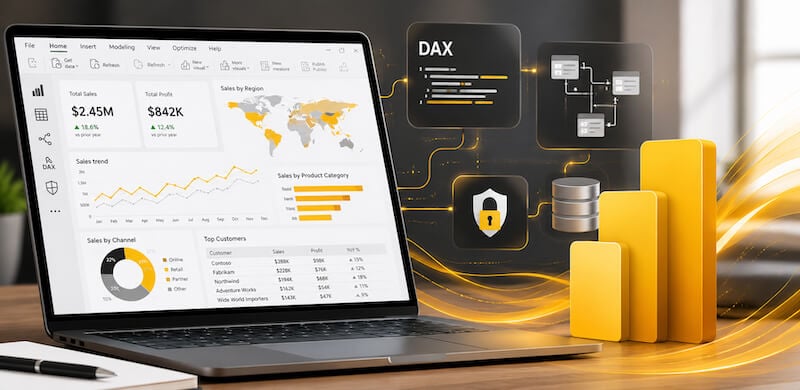
Power BI Advanced course covering reporting, modelling and DAX skills

Course Benefits

Build advanced Power BI reporting skills

Develop practical skills in advanced reporting, data modelling, DAX, report navigation and row-level security.

Advanced reports Use drill-through, custom tooltips and report navigation.
DAX and modelling Work with measures, filter context and relationship behaviour.
Security workflows Apply dynamic row-level security concepts in Power BI.

Quick course fit

Power BI Advanced is best suited to learners with intermediate Power BI skills who want to improve reporting, modelling, DAX and security workflows.

Not sure which Power BI course to choose? Use the Course Finder for a quick recommendation.

Course Finder

Which Power BI course should you take?

Answer 10 quick questions to get a course recommendation based on your current Power BI skills, reporting goals and certification needs.

Question 1 of 10 10%
1. How would you describe your current Power BI experience?
2. What is your main training goal?
3. How confident are you with Power Query and data preparation?
4. How much DAX experience do you have?
5. How comfortable are you with data models and relationships?
6. Do you need advanced report features?
7. Are you working towards Microsoft PL-300 certification?
8. What best describes your workplace reporting need?
9. What are you struggling with most?
10. Which statement sounds most like you?

Recommended course

Power BI Beginner Course

This course is recommended based on your answers.

View recommended course

Still unsure? Take Nexacu’s Power BI Skills Test for a more in-depth skills check before choosing your course.

Power BI Advanced course covering reporting, modelling and DAX skills

Course Benefits

Build advanced Power BI reporting skills

Develop practical skills in advanced reporting, data modelling, DAX, report navigation and row-level security.

Advanced reports Use drill-through, custom tooltips and report navigation.
DAX and modelling Work with measures, filter context and relationship behaviour.
Security workflows Apply dynamic row-level security concepts in Power BI.

Quick course fit

Power BI Advanced is best suited to learners with intermediate Power BI skills who want to improve reporting, modelling, DAX and security workflows.

Not sure which Power BI course to choose? Use the Course Finder for a quick recommendation.

Course Finder

Which Power BI course should you take?

Answer 10 quick questions to get a course recommendation based on your current Power BI skills, reporting goals and certification needs.

Question 1 of 10 10%
1. How would you describe your current Power BI experience?
2. What is your main training goal?
3. How confident are you with Power Query and data preparation?
4. How much DAX experience do you have?
5. How comfortable are you with data models and relationships?
6. Do you need advanced report features?
7. Are you working towards Microsoft PL-300 certification?
8. What best describes your workplace reporting need?
9. What are you struggling with most?
10. Which statement sounds most like you?

Recommended course

Power BI Beginner Course

This course is recommended based on your answers.

View recommended course

Still unsure? Take Nexacu’s Power BI Skills Test for a more in-depth skills check before choosing your course.

Course Details

Download Course PDF
Price
$595
Duration
1 day
Times
9am - 4pm ( approx )
Class Size (max)
10
Class Size (avg)
5
Reference Materials
Provided
CPD Hours
6 hours
Delivery
Instructor-led training
Live Online

Course Details

Download Course PDF
Price
$595
Duration
1 day
Time
9am - 4pm ( approx )
Class Size (max)
10
Class Size (avg)
5
Reference Materials
Provided
Training Computer
Provided
CPD Hours
6 hours
Delivery
Instructor-led training
Address
Level 8
201 Charlotte Street
Brisbane QLD 4000

Course Details

Download Course PDF
Price
$595
Duration
1 day
Time
9am - 4pm ( approx )
Class Size (max)
10
Class Size (avg)
5
Reference Materials
Provided
Training Computer
Provided
CPD Hours
6 hours
Delivery
Instructor-led training
Address
Level 24/477 Pitt Street
Sydney
New South Wales 2000

Course Details

Download Course PDF
Price
$595
Duration
1 day
Time
9am - 4pm ( approx )
Class Size (max)
10
Class Size (avg)
5
Reference Materials
Provided
Training Computer
Provided
CPD Hours
6 hours
Delivery
Instructor-led training
Address
Level 12A
45 William Street Melbourne VIC 3000

Course Details

Download Course PDF
Price
$595
Duration
1 day
Time
9am - 4pm ( approx )
Class Size (max)
10
Class Size (avg)
5
Reference Materials
Provided
Training Computer
Provided
CPD Hours
6 hours
Delivery
Instructor-led training
Address
NEW LOCATION
Level 2
221 London Circuit
Canberra ACT 2600

Course Details

Download Course PDF
Price
$595
Duration
1 day
Time
9am - 4pm ( approx )
Class Size (max)
10
Class Size (avg)
5
Reference Materials
Provided
Training Computer
Provided
CPD Hours
6 hours
Delivery
Instructor-led training
Address
Level 15
33 King William Street
Adelaide 5000

Course Details

Download Course PDF
Price
$595
Duration
1 day
Time
9am - 4pm ( approx )
Class Size (max)
10
Class Size (avg)
5
Reference Materials
Provided
Training Computer
Provided
CPD Hours
6 hours
Delivery
Instructor-led training
Address
Level 7
553 Hay Street
Perth WA 6000

Course Details

Download Course PDF
Price
$595
Duration
1 day
Times
9am - 4pm ( approx )
Class Size (max)
10
Class Size (avg)
5
Reference Materials
Provided
CPD Hours
6 hours
Delivery
Instructor-led training
Live Online

Upcoming Courses

Remote East

Brisbane

Sydney

Melbourne

Canberra

Adelaide

Perth

Remote West

Remote East
Date
Course
City
Status
Mon 15 Jun 26
Mon
15
Jun
Power BI Advanced
Remote East
Status: Scheduled
Scheduled
Fri 19 Jun 26
Fri
19
Jun
Power BI Advanced
Remote East
Status: Scheduled
Scheduled
Fri 19 Jun 26
Fri
19
Jun
Power BI Advanced
Remote East
Status: Scheduled
Scheduled
Thu 25 Jun 26
Thu
25
Jun
Power BI Advanced
Remote East
Status: Scheduled
Scheduled
Fri 10 Jul 26
Fri
10
Jul
Power BI Advanced
Remote East
Status: Scheduled
Scheduled
Thu 16 Jul 26
Thu
16
Jul
Power BI Advanced
Remote East
Status: Scheduled
Scheduled
Fri 24 Jul 26
Fri
24
Jul
Power BI Advanced
Remote East
Status: Scheduled
Scheduled
Thu 30 Jul 26
Thu
30
Jul
Power BI Advanced
Remote East
Status: Scheduled
Scheduled
Fri 7 Aug 26
Fri
7
Aug
Power BI Advanced
Remote East
Status: Scheduled
Scheduled
Thu 13 Aug 26
Thu
13
Aug
Power BI Advanced
Remote East
Status: Scheduled
Scheduled
Brisbane
Date
Course
City
Status
Fri 19 Jun 26
Fri
19
Jun
Power BI Advanced
Brisbane
Status: Scheduled
Scheduled
Fri 10 Jul 26
Fri
10
Jul
Power BI Advanced
Brisbane
Status: Scheduled
Scheduled
Fri 24 Jul 26
Fri
24
Jul
Power BI Advanced
Brisbane
Status: Scheduled
Scheduled
Fri 7 Aug 26
Fri
7
Aug
Power BI Advanced
Brisbane
Status: Scheduled
Scheduled
Fri 21 Aug 26
Fri
21
Aug
Power BI Advanced
Brisbane
Status: Scheduled
Scheduled
Fri 4 Sep 26
Fri
4
Sep
Power BI Advanced
Brisbane
Status: Scheduled
Scheduled
Fri 18 Sep 26
Fri
18
Sep
Power BI Advanced
Brisbane
Status: Scheduled
Scheduled
Sydney
Date
Course
City
Status
Fri 19 Jun 26
Fri
19
Jun
Power BI Advanced
Sydney
Status: Scheduled
Scheduled
Fri 10 Jul 26
Fri
10
Jul
Power BI Advanced
Sydney
Status: Scheduled
Scheduled
Fri 24 Jul 26
Fri
24
Jul
Power BI Advanced
Sydney
Status: Scheduled
Scheduled
Fri 7 Aug 26
Fri
7
Aug
Power BI Advanced
Sydney
Status: Scheduled
Scheduled
Fri 21 Aug 26
Fri
21
Aug
Power BI Advanced
Sydney
Status: Scheduled
Scheduled
Fri 4 Sep 26
Fri
4
Sep
Power BI Advanced
Sydney
Status: Scheduled
Scheduled
Fri 18 Sep 26
Fri
18
Sep
Power BI Advanced
Sydney
Status: Scheduled
Scheduled
Melbourne
Date
Course
City
Status
Mon 15 Jun 26
Mon
15
Jun
Power BI Advanced
Melbourne
Status: Scheduled
Scheduled
Thu 25 Jun 26
Thu
25
Jun
Power BI Advanced
Melbourne
Status: Scheduled
Scheduled
Fri 10 Jul 26
Fri
10
Jul
Power BI Advanced
Melbourne
Status: Scheduled
Scheduled
Fri 24 Jul 26
Fri
24
Jul
Power BI Advanced
Melbourne
Status: Scheduled
Scheduled
Thu 30 Jul 26
Thu
30
Jul
Power BI Advanced
Melbourne
Status: Scheduled
Scheduled
Fri 7 Aug 26
Fri
7
Aug
Power BI Advanced
Melbourne
Status: Scheduled
Scheduled
Fri 21 Aug 26
Fri
21
Aug
Power BI Advanced
Melbourne
Status: Scheduled
Scheduled
Thu 27 Aug 26
Thu
27
Aug
Power BI Advanced
Melbourne
Status: Scheduled
Scheduled
Fri 4 Sep 26
Fri
4
Sep
Power BI Advanced
Melbourne
Status: Scheduled
Scheduled
Fri 18 Sep 26
Fri
18
Sep
Power BI Advanced
Melbourne
Status: Scheduled
Scheduled
Canberra
Date
Course
City
Status
Mon 15 Jun 26
Mon
15
Jun
Power BI Advanced
Canberra
Status: Scheduled
Scheduled
Thu 16 Jul 26
Thu
16
Jul
Power BI Advanced
Canberra
Status: Scheduled
Scheduled
Thu 30 Jul 26
Thu
30
Jul
Power BI Advanced
Canberra
Status: Scheduled
Scheduled
Thu 13 Aug 26
Thu
13
Aug
Power BI Advanced
Canberra
Status: Scheduled
Scheduled
Thu 27 Aug 26
Thu
27
Aug
Power BI Advanced
Canberra
Status: Scheduled
Scheduled
Thu 10 Sep 26
Thu
10
Sep
Power BI Advanced
Canberra
Status: Scheduled
Scheduled
Thu 24 Sep 26
Thu
24
Sep
Power BI Advanced
Canberra
Status: Scheduled
Scheduled
Adelaide
Date
Course
City
Status
Fri 19 Jun 26
Fri
19
Jun
Power BI Advanced
Adelaide
Status: Scheduled
Scheduled
Thu 16 Jul 26
Thu
16
Jul
Power BI Advanced
Adelaide
Status: Scheduled
Scheduled
Thu 30 Jul 26
Thu
30
Jul
Power BI Advanced
Adelaide
Status: Scheduled
Scheduled
Thu 13 Aug 26
Thu
13
Aug
Power BI Advanced
Adelaide
Status: Scheduled
Scheduled
Thu 27 Aug 26
Thu
27
Aug
Power BI Advanced
Adelaide
Status: Scheduled
Scheduled
Thu 10 Sep 26
Thu
10
Sep
Power BI Advanced
Adelaide
Status: Scheduled
Scheduled
Thu 24 Sep 26
Thu
24
Sep
Power BI Advanced
Adelaide
Status: Scheduled
Scheduled
Perth
Date
Course
City
Status
Thu 18 Jun 26
Thu
18
Jun
Power BI Advanced
Perth
Status: Scheduled
Scheduled
Fri 10 Jul 26
Fri
10
Jul
Power BI Advanced
Perth
Status: Scheduled
Scheduled
Fri 24 Jul 26
Fri
24
Jul
Power BI Advanced
Perth
Status: Scheduled
Scheduled
Thu 13 Aug 26
Thu
13
Aug
Power BI Advanced
Perth
Status: Scheduled
Scheduled
Thu 27 Aug 26
Thu
27
Aug
Power BI Advanced
Perth
Status: Scheduled
Scheduled
Thu 10 Sep 26
Thu
10
Sep
Power BI Advanced
Perth
Status: Scheduled
Scheduled
Thu 24 Sep 26
Thu
24
Sep
Power BI Advanced
Perth
Status: Scheduled
Scheduled
Remote West
Date
Course
City
Status
Thu 18 Jun 26
Thu
18
Jun
Power BI Advanced
Remote West
Status: Scheduled
Scheduled
Fri 10 Jul 26
Fri
10
Jul
Power BI Advanced
Remote West
Status: Scheduled
Scheduled
Fri 24 Jul 26
Fri
24
Jul
Power BI Advanced
Remote West
Status: Scheduled
Scheduled
Thu 13 Aug 26
Thu
13
Aug
Power BI Advanced
Remote West
Status: Scheduled
Scheduled
Thu 27 Aug 26
Thu
27
Aug
Power BI Advanced
Remote West
Status: Scheduled
Scheduled
Thu 10 Sep 26
Thu
10
Sep
Power BI Advanced
Remote West
Status: Scheduled
Scheduled
Thu 24 Sep 26
Thu
24
Sep
Power BI Advanced
Remote West
Status: Scheduled
Scheduled
Scheduled
Taking enrollments.
Confirmed
Taking enrollments.
Few Seats left
Book Now.
Sold Out
Try another date.

Power BI Training Courses

Course Icon Power BI Beginner

Learn to use Power BI to create interactive dashboards, custom reports, analyse data and share insights.

download course pdf
Price: $395
Course Icon Power BI Intermediate

Learn to build data models and calculations to produce intelligent dashboards. In-class and remote training.

download course pdf
Price: $595
Course Icon Power BI DAX

Learn Power BI DAX from our experienced trainers. Login remotely or attend our CBD locations nationwide.

download course pdf
Price: $595
Course Icon Power BI Desktop Advanced Reporting

Master advanced Power BI reporting techniques in 1 day. Learn to create complex, layered, and interactive reports with custom visuals and navigation controls.

download course pdf
Price: $622
Course Icon Power BI Data Transformation using Power Query

Learn Power Query for Excel and Power BI Desktop in 1 day. Master data transformation, query management, and M code to optimise your data workflows.

download course pdf
Price: $622
Course Icon Data Visualisation with Power BI Desktop

Learn to create powerful visualisations and reports in Power BI Desktop in 1 day. Master data modelling, visualisation techniques, and report sharing.

download course pdf
Price: $622
PL-300 Power BI Certification

Become a Microsoft Power BI certified expert. Attend our Nexacu Power BI courses, sit the PL-300 exam and become a Power BI Data Analyst Associate.

Price: 

$2,170 inc GST

Power BI Advanced Course Content

Expand All | Collapse All

Power BI Course Introduction

Overview of Power BI

Power BI Data Model

Data modelling in the real world

The dataset

Report Themes, Parameters and Templates

Report themes

Parameters for changing the data source

Report templates

Advanced Slicing in Power BI

Working with multiple date dimension tables

Create a date dimension table using DAX

Role-playing dimensions

Create hierarchies

DAX Measures and Filter Context

What is DAX?

DAX measures

Measures table

Filters on a measure

Filter context

DAX Measure Evaluation

Measure evaluation with empty filter context

Measure evaluation with propagation of filters

Adding to the filter context

Using DAX to modify the filter context

Dynamic Row-Level Security in Power BI

USERNAME

Parent-child hierarchy

PATH

LOOKUPVALUE

Dynamic row-level security

Publish and test RLS

Data Streaming Exercise

Stream data from PubNub

Basic Filtering with CALCULATE

CALCULATE basics

CALCULATE with simple filters

Filter behaviour

CALCULATE with table expression filters

CALCULATE and Filter Modifiers

USERELATIONSHIP

REMOVEFILTERS

ALLSELECTED

KEEPFILTERS

CROSSFILTER

Filter context follows relationships

Bidirectional cross filtering

Temporarily change the cross-filter direction

Advanced Power BI Report Features

Bin data

Group data

Drill through

Custom report tooltips

Manually setting a report tooltip

Add navigation

Page navigator

Page navigation buttons

Drill-through buttons

API Data Sources Exercise

Query a real API data source

HTTP and JSON terminology

Transform a JSON response

Publish to the Power BI service

Files in Folders Exercise

Query a folder of files

Column consistency

Understanding the folder query

View query dependencies

Power Query M Language Exercise

Syntax

Special identifiers and hash syntax

The let and in statements

Basic exercises in M

Values, records and lists

Operators

Power Query M Language Exercise Continued

Conditional testing using if

Errors and error handling

Accessing table data

More advanced M language exercises

Each expression

Refer to other queries

Understanding a web query

Remove rows by filtering

Frequently Asked Questions

What is the Power BI Advanced course?

Power BI Advanced is a one-day instructor-led course for experienced Power BI users who want to deepen their reporting, modelling and DAX capability. It focuses on practical techniques for building more flexible, interactive and sophisticated business intelligence reports in Power BI Desktop.

What will I learn in the Power BI Advanced course?

You will learn advanced Power BI techniques including DAX evaluation, filter context, CALCULATE, role-playing dimensions, multiple date-dimension tables, dynamic row-level security, drill-through, custom tooltips and report navigation.

Who should attend this Power BI Advanced course?

This course is suitable for Power BI users, analysts, reporting teams, data professionals and business intelligence users who already have intermediate Power BI skills and want to build more advanced reports and reporting workflows.

Do I need Power BI experience before attending?

Yes. Intermediate Power BI skills are recommended before attending. Participants should be familiar with data import, Power Query, visualisations, filters, basic data modelling, calculated fields and row-level security.

Is Power BI Advanced suitable after Power BI Intermediate?

Yes. Power BI Advanced is a suitable next step after Power BI Intermediate. It builds on intermediate reporting and modelling skills by introducing more advanced DAX, filter context, security and report navigation techniques.

Does the Power BI Advanced course cover DAX?

Yes. The course covers DAX evaluation, DAX measures, filter context, CALCULATE and filter modifiers. These topics help participants understand how Power BI calculations respond to different filters, relationships and reporting scenarios.

Does the course cover dynamic row-level security?

Yes. The course covers dynamic row-level security, including USERNAME, parent-child hierarchy concepts, PATH, LOOKUPVALUE, publishing and testing RLS. This helps participants understand how report access and data visibility can be managed in Power BI.

What advanced Power BI report features are covered?

The course covers advanced report features including drill-through, custom report tooltips, page navigation, navigation buttons, report themes and templates. Participants also work with multiple date-dimension tables and role-playing dimensions.

Can I take Power BI Advanced online?

Yes. Nexacu offers Power BI Advanced as instructor-led live online training, with face-to-face options also available where scheduled. To attend remotely, select Remote East or Remote West as your location when booking. Remote training is delivered live by an instructor, not as a self-paced video course.

What is the difference between Power BI Advanced and Power BI DAX?

Power BI Advanced covers DAX as part of a broader advanced course that also includes data modelling, report features, dynamic row-level security and Power Query M exercises. Power BI DAX is a dedicated course for learners who want to focus more deeply on DAX calculations, functions, contexts and calculation logic.

Is Power BI Advanced part of the PL-300 certification pathway?

Yes. Power BI Advanced can be taken as part of Nexacu’s PL-300 Power BI Certification pathway. Microsoft certification is earned separately by meeting the relevant Microsoft certification requirements and passing the required exam.

What Power BI course should I take after Power BI Advanced?

After Power BI Advanced, many learners progress to Power BI DAX, Data Transformation with Power Query, Power BI Desktop Advanced Reporting or PL-300 Power BI Certification, depending on their role and goals.

Will I receive a certificate after completing this course?

Yes. Participants receive a certificate of completion, which can be added to a resumé or LinkedIn profile to acknowledge their Power BI training.


Course Details

Download Course PDF
Price
$595
Duration
1 day
Times
9am - 4pm ( approx )
Class Size (max)
10
Class Size (avg)
5
Reference Materials
Provided
CPD Hours
6 hours
Delivery
Instructor-led training
Live Online

Course Details

Download Course PDF
Price
$595
Duration
1 day
Time
9am - 4pm ( approx )
Class Size (max)
10
Class Size (avg)
5
Reference Materials
Provided
Training Computer
Provided
CPD Hours
6 hours
Delivery
Instructor-led training
Address
Level 8
201 Charlotte Street
Brisbane QLD 4000

Course Details

Download Course PDF
Price
$595
Duration
1 day
Time
9am - 4pm ( approx )
Class Size (max)
10
Class Size (avg)
5
Reference Materials
Provided
Training Computer
Provided
CPD Hours
6 hours
Delivery
Instructor-led training
Address
Level 24/477 Pitt Street
Sydney
New South Wales 2000

Course Details

Download Course PDF
Price
$595
Duration
1 day
Time
9am - 4pm ( approx )
Class Size (max)
10
Class Size (avg)
5
Reference Materials
Provided
Training Computer
Provided
CPD Hours
6 hours
Delivery
Instructor-led training
Address
Level 12A
45 William Street Melbourne VIC 3000

Course Details

Download Course PDF
Price
$595
Duration
1 day
Time
9am - 4pm ( approx )
Class Size (max)
10
Class Size (avg)
5
Reference Materials
Provided
Training Computer
Provided
CPD Hours
6 hours
Delivery
Instructor-led training
Address
NEW LOCATION
Level 2
221 London Circuit
Canberra ACT 2600

Course Details

Download Course PDF
Price
$595
Duration
1 day
Time
9am - 4pm ( approx )
Class Size (max)
10
Class Size (avg)
5
Reference Materials
Provided
Training Computer
Provided
CPD Hours
6 hours
Delivery
Instructor-led training
Address
Level 15
33 King William Street
Adelaide 5000

Course Details

Download Course PDF
Price
$595
Duration
1 day
Time
9am - 4pm ( approx )
Class Size (max)
10
Class Size (avg)
5
Reference Materials
Provided
Training Computer
Provided
CPD Hours
6 hours
Delivery
Instructor-led training
Address
Level 7
553 Hay Street
Perth WA 6000

Course Details

Download Course PDF
Price
$595
Duration
1 day
Times
9am - 4pm ( approx )
Class Size (max)
10
Class Size (avg)
5
Reference Materials
Provided
CPD Hours
6 hours
Delivery
Instructor-led training
Live Online

skills test nexacu

Skills Test

Try our short skills test and find out which course is right for you.

Skills Test

Locations In-Person & Online

Find the nearest location and date that works for you

Locations In-Person & Online

Find the nearest location and date that works for you

Related Training Courses

Course Icon Power BI Beginner

Learn to use Power BI to create interactive dashboards, custom reports, analyse data and share insights.

download course pdf
Price: $395
Course Icon Power BI Intermediate

Learn to build data models and calculations to produce intelligent dashboards. In-class and remote training.

download course pdf
Price: $595
Course Icon Power BI DAX

Learn Power BI DAX from our experienced trainers. Login remotely or attend our CBD locations nationwide.

download course pdf
Price: $595
Course Icon Power BI Desktop Advanced Reporting

Master advanced Power BI reporting techniques in 1 day. Learn to create complex, layered, and interactive reports with custom visuals and navigation controls.

download course pdf
Price: $622
Course Icon Power BI Data Transformation using Power Query

Learn Power Query for Excel and Power BI Desktop in 1 day. Master data transformation, query management, and M code to optimise your data workflows.

download course pdf
Price: $622
Course Icon Data Visualisation with Power BI Desktop

Learn to create powerful visualisations and reports in Power BI Desktop in 1 day. Master data modelling, visualisation techniques, and report sharing.

download course pdf
Price: $622
PL-300 Power BI Certification

Become a Microsoft Power BI certified expert. Attend our Nexacu Power BI courses, sit the PL-300 exam and become a Power BI Data Analyst Associate.

Price: 

$2,170 inc GST

Locations In-Person & Online

Find the nearest location and date that works for you

Locations In-Person & Online

Find the nearest location and date that works for you

Trusted Nationwide by Leading Organisations

at Nexacu, we're proud to be the trusted training partner for hundreds of leading organisations accross Australia and New Zealand. From government departments to top corporates, we help teams upskill and succeed everyday

  • 400+ companies rely on Nexacu for team training
  • Trusted by federal, state, and local government agencies
  • Delivering training across 9 countries

Why Nexacu?

Books Icon

Step by Step Courseware

Custom workbook included with a step by step exercises

Facility Image 2
Facility Image 3
Facility Image 1

Refresh Icon

Free Refresher

Resit your course for free within 6 Months

More than 1,300 Business trust Nexacu

Trusted by Business

Procured by Government

Procured by Goverment

Reviews Not Found

Valued by Individuals