

In today's marketing landscape, social media has emerged as an indispensable tool for businesses, driving the need for social media managers to seek reliable and effective methods to boost brand visibility, connect with their desired audience, and foster meaningful engagement across multiple platforms.
However, with the increasing amount of data generated on social media platforms, it can be overwhelming for social media managers to make sense of it all.
Embracing the power of Microsoft Power BI, social media managers can now harness robust business analytics to effectively visualise, analyse, and derive actionable insights from diverse data sources. In this article, we delve into the transformative capabilities of Power BI for social media managers and their quest to optimise their social media activities.
What is Power BI?
Power BI is a data visualisation tool and intelligence created and developed by Microsoft. It allows users to connect to multiple data sources, transform and manipulate data, create reports and dashboards, and share insights with others.
Unleashing its capabilities, Power BI empowers users to effortlessly connect with a vast array of data sources ranging from Excel spreadsheets and databases to cloud-based services and web applications. This versatile tool enables seamless data modelling and transformation, facilitating streamlined workflows by reshaping and cleansing data for enhanced usability.
Moreover, Power BI offers an extensive repertoire of data visualisation options, encompassing dynamic charts, graphs, and maps. Users can create interactive reports and real-time dashboards that delve into specific data points, fostering deeper insights. Sharing these impactful reports and dashboards becomes effortless through channels such as email, Microsoft Teams, and SharePoint.
Power BI has emerged as an indispensable tool that enables organisations, irrespective of size or industry, to unlock the true potential of their data. It facilitates data-driven decision-making, serving as an invaluable asset utilised by businesses and individuals alike for personal and professional applications.
How Social Media Managers Use Microsoft Power BI
Social media managers excel in optimizing outcomes and deciphering metrics, making Power BI training a game-changer to have in their arsenal. Here are key avenues where they can leverage the exceptional capabilities of this transformational data visualisation tool.
Data Consolidation
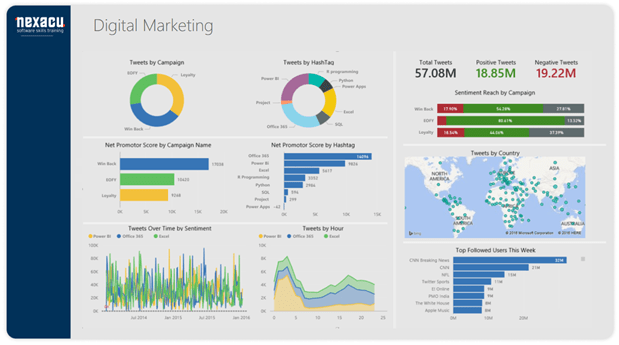
In the dynamic landscape of digital marketing, managing diverse data channels can be overwhelming without a reliable tool to preserve data integrity. Similarly, social media managers often grapple with multiple accounts and platforms, making data tracking a formidable task. However, Power BI comes to their rescue by enabling consolidation of all social media data into a single, comprehensive dashboard.
With Power BI, social media managers gain a holistic view of their activities, encompassing crucial metrics like engagement rates, follower growth, and more. This consolidated dashboard acts as a central hub, empowering managers to streamline KPI tracking and ensuring no metric goes unnoticed. By harnessing the power of platform, social media managers can seamlessly navigate the complexities of data management, unlock valuable insights, and propel their strategies towards success.
Measurement of Organic Data
Recognising the significance of organic data in marketing, both marketers and social media managers understand the value of measuring audience engagement and conversions independent of paid advertisements. Facilitating the seamless tracking of organic data, Power BI offers a suite of indispensable features.
A notable example is the ability to monitor the performance of the most searched keywords. By importing these keywords from platforms like Google Analytics or spreadsheets, social media managers can analyze the results and make informed adjustments to their overall strategy. As a result, tracking SEO performance becomes a more effortless endeavor, empowering managers to unlock new insights through Power BI.
Create Marketing Reports
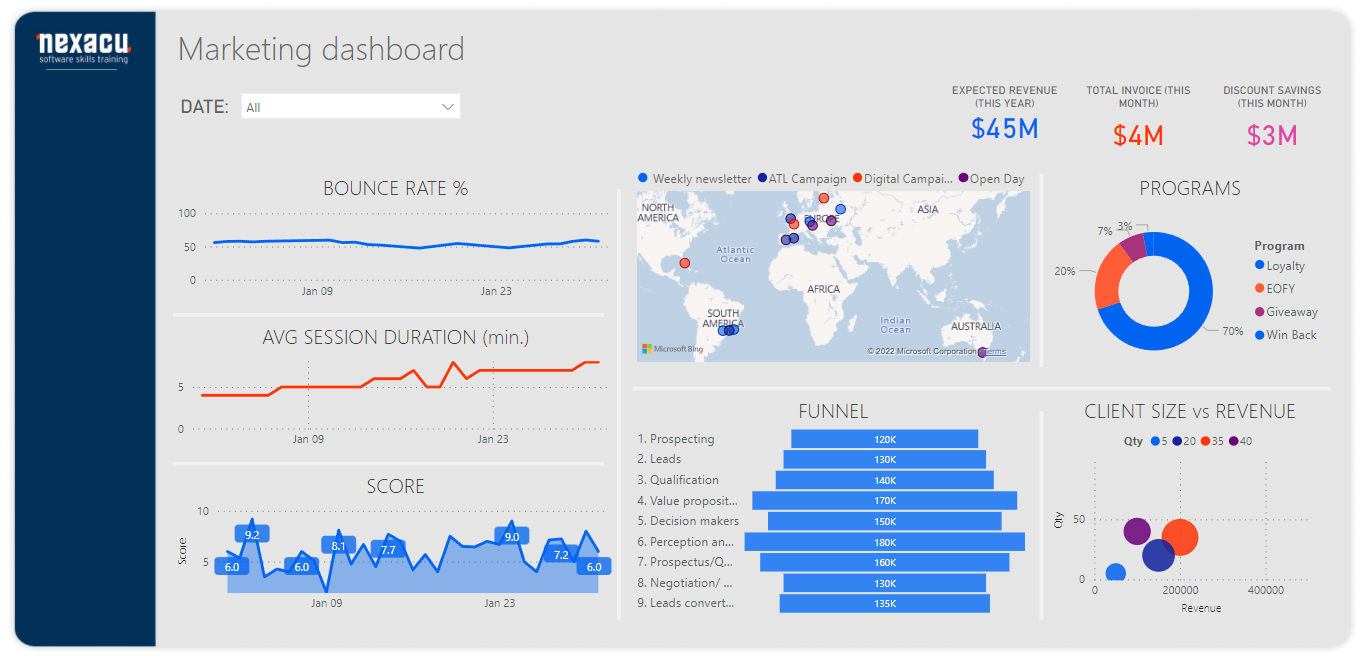
Mastering the art of presentation is vital for social media managers to captivate and attract key clients, enticing them to leverage the marketer's services. Power BI desktop emerges as the ultimate solution, enabling users to craft visually stunning, coherent, and user-friendly reports that effortlessly reflect their business vision. This unparalleled clarity serves as a catalyst for securing more clients and expanding business opportunities.
Additionally, Power BI impresses upper management by providing organized and well-presented marketing insights and performance overviews. It ensures that presenters never miss any crucial detail during their presentations, especially when dealing with large volumes of data. With Power BI, social media managers can confidently deliver impactful presentations, leaving a lasting impression on stakeholders, and fueling business growth.
Competitive Analysis
In the vast realm of social media platforms, teeming with global competitors, businesses strategically harness the power of popular platforms for their digital marketing endeavours.
Power BI presents a remarkable opportunity to analyze the social media activities of competitors. Social media managers can leverage this tool to meticulously track and evaluate the performance of their rivals, scrutinising crucial metrics such as engagement rates, follower growth, and content strategies. Armed with these invaluable insights, managers can identify areas for enhancement within their own social media strategies, enabling them to stay ahead of the competition.
-
Monitoring social media metrics: Industry leaders use Power BI to track metrics like engagement rates, follower growth, and sentiment analysis for competitive analysis.
-
Visualising competitor benchmarks: Power BI helps create visually appealing dashboards to compare key performance indicators (KPIs) of competitors, such as audience demographics and content engagement.
-
Identifying trending topics and hashtags: Power BI integrates social media APIs to track industry trends and popular hashtags, enabling leaders to tailor content strategies accordingly.
-
Analysing content performance: Power BI evaluates the effectiveness of social media content, measuring the performance of different types of posts and optimising content creation.
-
Monitoring brand sentiment: Power BI tracks brand sentiment on social media to gauge customer satisfaction, identify potential issues, and maintain brand reputation.
-
Tracking influencer campaigns: Power BI evaluates the success of influencer marketing campaigns, measuring impact, conversions, and optimising influencer strategies.
-
Identifying market trends: Power BI analyses social media data to identify emerging trends and consumer preferences, allowing leaders to adapt strategies and gain a competitive edge.
-
Benchmarking against industry leaders: Power BI compares social media performance with competitors and industry benchmarks to identify areas for improvement.
-
Predictive analytics for competitive advantage: Power BI's advanced analytics predicts future social media trends and competitor strategies, optimising social media strategies.
Real-Time Insights
Power BI provides real-time data analysis, which is crucial for social media managers who need to stay on top of their social media activities. By setting up alerts for certain metrics, they can quickly identify any issues and take action before they escalate.
Benefits of Using Power BI Desktop for Social Media Management
Power BI offers a comprehensive array of benefits that serve as an invaluable tool kit for social media managers, including:
Automated Data Analysis
Microsoft Power BI offers a time-saving and effortless solution for data analysis, alleviating the burden on social media managers who often grapple with overwhelming amounts of data. With its automated capabilities, Power BI seamlessly consolidates and interprets data, freeing up valuable time for managers to focus on core business areas.
By automating the data analysis process, Power BI empowers social media managers to streamline their workflows and eliminate the need for manual data handling. This enables them to allocate their energy and attention to critical aspects of the business, ensuring optimal productivity and efficiency.
Improved Decision-Making
Informed decisions in social media management rely on accurate data rather than abstract concepts conjured from memory. Visualising complex data in real time provides a more efficient and reliable means of analysis. With the aid of Power BI, marketers can base their decisions on meticulously calculated figures, ensuring precision and eliminating reliance on guesswork. By leveraging Power BI's data visualisation capabilities, social media managers can confidently navigate the intricate landscape of decision-making, unlocking insights that drive strategic success.
Seamless Data Visualisation
The sheer volume of social media data can be overwhelming, even for seasoned managers. However, Power BI offers a range of features designed to transform large data sets into concise, detailed, and visually compelling visualisations. These visualisations not only simplify the complexity of the data but also retain its richness and depth.
FAQs
How is Power BI used in digital marketing?
Power BI is a powerful data visualization tool that can be used in digital marketing to analyze and present data in a way that helps marketing professionals make informed decisions. For instance, Power BI can be used for website analytics, social media analytics, email marketing analytics, and advertising and customer analytics.
Does Facebook integrate with Power BI?
Yes, Facebook data can be integrated with Power BI using the Facebook Graph API. The Facebook Graph API is a platform that allows developers to access Facebook data, such as posts, likes, comments, and other user activity data, programmatically.
To use the Facebook Graph API with Power BI, you will need to create a Facebook app and obtain an access token. Once you have obtained the access token, you can use it to authenticate your Facebook account and access your data.
You can then connect to the Facebook Graph API using the Web connector in Power BI and import your Facebook data into Power BI. Once your data is imported, you can create reports and visualizations to analyze your Facebook data.
What is the main purpose of using Power BI?
The main purpose of Power BI is to provide a business intelligence and data analytics platform that enables users to easily analyze, visualize, and share data insights across their organization. Power BI is a powerful tool that can connect to a wide variety of data sources, including cloud-based and on-premises data sources, and it offers a range of features and functionalities to help users gain valuable insights from their data.
Power BI in the Social Media Landscape
In the rapidly evolving business landscape where social media plays a pivotal role, social media managers are harnessing the power of Power BI to gain actionable insights, monitor progress, and drive data-driven decision-making. To remain competitive and achieve their goals, it is essential for social media managers to leverage tools like Power BI.
Stay ahead by enrolling in our comprehensive Power BI training programs. Our courses cater to all skill levels, from beginner to advanced, covering essential topics such as DAX. By acquiring this skillset, you can guarantee yourself a competitive edge in your industry.
Don't miss out on the opportunity to excel in the dynamic world of social media management. Enrol in our Power BI training today and elevate your expertise to new heights. We offer courses from the Beginner level up to Certification.
































