

To become a Database Administrator, you'll need a deep understanding of SQL and data management systems, a bachelor's degree in selected courses, and a deeper understanding of database networks.
Most importantly, you'll need computer language skills and knowledge of how to automate most of the traditional DBA roles on a large scale.
If this sounds like a career path you'd like to pursue, know that the function of a Database Administrator has undergone significant changes due to big data and automation.
A Database Administrator DBA is an IT professional who uses special software to secure, organise, and store data. The DBA oversees and manages all aspects of a database environment to ensure that an organisation's databases and related applications work optimally, and that data is searchable.
The core job of a DBA is data integrity. You need to understand most business processes and the technical aspects.
Keep reading as we share the ultimate guide to becoming a Database Administrator. From the skills, education, key programming languages/software certification, responsibilities, remuneration, typical DBA projects, reporting, and querying. We'll also outline jobs with similar set skills.
What's it like to be a Database Administrator?
Your work-life will be punctuated with constant calls to explain or solve data-related problems. You'll need to ensure zero data breaches. No unauthorised persons should lay their hands on sensitive data.
You'll also need to restore systems in case of cyberattacks or system failures. Skills in systems evaluation and systems analysis are helpful.
Your work demands will be 9-5 pm, 40 hours or more per week. It is not a temporary part-time job since data is critical to businesses. Sometimes you'll be on call.
Additionally, it would be best if you were results-oriented, had people skills, and were an excellent communicator.
DBA roles and tech keep changing, so stay up-to-date with the latest advancements in tech if your roles are to remain relevant.
Tasks and Duties
DBA roles are fast changing. Tasks and duties today are not entirely on SQL queries but more on automating operations at a large scale. The database servers are in thousands, unlike when you had just a handful.
Hence, the traditional roles of software upgrades, expired password changes, and monitoring logs have changed. Scripting and automation come in.
Database installation is a traditional role since there are other ways to bring up a database without installation, such as cloud-based services.
Currently, these are the Database Administrator's duties and tasks:
- Data monitoring. DBAs track thousands of servers and centralise trends and alerts, ensuring optimal performance.
- Data migration. DBAs move databases from one server to another when hardware fails. Using special software, you'll have to clone and reduplicate data fast and hands-free.
Data migration often happens when developers must test an app. So you'll move it from the production database to the developer database.
Other reasons are for back up, and to report and analyse. You'll need to be conversant with ETL tools (Extract, Transport Load) like Talend, Apache Nifi, AWS Glue, Pentah and Google Data Flow.
- Performance tuning. Performance tuning is one task here to stay whether the database is on cloud or on-premise. Excellent skills in performance tuning lead to a positive career trajectory.
- Ensure database availability. Database availability is one of the most critical database administrator duties. Applications used to pull out reports have to be ever-present and never offline.
- Database backup. DBAs perform both hot and cold backups on schedule (weekly or daily). Some backup files are stored away from the premise.
- Database restoration. A DBA often has to build up a database from a backup copy, especially after a cyberattack threat, hardware failure, or a natural disaster like a destructive earthquake. Only by successfully restoring the backup can you be sure it is devoid of corruption.
- Database design. The DBA will oversee the writing of secure, scalable, maintainable, and high-performance schemas. App developers and design teams handle the nitty-gritty.
- Database security. Database security is core in the DBA roles. It involves limiting access and giving minimum privileges to a selected few, including multifactor authentication.
Database Administrator Average Salary
The average Database Administrator salary is $50,000 – $112,000 (Median: $73,000).
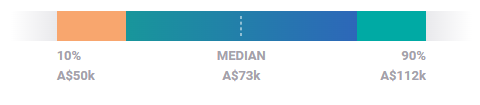
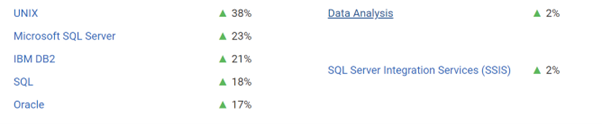
Skills in Microsoft SQL servers and in-depth practical knowledge of data analysis correlate to remuneration above the average market rate.
Database Administrator Requirements
Education
You'll need a bachelor's degree in related fields. A DBA role requires extensive training beyond a bachelor's degree.
Training
Data is the most sensitive asset of a business, and hiring managers are afraid to hire fresh graduates with no hands-on training on the job. You will need to have undergone an internship for a considerable time to get a DBA entry-level job.
Certifications
The first step to becoming a database professional is to learn SQL. Microsoft server SQL has more functionality and is more user-friendly than other software.
SQL is used all the time by DBAs. It is a language for writing queries to retrieve data from most Relational DBMS systems (RDBMS), change data, store it, and create schema (database design).
You also have to know data manipulation language (DML) and data definition language.
Other computer languages you should familiarise yourself with are PHP, C#, Python and R.
PHP is used to develop complex, interactive websites. It's linked to databases. PHP helps developers establish a database with solid connections for quickly writing, keeping, and retrieving data. WordPress uses PHP.
DBAs can use Python for database management, system management, and integration with plug-ins and frameworks. It can show, analyse, store, and support data and reduce development time.
R is excellent for data analysis, mining, statistical computing, and more. It handles sophisticated data and computations. It can show, analyse, and store mathematical equations.
Skills
- Database queries and database design
- Knowledge in relational database management systems like Microsoft SQL Server or MySQL, IBM DB2, MongoDB, Oracle, PostgreSQL, CockroachDB, Actian Ingres and any upcoming technology
- Understand operating systems like Windows and Linux where the databases will be running
- Some knowledge of storage technologies, networks, data protection
- Data maintenance, data recovery, data security, and data restoration
- Examining the efficiency and efficacy of a system and devising improvements
These interpersonal skills are a must-have:
- Analytical and critical mindset
- Teamwork
- Ability to train and develop curriculums for training
- Excellent communication and
- Problem-solving skills
Typical DBA Projects
These are the day-to-day tasks of a DBA.
- Database upgrade
- Database patching
- Capacity-building developers and colleagues
- Query tuning
- Troubleshooting and error log review
- Reporting and querying
A database query requests information stored in a database management system (DBMS). Users can request to retrieve or alter information in a database.
On the other hand, a report is information generated from the query and condensed. It may or may not have the information queried.
A report has valuable information that helps in decision-making and analysing a situation.
How to Be a Database Administrator
Here is the summary cheat sheet on how to become a Database Administrator
- Earn a bachelor's degree
Get a degree in computer science, mathematics, business information science, management information systems, or information science.
- Get work experience
Data is susceptible, and organisations are data-driven. You will need to have some practical skills gathered from an internship. Visit a website like Oracle and Microsoft, and read their technical documents and white papers to familiarise yourself with DBA features.
- Learn key computer languages
You will need tons of programming classes and certifications to boost your resume.
Familiarise yourself with scripting languages such as shell scripting, PowerShell, AWK, and Linux Command to help automate tasks.
Knowing the programming languages used by your company's developers is also a significant advantage.
- Master computer programs and platforms
Follow website instructions to learn how to install Microsoft SQL Server or MySQL. Companies like Microsoft have free, lightweight database management systems. The express versions are easy to install.
Master these lightweight versions, and learn SQL and database concepts like a primary key.
- Create a resume
Add these skills to your resume. Make it short and valuable to stand out. Once you’ve sent out your resume, practice Database Administrator interview questions to increase your chances of getting hired.
Jobs like Database Administrators
Data Manager vs Database Administrator
Database Managers manage and update various database systems. They don't delete or design a database from zero. On the other hand, a Database Administrator's job is to create, update, manage, monitor, secure, and delete databases.
Compared to a Database Manager, a DBA has more freedom and responsibilities. But most of the time, a Database Manager keeps an eye on the DBA.
While the DBA needs to understand how database management systems work in-depth, the manager knows little about networks and databases, but not as much as the administrator.
Similar roles include Computer Programmer, Computer Systems Analyst, Information Security Analyst, Network and Computer System Administrator, and Computer Support Specialists.
The employment outlook for Database Administration
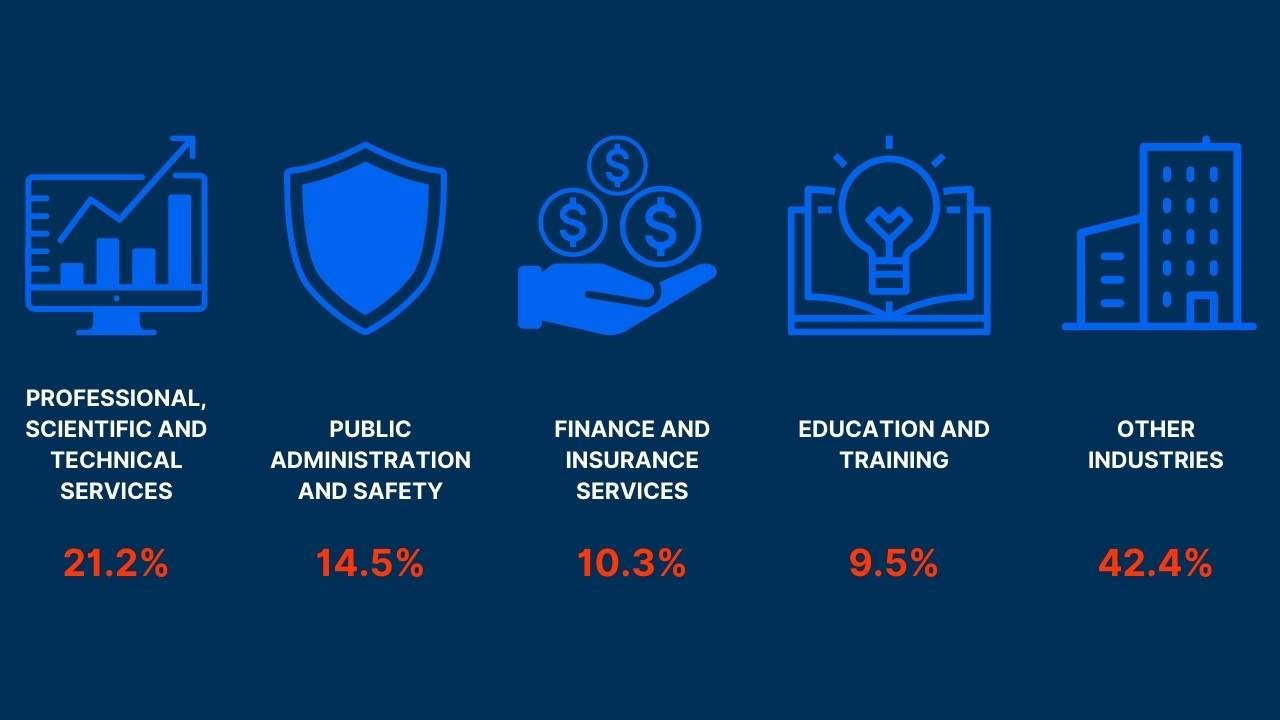
Other places are computer systems design and related services firms and health care.
FAQs
What do you need to become a Database Administrator?
A bachelor's degree in information science or computer science from a recognised institution. Knowledge of computer languages like SQL. It would be best if you also had a general understanding of Linux, UNIX platforms and platforms like Microsoft Access and Oracle.
Is it hard to become a Database Administrator?
It depends on your passion. A DBA role requires extensive computer languages and platforms knowledge, including a bachelor's degree and internship experience. If you are passionate about the Database Administrator course, it won't feel difficult.
Is the DBA job easy?
No. You need to understand networks, database management systems, SQL, configuration, and more.
Is Database Administrator a good career?
Yes, it is. There is more money with experience and career growth opportunities. However, you need to keep up with technology affecting your role and specialise in one (e.g. PowerShell) to stay valuable.
Enrol in a certification program to jumpstart your DBA career.
































