Recent Searches
Category

Microsoft Power BI

Category

Microsoft Copilot Courses

Category

AI for Business

Category

Microsoft Windows 11 Courses

Category

Microsoft 365

Category

Microsoft Excel

Category

Excel Specialist

Category

Microsoft Project

Category

R Programming

Category

Python

Category

Power Apps

Category

SQL

Category

SharePoint

Category

Microsoft Teams

Category

Power Automate

Category

Microsoft Visio

Category

Microsoft PowerPoint

Category

Microsoft Word

Category

Microsoft Outlook

Category

Adobe InDesign Courses

Category

Adobe Photoshop Courses

Category

Adobe Illustrator Courses

Category

Adobe Premiere Pro Training

Category

Adobe After Effects Training

Category

Adobe Acrobat Courses

Category

Adobe Captivate Training

Category

Adobe Animate Training

Category

Canva Courses

Category

HTML Courses

Category

WordPress

Category

Professional Development

Category

Microsoft Access

Category

Webinars

Course

Power BI Beginner

Course

Copilot for M365

Course

Windows 11 End User Course

Course

Excel Beginner

Course

Financial Modelling

Course

Project Beginner

Course

R Programming Beginner

Course

Python Beginner

Course

Power Apps Beginner

Course

SQL Beginner

Course

SharePoint Beginner

Course

Teams Essentials

Course

Visio Essentials

Course

PowerPoint Level 1

Course

Word Intermediate

Course

Word Beginner

Course

Word Advanced

Course

Microsoft Outlook Beginner to Intermediate

Course

InDesign Lite

Course

Photoshop Lite

Course

Illustrator Training Intro

Course

Premiere Training Intro

Course

After Effects Training Intro

Course

Acrobat Essentials

Course

Captivate Training

Course

Animate Training Intro

Course

Canva AI

Course

HTML Training Intro

Course

Achieving Leadership & Success

Course

Microsoft Access Essentials

Course

Copilot for M365 On Demand

Course

Power BI Intermediate

Course

Copilot for Word

Course

ChatGPT Beginner

Course

Microsoft 365 Beginner

Course

Excel Intermediate

Course

Analysis and Dashboards

Course

Project Intermediate

Course

R Programming Intermediate

Course

Python Intermediate

Course

Power Apps Intermediate

Course

SQL Intermediate

Course

SharePoint Intermediate

Course

PowerPoint Level 2

Course

InDesign Training Intro

Course

Photoshop Training Intro

Course

Acrobat Forms

Course

Anger Management & Negotiation Skills

Course

Copilot for M365 Live Online

Course

Power BI Advanced

Course

Copilot for Excel

Course

AI Prompting Fundamentals

Course

Microsoft 365 Intermediate

Course

Excel Advanced

Course

Excel VBA

Course

Project Advanced

Course

R Programming Advanced

Course

Python Advanced

Course

Power Apps Intermediate | Power Automate + Power BI Integration

Course

SharePoint Advanced (Site Owner)

Course

InDesign Training Advanced

Course

Assertiveness & Confidence

Course

Microsoft Access Advanced

Course

Power BI DAX

Course

Copilot for PowerPoint

Course

Excel Expert

Course

Machine Learning in R

Course

Power Apps Advanced

Course

SharePoint Advanced (Document Governance)

Course

Building Resilience

Course

Copilot for Outlook and Teams

Course

Coaching and Mentoring

Course

Illustrator Training Advanced

Course

Premiere Basics Training

Course

Advanced After Effects Training

Course

Canva Beginners

Course

WordPress Essentials

Course

Communications

Course

AI for Business Leaders and Managers

Course

Photoshop Training Advanced

Course

Advanced Premiere Training

Course

Canva Intermediate

Course

Communications & Quality Client Service Training

Course

InDesign Interactivity Training

Course

Canva Advanced

Course

Critical Thinking and Problem Solving

Course

InDesign Accessibility Training

Course

Cultural Diversity in the Workplace

Course

Microsoft Outlook Advanced

Course

Embracing Change

Course

SQL Advanced

Course

Growing Emotional Intelligence

Course

Planner Premium

Course

Minute Taking

Course

Excel Tables and Pivot Tables

Course

Power Automate Beginner

Course

Performance Management

Course

Data Transformation with Power Query

Course

Excel Macro Mastery

Course

Power Automate Intermediate

Course

Persuasion and Negotiation Skills

Course

Power BI Desktop Advanced Reporting

Course

Presentation Skills and Public Speaking

Course

Data Visualisation with Power BI Desktop

Course

Practical Project Management

Course

Respect, Equity and Diversity (RED)

Course

Resumé Writing and Interview Skills

Course

Stress Management

Course

Team Leadership, Management and Development

Course

Time Management Intensive

Course

Train the Trainer

Course

Write Effective Business Documents

Course

Dealing with Difficult People

Course

Managing Difficult Conversations

Course

Managing the Virtual Workplace

Course

Customer Service Training

Course

Technical Writing

How to make the most of Microsoft Teams

Jamilla Winter | Aug 29, 2018
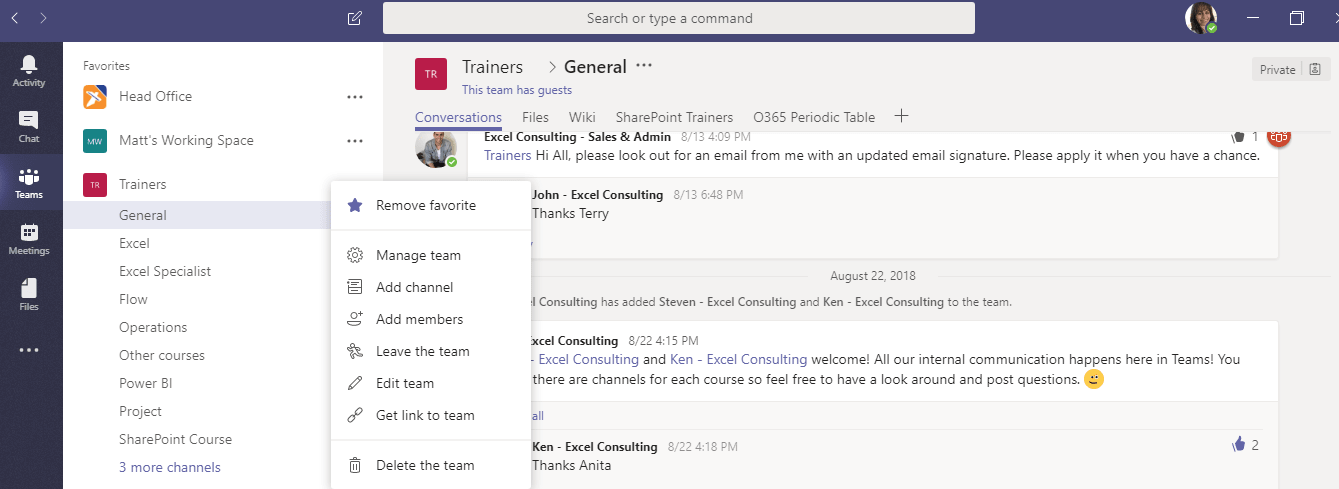
Screenshot of Microsoft Teams

Microsoft Teams - A tool for collaboration

The Onboarding

The first step to using Teams successfully in the office is to make sure that it gets rolled out to everyone, so everyone can be on the same page. The best way to do this is to organise a training day with a Microsoft Office Expert to help your team with everything from downloading the app to the different ways it can be used across your organisation. To roll out Microsoft Teams in your office check out our workplace training options here.

Process Change

Teams will undoubtedly revolutionise the way you conduct work in the workplace. Rather than sending hundreds of individual emails or messages in a day across different platforms, you can now create a hub of collaboration within Teams that will include your chat conversations, organised to-do lists and a central hub for all your important shared documents.

Identify Your Teams

The first step to using Teams successfully is to organise which Teams need to be created. Usually this is broken down into different departments, different projects or however you decide to divide your business. At Excel Consulting we create Teams by office locations, projects and our different groups of expertise. Each Team has a general tab where anyone in the team can post new ideas or general points of conversation. Additional targeted communication pages, called "channels" can be added within each Team. It’s important to create a skeleton of what you need, so you can always duplicate Teams for new projects.

Optimise & Organise Your Teams

Once you have identified which Teams needed to be created, the next step is to set a transfer date to migrate your files onto the Team. This can become very important because it can become a time of reflection to think about which existing documents are the most important in order to reduce clutter and improve workflow. Having everything in one central place makes a world of difference when trying to work efficiently. During the transition time, take some time to think about which apps will be most beneficial for the group to use, (there are a lot so it’s important to be picky!).

Here’s a breakdown of some of useful tools that integrate with Teams:

Planner

Microsoft Planner is part of the Office 365 and is a great tool to use when it comes to Microsoft Teams. Planner allows you to create different ‘boards’ for your employees and therefore makes it so much easier to track who is doing what, what’s been done and what hasn’t.

Smartsheet

Smartsheet is a great alternative to using Microsoft Excel if you want basic spreadsheet functionality. Everyone uses more spreadsheets then they’d like to admit and integrating that with Microsoft Teams becomes a whole lot easier to share what you’ve been working on. No more attaching spreadsheets to emails (unless you want to).

Power BI

Power BI is also a powerful part of the Office 365 suite. One of the best things about using Office 365 is that all apps have similar interfaces and communicate with each other seamlessly. This makes your life easier when learning new programs and sharing information. It’s now easier than ever to share your Power BI dashboards. Just add your Power BI report to its related channel for everyone to view. You can even add multiple reports to the same tab! To learn how to use Power BI join one of our Power BI courses.

Zendesk

Teams can collaborate to resolve customer problems in real time. Which means faster, more productive customer support.

That's just the tip of the iceberg, there is so much flexibility with Teams, just get started!

Trusted Nationwide by Leading Organisations

at Nexacu, we're proud to be the trusted training partner for hundreds of leading organisations accross Australia and New Zealand. From government departments to top corporates, we help teams upskill and succeed everyday

  • 400+ companies rely on Nexacu for team training
  • Trusted by federal, state, and local government agencies
  • Delivering training across 9 countries

Why Nexacu?

Books Icon

Step by Step Courseware

Custom workbook included with a step by step exercises

Facility Image 2
Facility Image 3
Facility Image 1

Refresh Icon

Free Refresher

Resit your course for free within 6 Months

More than 1,300 Business trust Nexacu

Trusted by Business

Procured by Government

Procured by Goverment

Reviews Not Found

Valued by Individuals
















