

Whether you're an experienced software engineer or a fresh graduate, coding interviews are a daunting prospect. Using our handy tips and tricks, you can start your preparation journey on the right foot.
Coding interview tips
- Research Topics
Though interview topics depend largely on the role you're interviewing for, it's good to know the concepts that come up consistently during coding interviews. Here are some topics that typically come up in coding interviews.
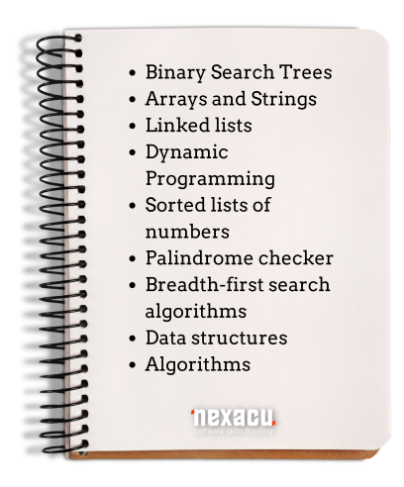
Pay particular attention to data structures and algorithms, as these are the most frequently cited topics. Note the above list is not exhaustive: do further research and compile as many sources as you can to ensure optimal preparation.
My Code School and Udemy are some resources you can use to learn data structures, algorithms, and other CS concepts. These will be useful coding interview tools.
- Research the company
Don't go for a coding interview without researching the company. The research will provide you with a better idea of the company's frameworks, languages, and job processes.
Depending on the company you are interviewing for, there may be information available online as to how they normally conduct their interviews. Even if you aren’t interviewing for a big firm, the approaches they take are often replicated by smaller firms and are worth reviewing.
For example, Google applicants need to pass a pre-screen and an onsite interview. This includes meeting with 4 to 6 Google staff for almost one hour each.
Research will also help you with your soft skills. Even the best coder still needs to be able to communicate, and base knowledge of the company’s goals and strategies will help demonstrate your commitment and interest in the role.
- Study other important interview questions
Yes, coding is technical, but you may face soft and behavioural skill questions during the interview. So, it's good to have ideas on some general interview questions.
In other words, in addition to determining your technical skills, the interviewer would assess your creative thinking and interpersonal skills, including how you can get and apply feedback.
You will likely have to work with the person interviewing you, and they will be looking for someone who will add to the team culture and work well with the people around them.
- Practice!
Try to practice the actual interview questions and processes. There are many great services (some of which we will outline below).
We recommend using a whiteboard and a timer so that you can familiarize yourself with the time pressure of the interviews and the difficulty of writing instead of typing. Not all coding interviews will require writing, so make sure to read all communication and do your research so you know the format of your interview.
Interviewers appreciate you talking through your code, so practice explaining your actions in a logical, succinct fashion.
Cracking the coding interview – A timeline for success!
When you first start studying and preparing for your coding interview is dependent on your existing knowledge, availability, and your learning ability.
Experts recommend an average of 2 – 3 hours per day for at least 4 – 6 weeks, but this is just a base case: beginners should look at a longer timeline of at least 10 – 11 weeks. Approx. 14 – 21 hours a week should be your goal, adjust accordingly for a longer timeline or more experience.
At the start of prep, create a list of every topic you want to cover and plan a loose schedule based on this list. Allocate time proportionately to your knowledge and confidence in the topic: topics you are less confident in require more time and vice versa. Practice coding challenges daily.
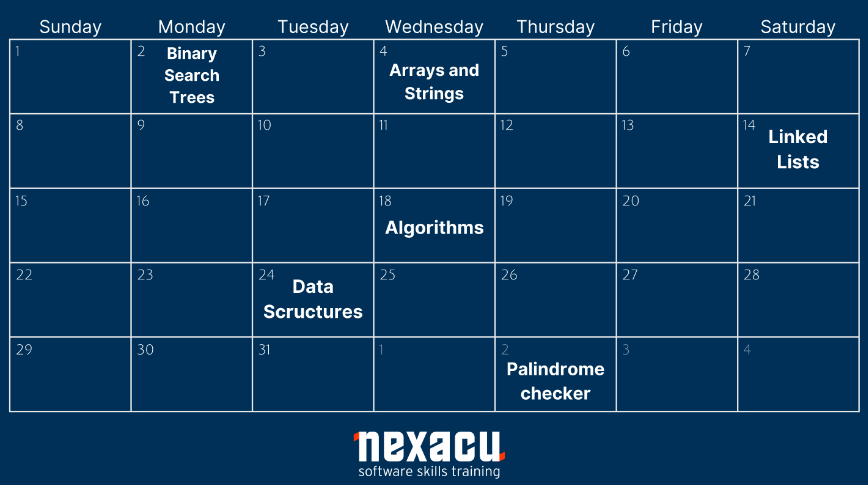
A couple of weeks out from your interview, attempt a practice interview. This will help you identify the areas in which you are lacking, which should be used to enrich your study. It can also help you get into the right mindset and visualize what the actual day will look like.
In the last week have a final look over your topic list: is there anything you missed? Anything you feel you need more time on? Ask yourself these questions and improve your preparation accordingly.
It may seem obvious, but the night before get a good night’s sleep! Any late-night last-minute study will not be effective and will only serve to confuse you the next day. If you are tired and your brain is a bit foggy, you will not be close to your best. Likewise, fuel up with food that makes you feel good.
On the day:
Once you get the question, take a moment, and repeat it back to the interviewer. Ensure you understand what is being asked of you. You want to fully understand the question before you attempt it.
You may ask some of these questions for clarity:
- What's the input size?
- What's the size of the value range?
- What values are there?
- Are there any negative numbers?
- Would there be any empty inputs?
- How's the input stored?
After clarifying your problem scope and intention, explain your approach to the interviewer. Verbal communication is not only a soft skill required by employers but will also allow the interviewer to more easily follow your work.
If you're stuck, talk through various approaches, and describe out loud why the approach may or may not function. This will help you eliminate the improper approach and communicate your knowledge to the interviewer.
Don’t panic if the interviewer asks the dreaded “can we do better?” question. They are looking for a more optimal method. Try to think of what they may be looking for, but if you can’t think of anything else just try to optimize the approach you have chosen.
- Starting the coding
It should go without saying but use best practice when writing your code. Enhance the interviewers understanding of your code by writing it clearly. Clearly writing your code helps your interviewer evaluate if the code does what it needs to and whether it'll solve the given challenge.
As mentioned earlier, be verbal with your interviewer. Talk through your code in a way that will enhance their understanding of your process.
- After coding
When you finish coding, pre-emptively review your code for syntax errors or bugs. After, write the test for your code. It's an added advantage to write tests for your code even before the interviewer asks you.
The interview mostly ends here if your interviewer is okay with the solution. In some cases, the interviewer may continue by asking you extension questions. Answer these to the best of your ability in a calm manner.
Practice with mock interviews. (Where can you practice coding questions?)
These are some platforms that allow you to practice mock interviews or study coding interviews:
- Interviewing.io
This is a good place to prepare for your coding interview. Interviewing.io offers anonymous and free practice interviews using Facebook and Google, guiding you to land real internships and jobs.
Its interview is low risk, inclusive, and unbiased. When the interview ends, the interviewee and interviewer can offer each other feedback.
- Pramp
Pramp is another place you can practice coding interviews. The platform pairs you with another job seeker.
You both can take turns to assume the duty of interviewee and interviewer. Also, the platform prepares questions and answers while guiding the interviewee through the process.
- LeetCode
LeetCode offers practice opportunities in over 14 languages and provides up to 1,500 sample problems.
- HackerRank
You can use HackerRank to practice your coding skills and prepare for coding interviews.
FAQ
- How long do coding interviews last?
A typical coding interview can last about 1 hour. Meanwhile, the more technical part of the interview can last 2-3 hours.
- Where can you practice coding questions?
Use these platforms to practice mock interviews or study coding interviews, Interviewing.io, Pramp, LeetCode, and HackerRank.
- How long do you need to study for a coding interview?
This largely depends on your experience. If you're a beginner, it's good to spend 10-11 weeks. You can spend 4-6 weeks if you have more experience in coding or use 2–3 hours per day.
- How do I prepare for a remote interview?
For remote interviews, have a pen and paper to write down any diagrams or notes. This helps if you want to draw data structure examples.
Be sure to use earphones, stay in a quiet environment, and don't use speakers.
































