Recent Searches
Category

Microsoft Power BI

Category

Microsoft Copilot Courses

Category

AI for Business

Category

Microsoft Windows 11 Courses

Category

Microsoft 365

Category

Microsoft Excel

Category

Excel Specialist

Category

Microsoft Project

Category

R Programming

Category

Python

Category

Power Apps

Category

SQL

Category

SharePoint

Category

Microsoft Teams

Category

Power Automate

Category

Microsoft Visio

Category

Microsoft PowerPoint

Category

Microsoft Word

Category

Microsoft Outlook

Category

Adobe InDesign Courses

Category

Adobe Photoshop Courses

Category

Adobe Illustrator Courses

Category

Adobe Premiere Pro Training

Category

Adobe After Effects Training

Category

Adobe Acrobat Courses

Category

Adobe Captivate Training

Category

Adobe Animate Training

Category

Canva Courses

Category

HTML Courses

Category

WordPress

Category

Professional Development

Category

Microsoft Access

Category

Webinars

Course

Power BI Beginner

Course

Copilot for M365

Course

Windows 11 End User Course

Course

Excel Beginner

Course

Financial Modelling

Course

Project Beginner

Course

R Programming Beginner

Course

Python Beginner

Course

Power Apps Beginner

Course

SQL Beginner

Course

SharePoint Beginner

Course

Teams Essentials

Course

Visio Essentials

Course

PowerPoint Level 1

Course

Word Intermediate

Course

Word Beginner

Course

Word Advanced

Course

Microsoft Outlook Beginner to Intermediate

Course

InDesign Lite

Course

Photoshop Lite

Course

Illustrator Training Intro

Course

Premiere Training Intro

Course

After Effects Training Intro

Course

Acrobat Essentials

Course

Captivate Training

Course

Animate Training Intro

Course

Canva AI

Course

HTML Training Intro

Course

Achieving Leadership & Success

Course

Microsoft Access Essentials

Course

Copilot for M365 On Demand

Course

Power BI Intermediate

Course

Copilot for Word

Course

ChatGPT Beginner

Course

Microsoft 365 Beginner

Course

Excel Intermediate

Course

Analysis and Dashboards

Course

Project Intermediate

Course

R Programming Intermediate

Course

Python Intermediate

Course

Power Apps Intermediate

Course

SQL Intermediate

Course

SharePoint Intermediate

Course

PowerPoint Level 2

Course

InDesign Training Intro

Course

Photoshop Training Intro

Course

Acrobat Forms

Course

Anger Management & Negotiation Skills

Course

Copilot for M365 Live Online

Course

Power BI Advanced

Course

Copilot for Excel

Course

AI Prompting Fundamentals

Course

Microsoft 365 Intermediate

Course

Excel Advanced

Course

Excel VBA

Course

Project Advanced

Course

R Programming Advanced

Course

Python Advanced

Course

Power Apps Intermediate | Power Automate + Power BI Integration

Course

SharePoint Advanced (Site Owner)

Course

InDesign Training Advanced

Course

Assertiveness & Confidence

Course

Microsoft Access Advanced

Course

Power BI DAX

Course

Copilot for PowerPoint

Course

Excel Expert

Course

Machine Learning in R

Course

Power Apps Advanced

Course

SharePoint Advanced (Document Governance)

Course

Building Resilience

Course

Copilot for Outlook and Teams

Course

Coaching and Mentoring

Course

Illustrator Training Advanced

Course

Premiere Basics Training

Course

Advanced After Effects Training

Course

Canva Beginners

Course

WordPress Essentials

Course

Communications

Course

AI for Business Leaders and Managers

Course

Photoshop Training Advanced

Course

Advanced Premiere Training

Course

Canva Intermediate

Course

Communications & Quality Client Service Training

Course

InDesign Interactivity Training

Course

Canva Advanced

Course

Critical Thinking and Problem Solving

Course

InDesign Accessibility Training

Course

Cultural Diversity in the Workplace

Course

Microsoft Outlook Advanced

Course

Embracing Change

Course

SQL Advanced

Course

Growing Emotional Intelligence

Course

Planner Premium

Course

Minute Taking

Course

Excel Tables and Pivot Tables

Course

Power Automate Beginner

Course

Performance Management

Course

Data Transformation with Power Query

Course

Excel Macro Mastery

Course

Power Automate Intermediate

Course

Persuasion and Negotiation Skills

Course

Power BI Desktop Advanced Reporting

Course

Presentation Skills and Public Speaking

Course

Data Visualisation with Power BI Desktop

Course

Practical Project Management

Course

Respect, Equity and Diversity (RED)

Course

Resumé Writing and Interview Skills

Course

Stress Management

Course

Team Leadership, Management and Development

Course

Time Management Intensive

Course

Train the Trainer

Course

Write Effective Business Documents

Course

Dealing with Difficult People

Course

Managing Difficult Conversations

Course

Managing the Virtual Workplace

Course

Customer Service Training

Course

Technical Writing

How to Write a Resume

| Dec 05, 2022

How To Write A Resume

Looking for a new job should be a process that is full of excitement; but the legwork involved sometimes complicates the process. From researching prospective employers and lining up references to ensuring a job meets your needs and actually attending the interview, there are many aspects of the job hunt that require your attention.

It is easy to let your resume fall to the wayside among all of the other things you must consider. But you cannot make a second first impression, and your resume is the first opportunity a company has to get to know you.

In the midst of a job hunt, it is very common to just recycle your old resume. To just update it with your new experience and skills saves time and hassle. But in doing this, you miss an invaluable opportunity to reflect on your career thus far and tailor your resume to the job. This allows you to highlight your strengths as well as achievements in a way that will stand out the most to prospective employers.

Importance Of A Resume

Your resume is the most crucial document you will have during your job search. It is your first chance to introduce yourself to a potential employer, so you can show you are worth the investment.

Hiring managers tend to only spend six to seven seconds on each CV. Making the most of every second is crucial to help you stand out from the competition.

1. Pick the Right Resume Format & Layout

The first thing a recruiter sees is the format and layout of your resume. When you start at the very beginning by opening a new document in Google Docs, Microsoft Word, or Apple Pages, set ½”–1” inch margins on all sides of the resume and select a professional font for such as Arial or Helvetica. The font size must be between 10 and 12 points. This ensures the document is readable and looks professional and clean.

At this initial stage, you can also prepare a list of the information that you want to add to your resume. Make sure the format of your resume fits the kind of job you are applying for. For example, the left is mor appropriate for a professional career in law or finance whereas the right would be better suited for more creative industries.
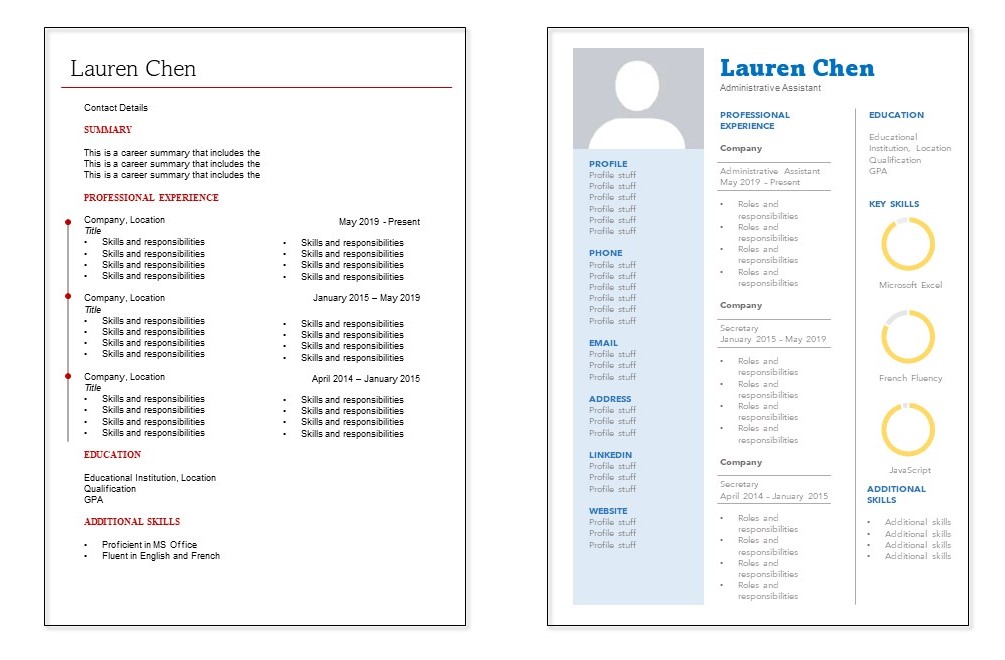
resume format

2. Contact Information

The contact information should include your full name, professional email address, phone number, city name, ZIP code, and any links to your professional website, portfolio, or social media accounts that are appropriate. This is more likely to be applicable to jobs in creative industries, with links to a portfolio of work.  

3. Summary Statement

A resume summary gives a short description of yourself to the reader. If you are not changing industries or jobs and have work experience, then you must add a good resume summary. Make sure it is clear, concise, and compelling. The following example will help you write an effective resume summary.
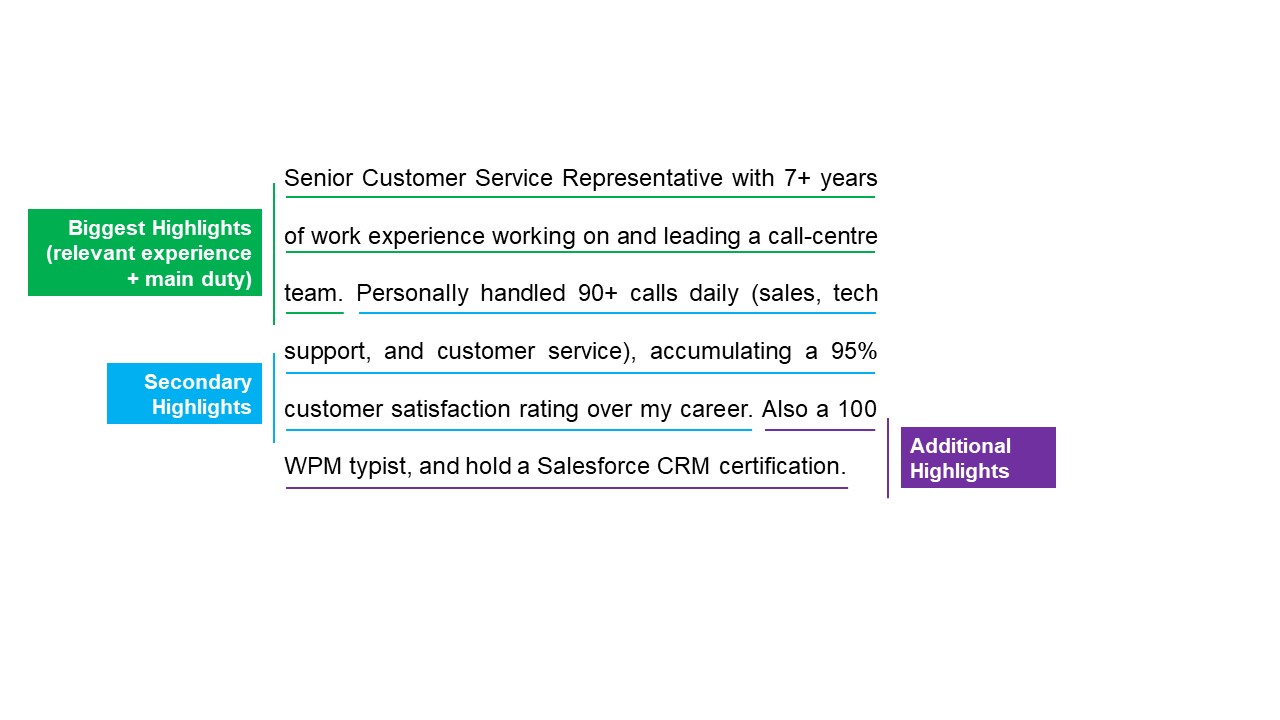
resume summary

4. Skills

When it comes to adding your skills to your resume, it is important to consider both technical and soft skills. Highlight the skills, qualifications, and experiences that are directly related to the job you want to get.

Soft skills cover your personal skills such as your career attributes, communication skills, social skills, personal traits, and so on. This could include:

  • Leadership skills
  • Critical thinker
  • Empathy

Technical skills highlight your knowledge or qualifications, such as:

  • C++
  • JavaScript
  • PHP
  • Python

5. Work History

It is essential to keep your work history clear and factual. Your work history should include information such as the date you joined the company, your job title, and the time period you were there.

Your work history must give hiring managers an idea of what they can expect from you.

6. Education

A common issue that freshers face when making a resume is deciding how to write a resume with no experience. This is where their education helps them make a good impression. It is always better to keep it concise by adding the academic qualification you have obtained, the year of their completion, and the name of the institution along with a one-sentence summary. Also, include any academic awards you have received.

7. Certifications & or Training Achievements

Along with your education and work history, your certifications and/or training achievements should be added to your resume. Training companies will generally issue a certificate or badge that can be added to your LinkedIn profile to verify your achievements.

Certifications and training achievements can push you over the edge with recruiters. Not only does it demonstrate your skills, but it also shows you are willing to continue learning and that you have a decent work ethic.

What To Include On Your Resume?

Your resume must include each piece of information that an employer wants to know before hiring you. From your phone number to your email address, everything in it must be correct and clear. Adding a professional title and objective/summary to your resume also helps you make it attractive as well as meaningful.

What Not To Include On Your Resume?

Avoid using bold or highly stylised fonts that make your resume hard to read at a glance. It is important to use your judgment: the fact that you played trumpet in high school probably isn’t relevant to that law job you want. Likewise, don’t include any false information.

Conclusion

Employers usually receive hundreds of resumes for every job opening. This makes it essential for you to make sure you will present yourself as well as you can with a good resume. Making a great resume is undoubtedly time-consuming, but will serve you incredibly well in the long term.

Trusted Nationwide by Leading Organisations

at Nexacu, we're proud to be the trusted training partner for hundreds of leading organisations accross Australia and New Zealand. From government departments to top corporates, we help teams upskill and succeed everyday

  • 400+ companies rely on Nexacu for team training
  • Trusted by federal, state, and local government agencies
  • Delivering training across 9 countries

Why Nexacu?

Books Icon

Step by Step Courseware

Custom workbook included with a step by step exercises

Facility Image 2
Facility Image 3
Facility Image 1

Refresh Icon

Free Refresher

Resit your course for free within 6 Months

More than 1,300 Business trust Nexacu

Trusted by Business

Procured by Government

Procured by Goverment

Reviews Not Found

Valued by Individuals
















