

What is the R Programming language?
R is an open-source, free, statistical programming language used by data analysts and data scientists for analysing and graphing data.
The R programming language is flexible with versions available that run on UNIX, Windows and macOS platforms. The program has immense capabilities and knowing how to operate within the program is an asset.
Before you learn R
For people who have never learned a computer programming language, starting out with the R programming language can be a daunting prospect. However, R is a relatively simple language to learn. In fact, unlike general-purpose programming languages, it was developed for non-programmers as an environment in which to conduct statistical analyses and graph results.
Although it is not a complex language to learn, there is a learning curve as you become familiar with the syntax, functions, and packages. Nexacu offers R programming classes that begin with the absolute basics, teach you to perform many common operations on data and finally use your new skills to automate tasks and work more efficiently.
We also offer two R Programming certifications that provide students with additional support and opportunities to practise and develop R programming skills. In addition to attending our R programming classes, students are provided with support and feedback to complete practice exercises and a capstone project. Our certifications are comprehensive learning experiences, designed to support new R users to become confident programmers.
Why use R for statistical computing and graphics?
Aside from its relative simplicity, the strength of R is in the wide range of functionality available for manipulating, analysing and visualising data. The R programming language offers a wide range of statistical (linear and nonlinear modeling, traditional statistical tests, time-series analysis, classification, segmentation, etc.) and graphical tools. One of the features of the R programming language is how simple it is to create well-designed publication-quality graphs.
R is a powerful tool with extensive functionality, due in large part to the active and sophisticated R user community that includes researchers, statisticians and mathematicians. User-contributed packages have contributed over 18,000 packages that have extended and enhanced the functionality of R (Ten simple rules for finding and selecting R packages - PMC (nih.gov)).
R enables users to manipulate and analyse data efficiently but also to perform more complex analyses including using machine learning techniques. New algorithms are constantly being added by users and this has resulted in R having an extensive collection of algorithms and being one of the most popular tools used by data scientists.
Examples Of Use
The R programming language is used in a variety of industries due to its versatility. The following industries use the R programming language:
- Fintech Businesses (financial services)
- Government Research Academic (FDA, National Weather Service)
- Manufacturing
- Healthcare
- Retail
- Social Media
- Data Journalism
If you need more information, here are ten notable corporations or organizations that use R:
- Airbnb
- Microsoft
- Uber
- Ford
- IBM
- American Airlines
- HP
R vs Python
R and Python are both popular tools for data analysis and data science and new users often wonder which programming language they should learn. Unlike R, Python is a general-purpose programming language.
Both are fairly easy languages to learn and both have powerful capabilities for manipulating and analysing data. R has a more extensive collection of algorithms, built up by the community over the last two decades. Python is better for larger datasets and for deep learning applications. Python can also be a better choice when building larger applications, where data analysis is just one component.
R can be an easier language for non-programmers to learn whereas people with programming experience may prefer Python. Many users choose between the two based on what other people in their industry or workplace are using. In some cases, that choice might be based on the availability of the algorithms they want or need to use. More and more users are choosing to learn both languages. The tools are complementary, and each has its own strengths and weaknesses.
Getting started with R
R is maintained by a worldwide group of developers who make the language available via The Comprehensive R Archive Network (CRAN) website. The base R package can be downloaded from this site (or a mirror site). CRAN also hosts a repository of user-contributed packages. There are currently 18,600 packages available packages.
Most users choose to work in RStudio, an integrated development environment for R. RStudio can be downloaded from the RStudio website. The open-source edition is free.
RStudio simplifies working with R. Common file types such as text and Excel files can be imported through the graphical user interface in RStudio.
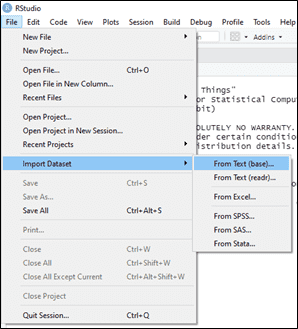
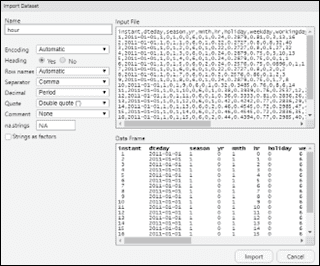
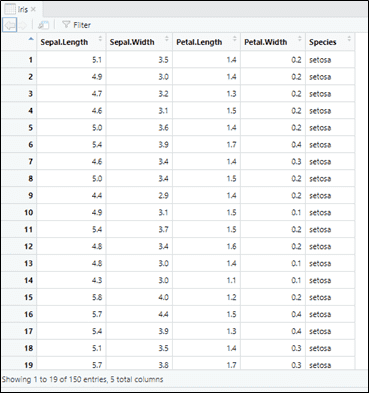
A data viewer makes it easier to visualise datasets.
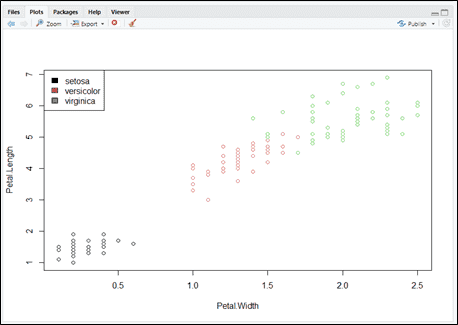
And graphs are displayed in the plot window.
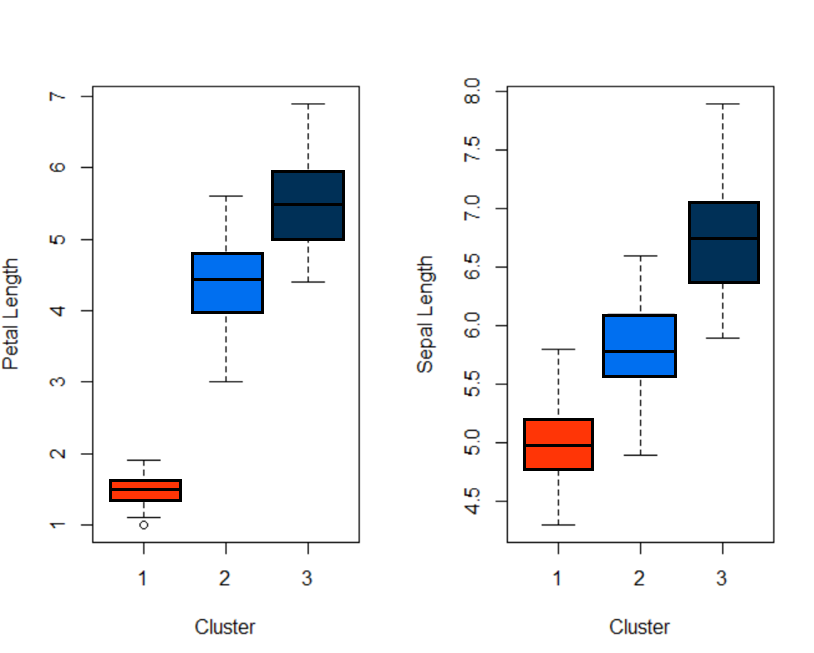
In RStudio, you can easily manage your projects; install new user-contributed packages; see which packages have been installed and loaded; access help files; work with scripts and Markdown files and access the command history. At Nexacu, we teach our students best practices for working with R and RStudio.
Should I learn R?
If you work with data and need to perform complex analyses or if you want to improve the way you work with data, you may want to learn R. R users have access to a wide range of pre-written complex algorithms. Writing code also allows you to work with reusable scripts, functions and looping functionality which can minimise the time spent on tedious, repetitive tasks, freeing you to work on more meaningful tasks.
There are many online resources available to help you learn R, including short courses, online books and documentation. Some students prefer and benefit from an instructor-led environment where they can ask questions and receive support as they learn. Nexacu specialises in instructor-led training for skilled end users. Our R courses and certifications have been designed to take you from complete novice to proficient user.
































