Recent Searches
Category

Microsoft Power BI

Category

Microsoft Copilot Courses

Category

AI for Business

Category

Microsoft Windows 11 Courses

Category

Microsoft 365

Category

Microsoft Excel

Category

Excel Specialist

Category

Microsoft Project

Category

R Programming

Category

Python

Category

Power Apps

Category

SQL

Category

SharePoint

Category

Microsoft Teams

Category

Power Automate

Category

Microsoft Visio

Category

Microsoft PowerPoint

Category

Microsoft Word

Category

Microsoft Outlook

Category

Adobe InDesign Courses

Category

Adobe Photoshop Courses

Category

Adobe Illustrator Courses

Category

Adobe Premiere Pro Training

Category

Adobe After Effects Training

Category

Adobe Acrobat Courses

Category

Adobe Captivate Training

Category

Adobe Animate Training

Category

Canva Courses

Category

HTML Courses

Category

WordPress

Category

Professional Development

Category

Microsoft Access

Category

Webinars

Course

Power BI Beginner

Course

Copilot for M365

Course

Windows 11 End User Course

Course

Excel Beginner

Course

Financial Modelling

Course

Project Beginner

Course

R Programming Beginner

Course

Python Beginner

Course

Power Apps Beginner

Course

SQL Beginner

Course

SharePoint Beginner

Course

Teams Essentials

Course

Visio Essentials

Course

PowerPoint Level 1

Course

Word Intermediate

Course

Word Beginner

Course

Word Advanced

Course

Microsoft Outlook Beginner to Intermediate

Course

InDesign Lite

Course

Photoshop Lite

Course

Illustrator Training Intro

Course

Premiere Training Intro

Course

After Effects Training Intro

Course

Acrobat Essentials

Course

Captivate Training

Course

Animate Training Intro

Course

Canva AI

Course

HTML Training Intro

Course

Achieving Leadership & Success

Course

Microsoft Access Essentials

Course

Copilot for M365 On Demand

Course

Power BI Intermediate

Course

Copilot for Word

Course

ChatGPT Beginner

Course

Microsoft 365 Beginner

Course

Excel Intermediate

Course

Analysis and Dashboards

Course

Project Intermediate

Course

R Programming Intermediate

Course

Python Intermediate

Course

Power Apps Intermediate

Course

SQL Intermediate

Course

SharePoint Intermediate

Course

PowerPoint Level 2

Course

InDesign Training Intro

Course

Photoshop Training Intro

Course

Acrobat Forms

Course

Anger Management & Negotiation Skills

Course

Copilot for M365 Live Online

Course

Power BI Advanced

Course

Copilot for Excel

Course

AI Prompting Fundamentals

Course

Microsoft 365 Intermediate

Course

Excel Advanced

Course

Excel VBA

Course

Project Advanced

Course

R Programming Advanced

Course

Python Advanced

Course

Power Apps Intermediate | Power Automate + Power BI Integration

Course

SharePoint Advanced (Site Owner)

Course

InDesign Training Advanced

Course

Assertiveness & Confidence

Course

Microsoft Access Advanced

Course

Power BI DAX

Course

Copilot for PowerPoint

Course

Excel Expert

Course

Machine Learning in R

Course

Power Apps Advanced

Course

SharePoint Advanced (Document Governance)

Course

Building Resilience

Course

Copilot for Outlook and Teams

Course

Coaching and Mentoring

Course

Illustrator Training Advanced

Course

Premiere Basics Training

Course

Advanced After Effects Training

Course

Canva Beginners

Course

WordPress Essentials

Course

Communications

Course

AI for Business Leaders and Managers

Course

Photoshop Training Advanced

Course

Advanced Premiere Training

Course

Canva Intermediate

Course

Communications & Quality Client Service Training

Course

InDesign Interactivity Training

Course

Canva Advanced

Course

Critical Thinking and Problem Solving

Course

InDesign Accessibility Training

Course

Cultural Diversity in the Workplace

Course

Microsoft Outlook Advanced

Course

Embracing Change

Course

SQL Advanced

Course

Growing Emotional Intelligence

Course

Planner Premium

Course

Minute Taking

Course

Excel Tables and Pivot Tables

Course

Power Automate Beginner

Course

Performance Management

Course

Data Transformation with Power Query

Course

Excel Macro Mastery

Course

Power Automate Intermediate

Course

Persuasion and Negotiation Skills

Course

Power BI Desktop Advanced Reporting

Course

Presentation Skills and Public Speaking

Course

Data Visualisation with Power BI Desktop

Course

Practical Project Management

Course

Respect, Equity and Diversity (RED)

Course

Resumé Writing and Interview Skills

Course

Stress Management

Course

Team Leadership, Management and Development

Course

Time Management Intensive

Course

Train the Trainer

Course

Write Effective Business Documents

Course

Dealing with Difficult People

Course

Managing Difficult Conversations

Course

Managing the Virtual Workplace

Course

Customer Service Training

Course

Technical Writing

Our Top 8 announcements from Microsoft Ignite 2021

Matt Burr | Mar 03, 2021
Microsoft Ignite

A few times a year Microsoft announces all of their latest new products and features. Like so many events in 2020, Microsoft Ignite 2021 was an all virtual event with presenters from all over the world.

Like all of these events, there are a lot of announcements - so let us do the hard work and explain our top announcements...

1. Microsoft Teams Connect makes inter-organisation collaboration easy

Previously when you were invited to a Microsoft Teams team from another organisation you couldn't see the team unless you changed the tenant you were viewing. This would mean spending a minute or two waiting for the new tenant to load, stopping your flow of work, creating potential disruptions to your productivity. You also wouldn't see notifications from that team as easily.

With Microsoft Teams Connect shared channel will appear within an individual’s primary Microsoft Teams tenant alongside other teams and channels, making it easy for everyone to access it in their workflow. This will be available later this calendar year.
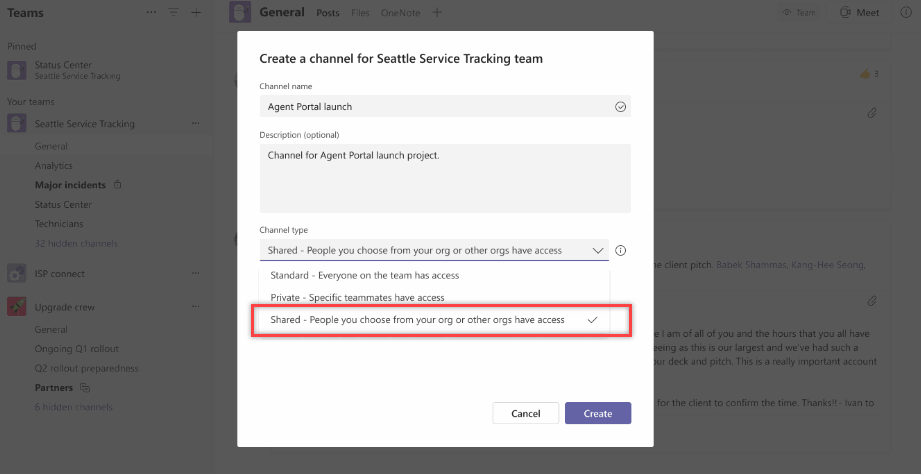
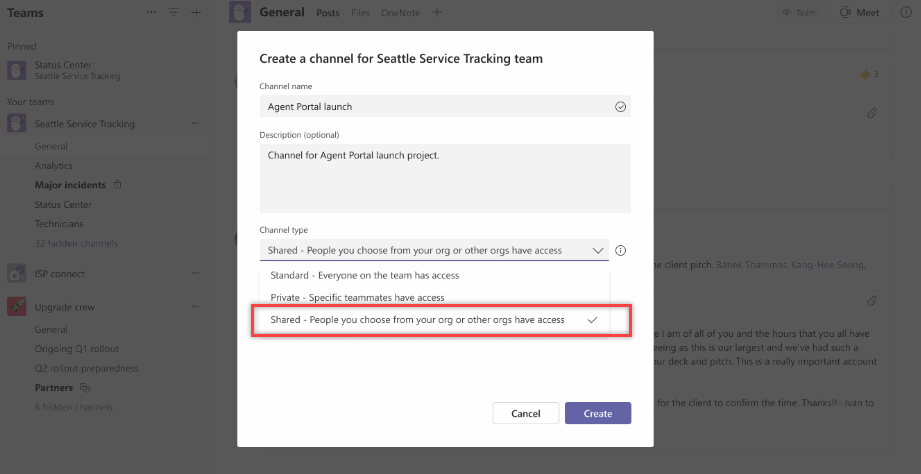
Microsoft Teams Connect allows you to created shared channels


2. Microsoft Viva Connections included with SharePoint and available in March

Announced last month Microsoft Viva is the new digital Employee Experience Platform (EXP). Microsoft Viva is experienced through Microsoft Teams and other core Microsoft 365 apps to bring together communications, knowledge, learning, and insights into an integrated employee experience.

Microsoft Viva Connections, one of the four Viva modules, provides a curated, company-branded experience that brings together relevant news, conversations, and other resources. Microsoft has announced that Viva Connections will be available to all customers as part of their existing Microsoft 365 and SharePoint license. Any employee in the organization that is licensed for SharePoint will be able to use Viva Connections at no additional costs.

Viva Connections will be generally available on Microsoft Teams Desktop by the end of March. The mobile version is planned for delivery mid-year.
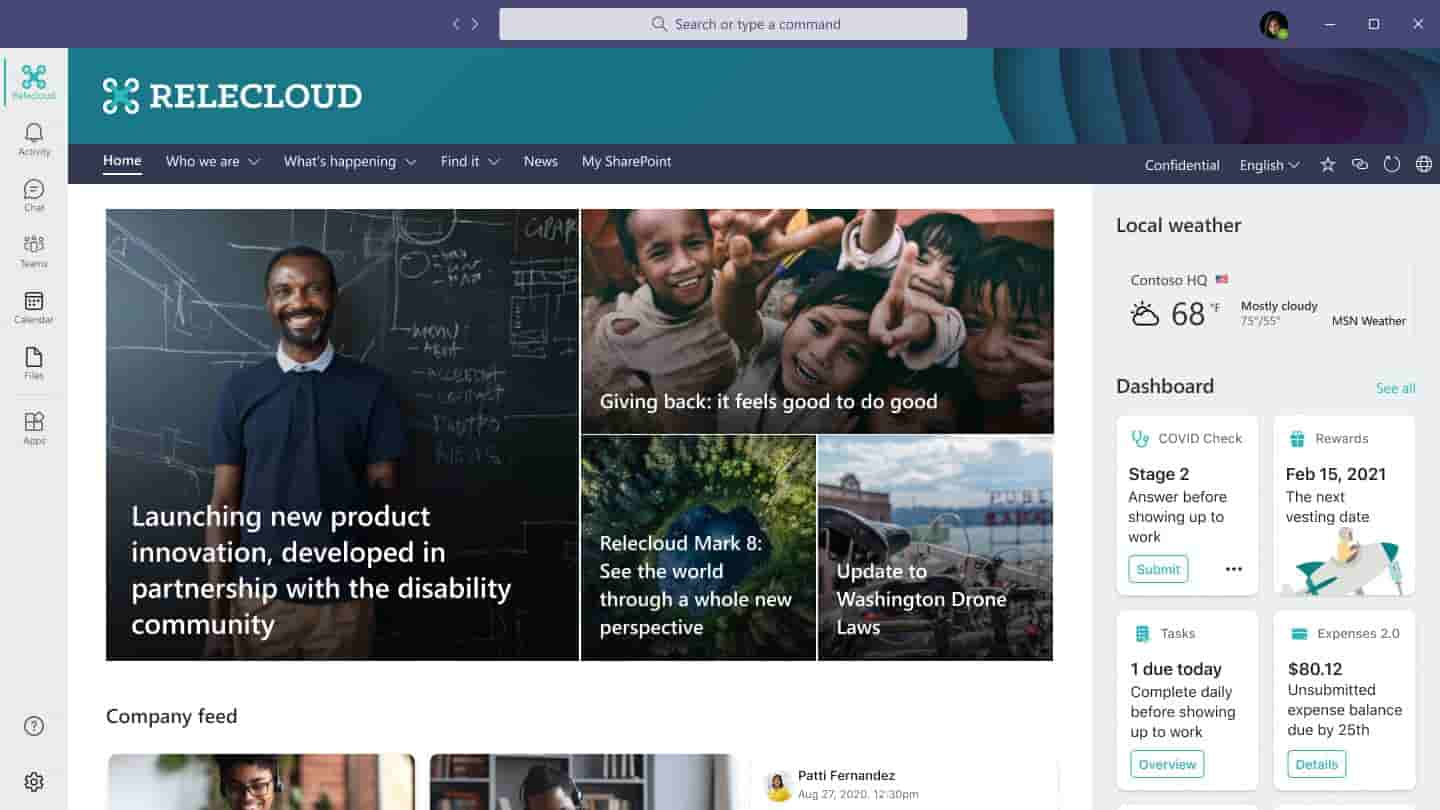
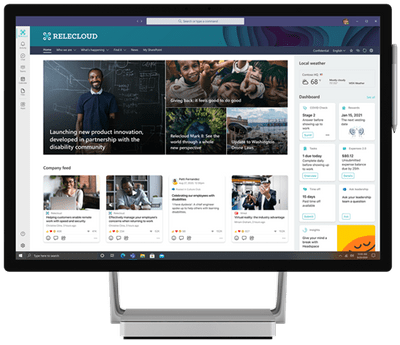
Microsoft Viva Connections is available in April
Microsoft Viva connections for desktop


3. Microsoft Viva Learning public preview in April

The Viva Learning app for Microsoft Teams is a central hub for learning where people can discover, share, assign, and learn from content libraries across the organisation—including LinkedIn Learning, Microsoft Learn, third-party content providers, and an organization’s own custom content—to help teams and individuals to make learning a natural part of their day.

Viva Learning public preview will be available next month. Pricing for Viva Learning hasn't been announced yet.
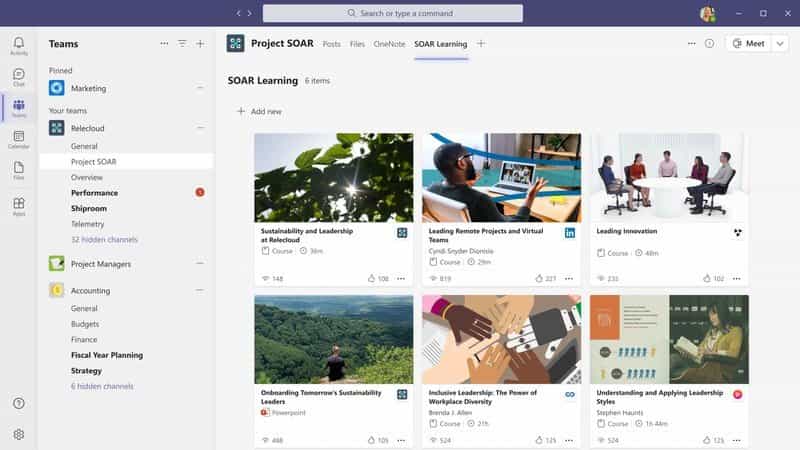
Microsoft Viva Learning will be available for preview in April


Microsoft Viva Learning will be available for preview in April


4. Outlook calendar board will help track all your tasks

On average, people use 6 tools to track all the things they need to get done. That is a lot of context switching, back and forth, and maybe even double tracking. Clearly, you live your life beyond the grid of your traditional calendar.

Microsoft have re-imagined the Outlook calendar and added a board view for you to quickly see, organize, and manage your time, task lists, sticky notes, files, links, goals, reminders, and of course – your calendar.

The Outlook calendar view is an ever-expanding visual way to organize, manage, and track all that is important to you, including multiple calendars, tasks, and goals.

Board will be available first in Outlook on the web and it will be available soon to customers with a commercial or education license.
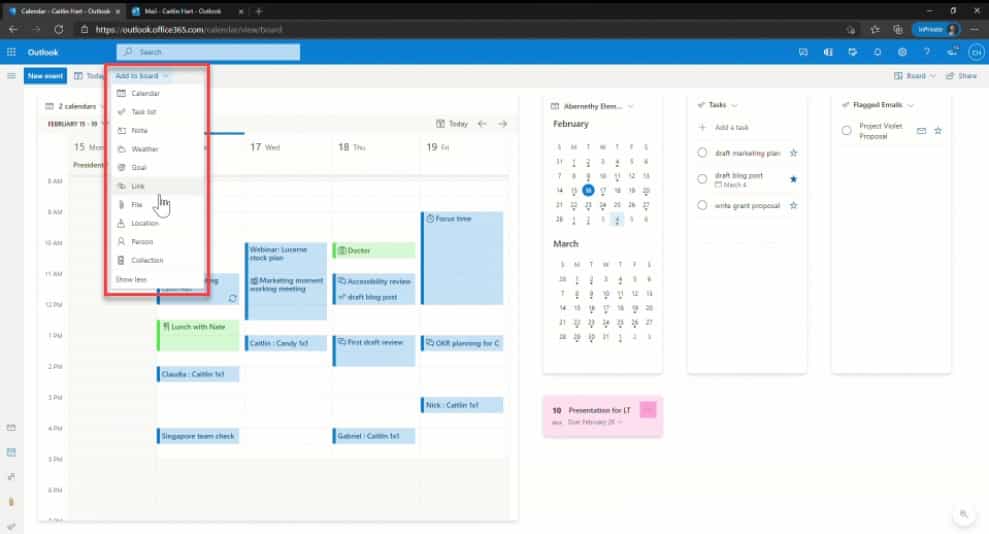
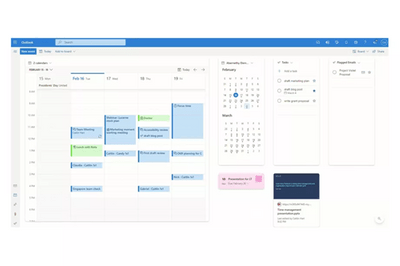
The new Outlook Calendar board view makes it easy to organise tasks
Outlook Calendar Board demo

5. Updates to Dataverse for Teams environment limits

Dataverse for Teams allows users to create a database, apps, flows and chatbots all within Microsoft Teams. When this was originally announced last year, organisations were limited to 500 environments. This limit has been increased to up to 10,000 environments for very large organisations. Capacity of environments will now be based upon licencing using the equation of: 5 + 1 per 20 eligible Microsoft 365 seats.
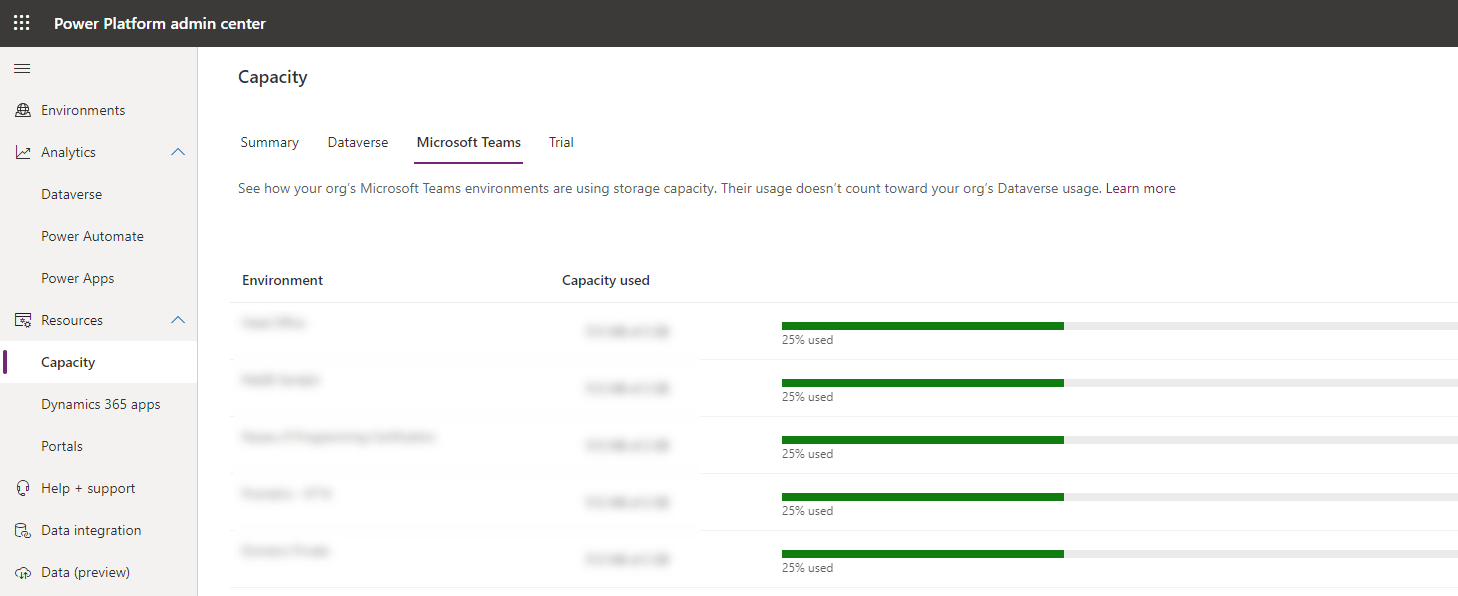
Dataverse for Teams environment capacity has increased

Power Platform admin centre capacity


6. Power Automate Desktop free for Windows 10 users

Microsoft has announced that Windows 10 users can now download Power Automate Desktop for free. Previously a Power Automate licence was required. This will allow any Windows 10 user to take advantage of the power of Robotic Process Automation (RPA) to automate repetitive processes with low-code, point-and-click solutions.

Find out more about Power Automate Desktop here: Automate tasks with Power Automate Desktop for Windows 10—no additional cost | Power Automate Blog (microsoft.com)


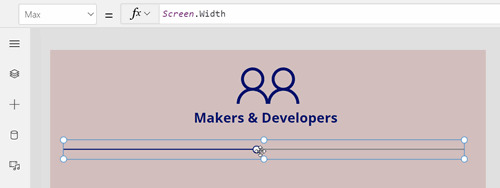
7. Microsoft Power Fx - the new name for Power Apps formula language

The formula language within Microsoft Power Apps Canvas Apps now has a name - Power Fx. We now have a name to refer to during our Power Apps courses!

Already the formula language for Power Apps, Microsoft Power Fx will expand across Dataverse, Power Virtual Agents, and Power Automate to bring even more consistency to the Power Platform experience.  
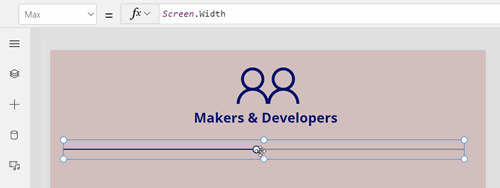

power apps makers and developers


8. Power BI Premium Per User - US$20 per user per month

Announced and released last year in public preview, Power BI Premium Per User allows small organisations to take advantage of the various capabilities of the large-enterprise Power BI Premium subscription. 

Power BI Premium Per User will become generally available on April 2, 2021, at a price of US$20 per user, per month. For customers who already have a Power BI Pro license either purchased standalone or through E5, the price will be just an additional $10 per user, per month.

This is excellent value if your small organisation or team needs the additional capabilities in Power BI Premium such as large model support, enhanced performance, paginated reports, and AI.
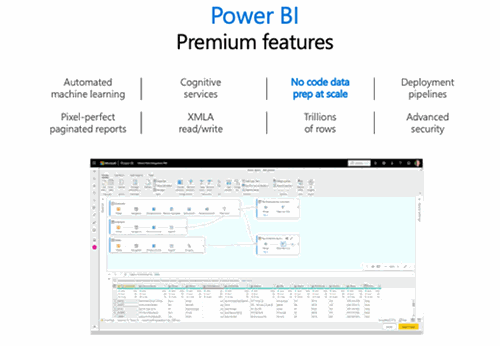

power bi premium costings
Learn more about Microsoft at our Microsoft 365 beginners course.

Trusted Nationwide by Leading Organisations

at Nexacu, we're proud to be the trusted training partner for hundreds of leading organisations accross Australia and New Zealand. From government departments to top corporates, we help teams upskill and succeed everyday

  • 400+ companies rely on Nexacu for team training
  • Trusted by federal, state, and local government agencies
  • Delivering training across 9 countries

Why Nexacu?

Books Icon

Step by Step Courseware

Custom workbook included with a step by step exercises

Facility Image 2
Facility Image 3
Facility Image 1

Refresh Icon

Free Refresher

Resit your course for free within 6 Months

More than 1,300 Business trust Nexacu

Trusted by Business

Procured by Government

Procured by Goverment

Reviews Not Found

Valued by Individuals