Recent Searches
Category

Microsoft Power BI

Category

Microsoft Copilot Courses

Category

AI for Business

Category

Microsoft Windows 11 Courses

Category

Microsoft 365

Category

Microsoft Excel

Category

Excel Specialist

Category

Microsoft Project

Category

R Programming

Category

Python

Category

Power Apps

Category

SQL

Category

SharePoint

Category

Microsoft Teams

Category

Power Automate

Category

Microsoft Visio

Category

Microsoft PowerPoint

Category

Microsoft Word

Category

Microsoft Outlook

Category

Adobe InDesign Courses

Category

Adobe Photoshop Courses

Category

Adobe Illustrator Courses

Category

Adobe Premiere Pro Training

Category

Adobe After Effects Training

Category

Adobe Acrobat Courses

Category

Adobe Captivate Training

Category

Adobe Animate Training

Category

Canva Courses

Category

HTML Courses

Category

WordPress

Category

Professional Development

Category

Microsoft Access

Category

Webinars

Course

Power BI Beginner

Course

Copilot for M365

Course

Windows 11 End User Course

Course

Excel Beginner

Course

Financial Modelling

Course

Project Beginner

Course

R Programming Beginner

Course

Python Beginner

Course

Power Apps Beginner

Course

SQL Beginner

Course

SharePoint Beginner

Course

Teams Essentials

Course

Visio Essentials

Course

PowerPoint Level 1

Course

Word Intermediate

Course

Word Beginner

Course

Word Advanced

Course

Microsoft Outlook Beginner to Intermediate

Course

InDesign Lite

Course

Photoshop Lite

Course

Illustrator Training Intro

Course

Premiere Training Intro

Course

After Effects Training Intro

Course

Acrobat Essentials

Course

Captivate Training

Course

Animate Training Intro

Course

Canva AI

Course

HTML Training Intro

Course

Achieving Leadership & Success

Course

Microsoft Access Essentials

Course

Copilot for M365 On Demand

Course

Power BI Intermediate

Course

Copilot for Word

Course

ChatGPT Beginner

Course

Microsoft 365 Beginner

Course

Excel Intermediate

Course

Analysis and Dashboards

Course

Project Intermediate

Course

R Programming Intermediate

Course

Python Intermediate

Course

Power Apps Intermediate

Course

SQL Intermediate

Course

SharePoint Intermediate

Course

PowerPoint Level 2

Course

InDesign Training Intro

Course

Photoshop Training Intro

Course

Acrobat Forms

Course

Anger Management & Negotiation Skills

Course

Copilot for M365 Live Online

Course

Power BI Advanced

Course

Copilot for Excel

Course

AI Prompting Fundamentals

Course

Microsoft 365 Intermediate

Course

Excel Advanced

Course

Excel VBA

Course

Project Advanced

Course

R Programming Advanced

Course

Python Advanced

Course

Power Apps Intermediate | Power Automate + Power BI Integration

Course

SharePoint Advanced (Site Owner)

Course

InDesign Training Advanced

Course

Assertiveness & Confidence

Course

Microsoft Access Advanced

Course

Power BI DAX

Course

Copilot for PowerPoint

Course

Excel Expert

Course

Machine Learning in R

Course

Power Apps Advanced

Course

SharePoint Advanced (Document Governance)

Course

Building Resilience

Course

Copilot for Outlook and Teams

Course

Coaching and Mentoring

Course

Illustrator Training Advanced

Course

Premiere Basics Training

Course

Advanced After Effects Training

Course

Canva Beginners

Course

WordPress Essentials

Course

Communications

Course

AI for Business Leaders and Managers

Course

Photoshop Training Advanced

Course

Advanced Premiere Training

Course

Canva Intermediate

Course

Communications & Quality Client Service Training

Course

InDesign Interactivity Training

Course

Canva Advanced

Course

Critical Thinking and Problem Solving

Course

InDesign Accessibility Training

Course

Cultural Diversity in the Workplace

Course

Microsoft Outlook Advanced

Course

Embracing Change

Course

SQL Advanced

Course

Growing Emotional Intelligence

Course

Planner Premium

Course

Minute Taking

Course

Excel Tables and Pivot Tables

Course

Power Automate Beginner

Course

Performance Management

Course

Data Transformation with Power Query

Course

Excel Macro Mastery

Course

Power Automate Intermediate

Course

Persuasion and Negotiation Skills

Course

Power BI Desktop Advanced Reporting

Course

Presentation Skills and Public Speaking

Course

Data Visualisation with Power BI Desktop

Course

Practical Project Management

Course

Respect, Equity and Diversity (RED)

Course

Resumé Writing and Interview Skills

Course

Stress Management

Course

Team Leadership, Management and Development

Course

Time Management Intensive

Course

Train the Trainer

Course

Write Effective Business Documents

Course

Dealing with Difficult People

Course

Managing Difficult Conversations

Course

Managing the Virtual Workplace

Course

Customer Service Training

Course

Technical Writing

Power BI vs Excel: Which Data Tool is Right for You

Nexacu | Jan 06, 2025

In today’s data-driven world, professionals across industries rely on tools that help them organise, analyse, and visualise data. Microsoft Excel and Power BI are two of the most popular and powerful tools available. While Excel has long been a staple in workplaces, Power BI is emerging as the go-to platform for advanced data analytics and visualisation.

So, which tool is right for your needs? This article compares Power BI and Excel, highlighting their unique features, use cases, and advantages to help you make an informed decision. Whether you’re an individual looking to enhance your skills or an organisation seeking to improve decision-making, Nexacu offers comprehensive training for both platforms.

Excel: A Versatile Classic

Excel is a widely-used spreadsheet application that has stood the test of time. It’s ideal for:

  • - Data Entry and Organisation: Create and manage spreadsheets with ease.

  • - Calculations and Analysis: Use formulas, functions, and pivot tables for data analysis.

  • - Basic Visualisation: Generate charts and graphs to present data visually.

  • - Customisation: Automate tasks using macros and Visual Basic for Applications (VBA).

Key Features of Excel

  • - Formulas and Functions: Perform calculations with ease using a vast library of built-in functions.

  • - Pivot Tables: Summarise and analyse large datasets efficiently.

  • - Data Cleaning: Use tools like text-to-columns and conditional formatting to prepare data.

  • - Macros and VBA: Automate repetitive tasks for improved efficiency.

Explore our Excel training courses here.

Power BI: The Future of Data Analytics

Power BI is a powerful business intelligence tool designed for advanced analytics and data visualisation. It’s perfect for:

  • Data Integration: Combine data from multiple sources such as Excel, databases, and cloud services.

  • Interactive Visualisation: Create dynamic dashboards and reports with real-time data updates.

  • Advanced Analytics: Use AI-powered tools and Data Analysis Expressions (DAX) for in-depth insights.

  • Collaboration: Share reports seamlessly across teams and devices.

Key Features of Power BI

  • Data Modelling: Build relationships between datasets for advanced analysis.

  • Custom Visuals: Use built-in and third-party visuals to enhance your reports.

  • Real-Time Dashboards: Monitor key metrics and trends in real-time.

  • DAX Functions: Perform complex calculations and aggregations for deeper insights.

Discover our Power BI training courses here.

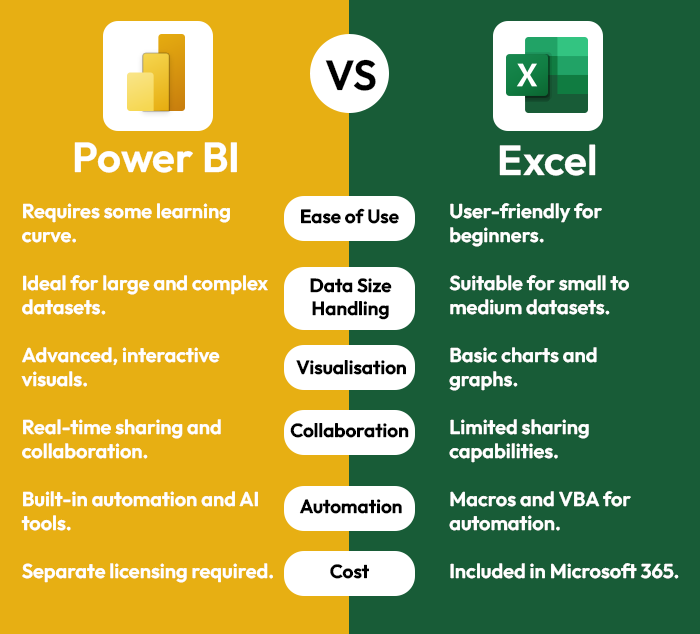
Excel vs Power BI: A Side-by-Side Comparison
Choosing the Right Tool for Your Needs

Use Excel If You:

  • Work with small to medium datasets.

  • Need a tool for basic data entry, analysis, and reporting.

  • Rely on formulas, pivot tables, and macros for daily tasks.

  • Prefer a familiar interface and minimal learning curve.

Use Power BI If You:

  • Work with large or complex datasets.

  • Require advanced data modelling and analytics.

  • Need to create dynamic, interactive dashboards.

  • Want seamless collaboration and sharing options.

Why Excel and Power BI Make the Perfect Pair?

For many professionals and organisations, Excel and Power BI complement each other. Excel is excellent for data preparation and preliminary analysis, while Power BI excels at advanced analytics and sharing insights with stakeholders. Together, they offer a comprehensive solution for end-to-end data management and analysis.

How Nexacu Can Help

At Nexacu, we offer expert-led training courses for both Excel and Power BI, ensuring you gain the skills to make the most of these powerful tools. Our courses cater to all experience levels, with options for individuals and corporate teams.

Flexible Learning Options:

  • In-Person Training: Hands-on learning at our training centres.

  • Online Training: Interactive sessions led by experienced instructors.

  • Corporate Training: Customised solutions to meet your team’s needs.

Explore all our training courses here.

Testimonials from Nexacu Learners

"The Power BI course at Nexacu was a game-changer for me. I can now create dashboards that provide actionable insights for my team." — Sarah, Marketing Analyst

"I’ve been using Excel for years, but Nexacu’s advanced course taught me how to automate my workflows and save hours each week." — James, Financial Analyst

Take the Next Step

Whether you’re looking to master Excel, Power BI, or both, Nexacu’s expert-led training courses provide the tools and knowledge to enhance your data skills. Don’t let data challenges hold you back—unlock your potential today.

Ready to get started? Book your course with Nexacu now!

Trusted Nationwide by Leading Organisations

at Nexacu, we're proud to be the trusted training partner for hundreds of leading organisations accross Australia and New Zealand. From government departments to top corporates, we help teams upskill and succeed everyday

  • 400+ companies rely on Nexacu for team training
  • Trusted by federal, state, and local government agencies
  • Delivering training across 9 countries

Why Nexacu?

Books Icon

Step by Step Courseware

Custom workbook included with a step by step exercises

Facility Image 2
Facility Image 3
Facility Image 1

Refresh Icon

Free Refresher

Resit your course for free within 6 Months

More than 1,300 Business trust Nexacu

Trusted by Business

Procured by Government

Procured by Goverment

Reviews Not Found

Valued by Individuals
















