Recent Searches
Category

Microsoft Power BI

Category

Microsoft Copilot Courses

Category

AI for Business

Category

Microsoft Windows 11 Courses

Category

Microsoft 365

Category

Microsoft Excel

Category

Excel Specialist

Category

Microsoft Project

Category

R Programming

Category

Python

Category

Power Apps

Category

SQL

Category

SharePoint

Category

Microsoft Teams

Category

Power Automate

Category

Microsoft Visio

Category

Microsoft PowerPoint

Category

Microsoft Word

Category

Microsoft Outlook

Category

Adobe InDesign Courses

Category

Adobe Photoshop Courses

Category

Adobe Illustrator Courses

Category

Adobe Premiere Pro Training

Category

Adobe After Effects Training

Category

Adobe Acrobat Courses

Category

Adobe Captivate Training

Category

Adobe Animate Training

Category

Canva Courses

Category

HTML Courses

Category

WordPress

Category

Professional Development

Category

Microsoft Access

Category

Webinars

Course

Power BI Beginner

Course

Copilot for M365

Course

Windows 11 End User Course

Course

Excel Beginner

Course

Financial Modelling

Course

Project Beginner

Course

R Programming Beginner

Course

Python Beginner

Course

Power Apps Beginner

Course

SQL Beginner

Course

SharePoint Beginner

Course

Teams Essentials

Course

Visio Essentials

Course

PowerPoint Level 1

Course

Word Intermediate

Course

Word Beginner

Course

Word Advanced

Course

Microsoft Outlook Beginner to Intermediate

Course

InDesign Lite

Course

Photoshop Lite

Course

Illustrator Training Intro

Course

Premiere Training Intro

Course

After Effects Training Intro

Course

Acrobat Essentials

Course

Captivate Training

Course

Animate Training Intro

Course

Canva AI

Course

HTML Training Intro

Course

Achieving Leadership & Success

Course

Microsoft Access Essentials

Course

Copilot for M365 On Demand

Course

Power BI Intermediate

Course

Copilot for Word

Course

ChatGPT Beginner

Course

Microsoft 365 Beginner

Course

Excel Intermediate

Course

Analysis and Dashboards

Course

Project Intermediate

Course

R Programming Intermediate

Course

Python Intermediate

Course

Power Apps Intermediate

Course

SQL Intermediate

Course

SharePoint Intermediate

Course

PowerPoint Level 2

Course

InDesign Training Intro

Course

Photoshop Training Intro

Course

Acrobat Forms

Course

Anger Management & Negotiation Skills

Course

Copilot for M365 Live Online

Course

Power BI Advanced

Course

Copilot for Excel

Course

AI Prompting Fundamentals

Course

Microsoft 365 Intermediate

Course

Excel Advanced

Course

Excel VBA

Course

Project Advanced

Course

R Programming Advanced

Course

Python Advanced

Course

Power Apps Intermediate | Power Automate + Power BI Integration

Course

SharePoint Advanced (Site Owner)

Course

InDesign Training Advanced

Course

Assertiveness & Confidence

Course

Microsoft Access Advanced

Course

Power BI DAX

Course

Copilot for PowerPoint

Course

Excel Expert

Course

Machine Learning in R

Course

Power Apps Advanced

Course

SharePoint Advanced (Document Governance)

Course

Building Resilience

Course

Copilot for Outlook and Teams

Course

Coaching and Mentoring

Course

Illustrator Training Advanced

Course

Premiere Basics Training

Course

Advanced After Effects Training

Course

Canva Beginners

Course

WordPress Essentials

Course

Communications

Course

AI for Business Leaders and Managers

Course

Photoshop Training Advanced

Course

Advanced Premiere Training

Course

Canva Intermediate

Course

Communications & Quality Client Service Training

Course

InDesign Interactivity Training

Course

Canva Advanced

Course

Critical Thinking and Problem Solving

Course

InDesign Accessibility Training

Course

Cultural Diversity in the Workplace

Course

Microsoft Outlook Advanced

Course

Embracing Change

Course

SQL Advanced

Course

Growing Emotional Intelligence

Course

Planner Premium

Course

Minute Taking

Course

Excel Tables and Pivot Tables

Course

Power Automate Beginner

Course

Performance Management

Course

Data Transformation with Power Query

Course

Excel Macro Mastery

Course

Power Automate Intermediate

Course

Persuasion and Negotiation Skills

Course

Power BI Desktop Advanced Reporting

Course

Presentation Skills and Public Speaking

Course

Data Visualisation with Power BI Desktop

Course

Practical Project Management

Course

Respect, Equity and Diversity (RED)

Course

Resumé Writing and Interview Skills

Course

Stress Management

Course

Team Leadership, Management and Development

Course

Time Management Intensive

Course

Train the Trainer

Course

Write Effective Business Documents

Course

Dealing with Difficult People

Course

Managing Difficult Conversations

Course

Managing the Virtual Workplace

Course

Customer Service Training

Course

Technical Writing

How to stay on top of everything at Christmas

Hannah Pearson | Nov 16, 2022

Christmas is the Busiest Time of Year

While Microsoft Office is generally marketed at workplaces and businesses, it’s easy-to-navigate interface and broad uses mean it can become a useful tool in your personal life. There are almost always Microsoft solutions to logistical problems. As we approach the end of another hectic year we are faced with another hectic season of Christmas and New Years Parties, family holidays, the start of another school year, the commitment to New Year’s Resolutions, and general summer festivities.

microsoft christmas

We have previously written about how a member of the Nexacu team used forms to simplify the organisation of an end-of-year class breakup. It got us thinking about how Microsoft 365 can be a useful tool for people and not just businesses. Considering this is one of the busiest personal times of the year, we thought it was time to dive into how Microsoft 365 can be utilised to help you out at home.

Microsoft 365 is the successor to Office 365. The suite of applications outgrew the old name and Microsoft responded with a rebranding. While Office 365 is still sometimes used to refer to Microsoft’s more recognisable ‘core’ applications – Word, Excel, and PowerPoint – the technically correct term is Microsoft 365.

The full Microsoft 365 suite is made up of many, many applications: Word, Excel, PowerPoint, Outlook, OneNote, Publisher, Access, Sway, SharePoint, Yammer, Skype for Business, Teams, OneDrive, Office Delve, MyAnalytics, Power Business Intelligence (BI), Forms, Power Automate and more.

Automatically create reminders or add items to your To-Do list

Power Automate is an app connectivity application – this means that it communicates between apps. You can use Power Automate to create flows. Flows are a series of actions triggered by an original event. For example, a simple outlook flow could create a task in planner each time you flag an email. We have a blog on how to do this here.

microsoft christmas


Power Automate is most useful in a personal capacity when used in conjunction with the events and calendar feature of your email. There are many templates on the Power Automate website that can be readapted from their original business purpose to a personal use. There is a template that will notify you when Google Tasks are due. Use this to keep on top of your personal holiday deadlines – Christmas presents aren’t going to buy themselves and sometimes things slip through the cracks.

You could also view it as a way to automate tedious small tasks. The ‘button’ section of templates has many templates that will do everything from converting word online documents to pdfs to receiving the weather details for the next five days. By automating otherwise time-consuming tasks, you can save time.


Struggling to get feedback from a lot of people? Let Forms do the heavy lifting

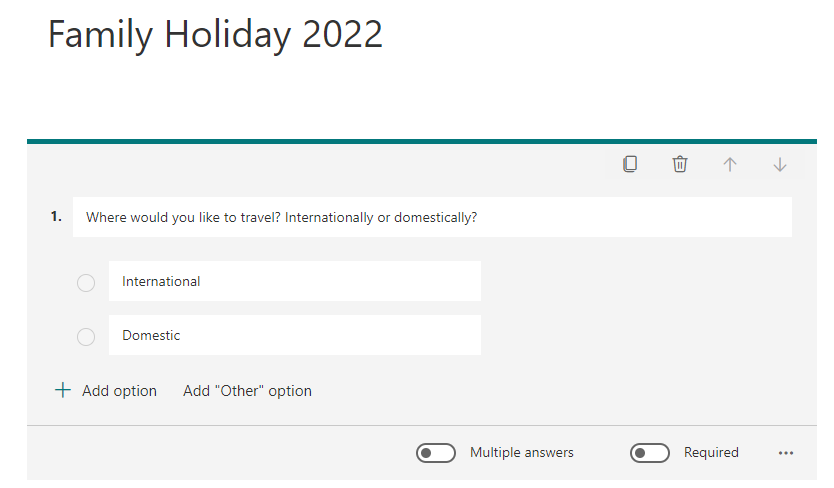
Microsoft Forms is a great way to collect information from many people at once. We all know that the holiday season is party season and organising events can become hard with the constant back-and-forth communication. One easy form can negate all of this and keep all the information you need in one spot. We have previously written about how Anita used her knowledge of forms to collate the information she needed for organising a class party.

This idea can be extrapolated to other uses; organising a family holiday, Christmas party, or you can even use it for a trivia game – use your imagination to suit your needs. Click here for a detailed how-to.
Christmas planning microsoft


Don't forget to order a present for your favourite Aunt!

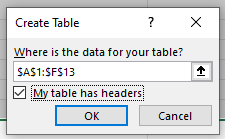
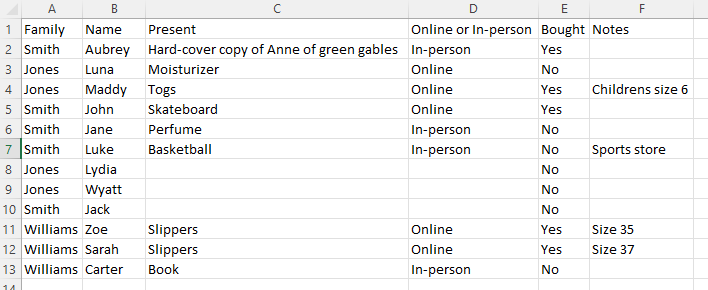
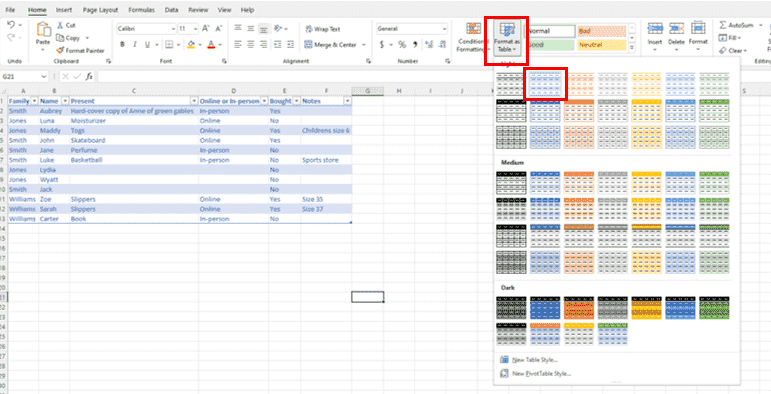
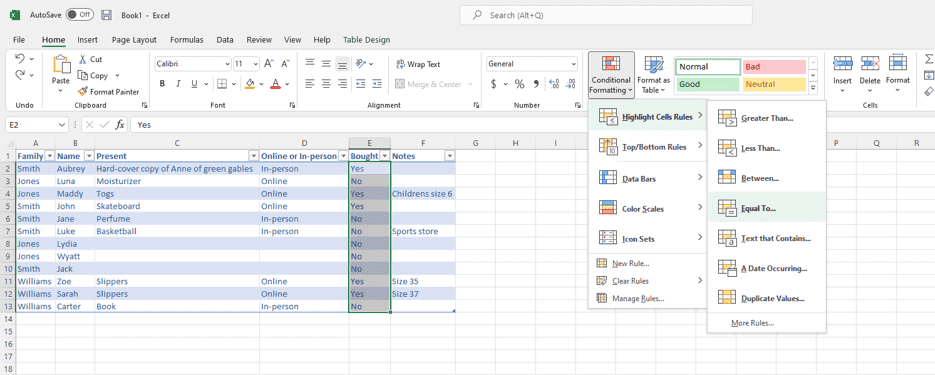
We all know that staying on top of Christmas presents and what you’ve bought and who wants what is a difficult ask. By creating a table in Excel you can keep all of the information in one spot. To demonstrate, I created a table in Excel. It tracks what I’m going to get the person, whether it has been bought, whether I must order it online or buy it in person, what side of the family they’re on, any extra information and the name of the recipient. I filled it out with everyone that I need to buy a present for (leaving blanks when appropriate) and formatted it as a table.
Christmas planning microsoft

Christmas planning microsoft


Christmas planning microsoft


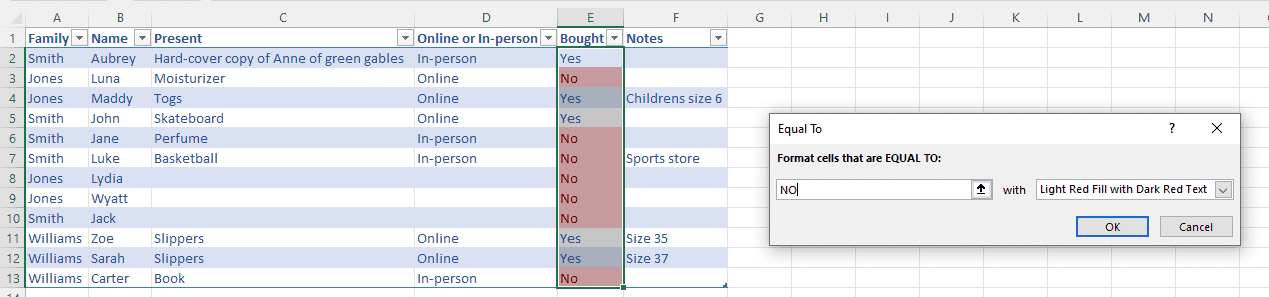
Once it was formatted as a table, you can sort all the information by your chosen categories. Here the ‘bought’ column is most useful to figure out who you still need to buy presents for. You can even take it a step further and apply conditional formatting to the ‘No’ cells to make them stand out.
Christmas planning microsoft


Christmas planning microsoft


Take the stress out of Christmas with a simple Plan


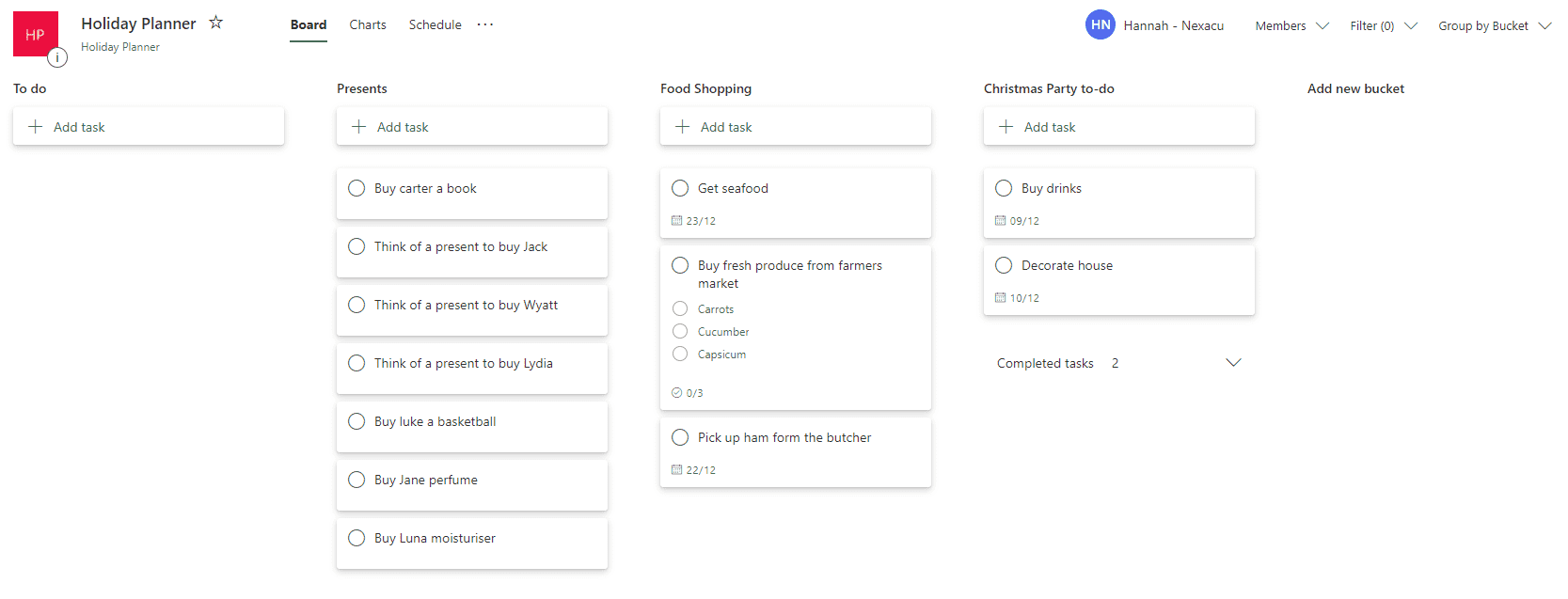
We have previously written about how Microsoft Planner is a useful organisational tool and gave a quick tutorial on how to use it. Simplify organisation this holiday season by creating a holiday planner. Each bucket could be an event, individual tasks that need to be done, shopping you need to do or whatever your schedule demands. We touched on how the versatility and user-friendly interface made planner an incredibly underrated application. I also think that being able to tick a task off gives you more satisfaction. I made a quick mock-up of what a holiday planner could look like:
Christmas planning microsoft

Planner gives you an overview of everything at once and gives you a better picture of what needs to be done. If you add start/due dates the calendar feature comes in very handy.

Well, they're our hot tips for getting organised this festive season, find what works for you! 

Getting creative with the Microsoft 365 applications can solve problems in your business and personal life. A deeper understanding of how these apps work will help you get the most out of them. Use our skills test to determine your level of knowledge and then join us at our beginner, intermediate, or advanced course. We also offer Excel training

Christmas excel

Trusted Nationwide by Leading Organisations

at Nexacu, we're proud to be the trusted training partner for hundreds of leading organisations accross Australia and New Zealand. From government departments to top corporates, we help teams upskill and succeed everyday

  • 400+ companies rely on Nexacu for team training
  • Trusted by federal, state, and local government agencies
  • Delivering training across 9 countries

Why Nexacu?

Books Icon

Step by Step Courseware

Custom workbook included with a step by step exercises

Facility Image 2
Facility Image 3
Facility Image 1

Refresh Icon

Free Refresher

Resit your course for free within 6 Months

More than 1,300 Business trust Nexacu

Trusted by Business

Procured by Government

Procured by Goverment

Reviews Not Found

Valued by Individuals