

The last 12 months has seen a lot of digital disruption, this has also included where and how we take Microsoft certification exams.
Previously we might have gone to a physical testing centre, now with many centres closed we are taking online proctored exams. This means that someone is watching you through the webcam while you take the test.
Here are our top five tips for setting yourself up for successfully passing the DA-100 exam.
1. Avoid using exam dumps
There are many websites that claim to have free exam questions and answers taken from actual exams. Apart from these sites (and users) violating Microsoft's non-disclosure agreement, they can be hurtful to your learning and preparation.
Many of the questions and answers are incorrect, leading to either confusing what you have already learned or, more dangerously, leading you down the wrong path entirely.
Exam dumps can help you become familiar with the questions and answers (if they are the right ones). However, they don't really help you learn, understand and put into practice the many techniques and concepts you need as an effective Power BI data analyst. Don't just remember the right answers, know why it is the right answer.
Do yourself a favour and avoid these dark alleyways of the internet. Stick with trusted and verified practice exams that allow you to practice official questions (that are similar, but not the same, as the exam) and support your learning with clear explanations and further information.
As part of our Power BI Certification Program you'll receive 6-months access to the official Microsoft DA-100 practice exam for free! Take as many attempts as you want and use the practice exam to understand your skills in each of the five skills that the DA-100 exam measures.
2. Create a study plan
The DA-100 exam covers a lot of information, the full breadth of the Power BI platform from connecting to data sources, creating and publishing reports through to workspace administration, securely sharing apps and managing datasets. Because there is a lot for you to learn, practice and implement the best way to keep on top of it all is by creating a simple study plan.
A study plan can be as simple as saying that you'll spend a few hours a week (for instance, every Thursday afternoon and Saturday morning) studying and revising various topics. Or you may opt for a more detailed plan that lists out what topics you need to cover and when you'll do it.
No matter how you plan it, remember that it is just a plan and it can be revised. Life and work have a way of disrupting plan, just shift it along and keep studying.
Within your plan also have a date scheduled to book in for the exam. Generally dates are available a few days out (I've booked one the day before once), but to get a preferred timeslot you might want to book a few weeks beforehand.
Once you have a plan, you're going to need somewhere to practice. A demo Office 365 tenant with Power BI Pro licensing can allow you to play in a safe non-work environment where if you break something it won't matter.
Our Power BI Certification Program provides you with your very own full-featured 90-day demo Power BI playground. You'll also find a variety of study plans that you can use as a starting point.
3. Find a study partner or group
Studying with someone else or as part of a group can make it more rewarding and also increase the chances of a better outcome. When you commit to studying with someone you are making yourself more accountable and therefore less likely to give up part way through.
Where can you find a study partner or group? Try these places:
- Find colleagues in your workplace who are also using Power BI
- Find a local Power BI user group and post on their forum.
- Join our Power BI Certification Program and receive free on-going guidance and support from our Microsoft Certified Trainers. We're like the study partners that already know everything and want to share it with you!
4. Be prepared for exam day
For the exam you will need to prepare a few things ahead of time:
- A computer with a reliable internet connection
- A webcam (a built-in laptop camera is fine or an external USB device)
- A mobile phone
- A room with 4 walls and a door, free of clutter (nothing within arms reach except the computer)
- A laptop screen will do, but a larger screen will be better
- Two government forms of ID (licence, passport, etc) as per the Pearson Vue ID policy
Set your computer up in your exam space the day before and run the System Test. This will download the exam software on to your computer and test out your microphone, webcam and internet. If any of these fail you won't be able to move on to the next step. On the day of my exam my microphone was failing to register, luckily I had a USB microphone as a back up.
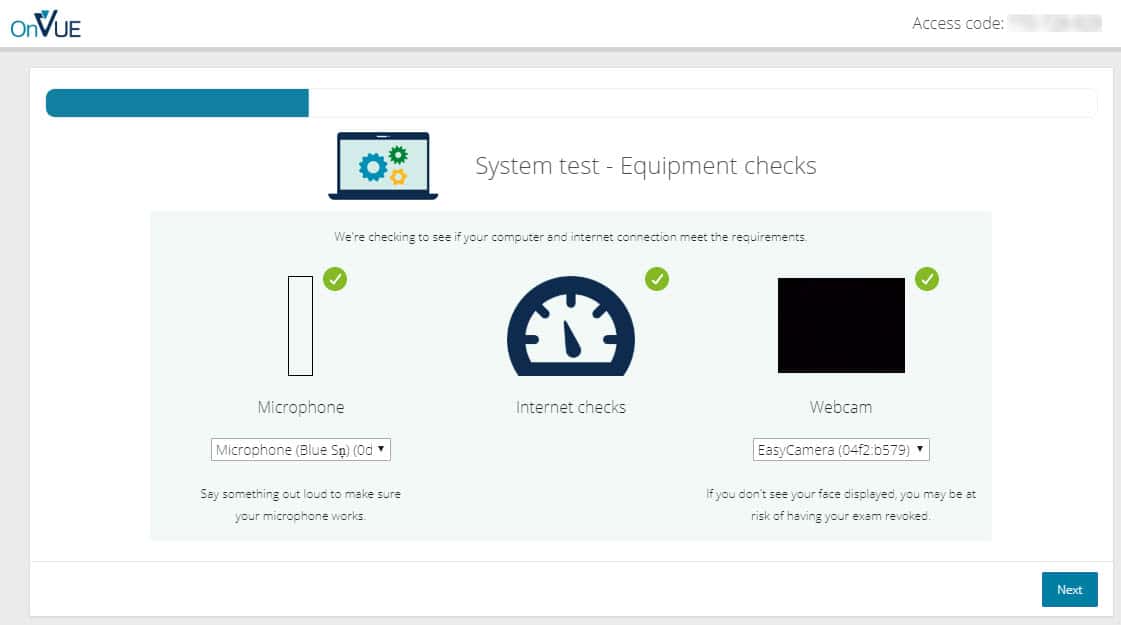
Once you have your checks done, the system test will then check to see if you have any other programs running. During the exam ALL programs need to be exited properly. Programs like Microsoft Teams often hide in the Hidden Icon part of your Task Bar near your clock.
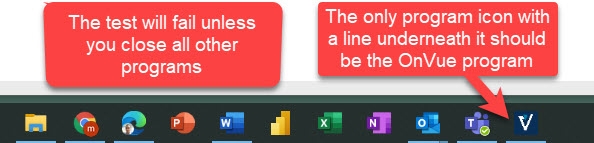
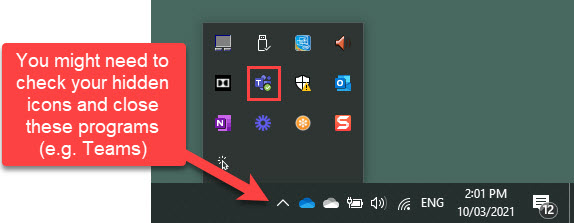
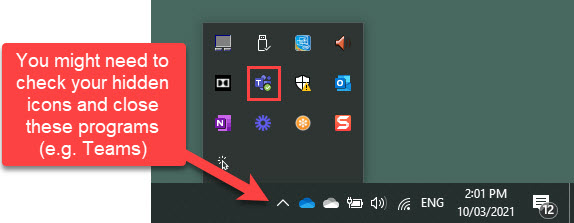
During an actual exam I had a program running in the background, luckily the proctor was kind enough to let me know and get me on my way. So it might also be a good idea to check your Task Manager. In Windows press the Ctrl + Alt + Delete keys and then select Task manager (or right-click the Task Bar and then select Task Manager)
5. Know (and follow) the rules
There are many stories out there of how strict the online exam proctors are about the rules...and they are all true!
After you agree to the rules and click continue these things can mean an automatic fail:
- No one can enter the room you are in.
This is why you need four walls and a door (preferably with a lockable door). If you have small children, you might need to consider finding someone to look after them during the exam. - You can't eat or drink.
Plan ahead. You can choose what time your exam is, don't schedule it to start right before your normal dinner or lunch time. - You can't go to the bathroom.
This can be a tough one as some exams go for three hours. Think ahead and take a bathroom break right before you enter the exam. Don't drink too much water before it either. I know people who have asked for a bathroom break and have been denied. - You can't talk to yourself.
We all do it and this is one that most people we know have been called out for. Simply reading a question out loud will get you a warning. - You can't use your phone.
You can have your phone in the room with you, but it must be at arms length. The exam information states this is so you can take calls from the proctor (you enter your phone number at the beginning of the exam process). However, all of my communication with the proctors have been either through the microphone/speakers of the computer or a simple text-based chat window that will appear. - You can't smile too much.
Just kidding, while there are lots of no-no's you can still enjoy yourself. Just don't laugh out loud or you might get a warning!
More information about online exams with Pearson Vue including how to prepare and what to expect can be found here.
How we can help get you certified
Our Power BI Certification Program provides you with everything you need to complete the DA-100 exam and achieve the Microsoft Certified Data Analyst Associate certification. For just the price of our four Power BI courses you'll receive:
- Attendance to our four instructor-led Power BI courses. Choose dates that suits you.
- Ongoing exam preparation and study support in our Microsoft Teams environment.
- Access to our supplementary exam study materials and guidance.
- Six months access to the official Microsoft DA-100 practice exam.
- Exam voucher for sitting the DA-100, plus a free re-sit (just in case!).
- Free access to a 90-day training environment with your very own Office 365 E5 and Power BI Pro licencing.
- We also have 2, 3, and 4 course options for the more seasoned Power BI user. If you already have the knowledge of our beginner, intermediate, advanced, and DAX courses, there is an also an exam only choice!
Achieving the certification isn't an easy task, but being part of our program gives you access to the support and resources that will make it a whole lot easier! Check out the certification page today for all of your options.
































