

What makes Microsoft a market leader is their use of user feedback to drive updates. We have previously covered how large companies have leveraged Power Apps to streamline operations and why being able to create apps is a useful skill. Today we are going to look at the new features introduced to Power Apps this year and the planned updates.
Features Already Released to General Availability
Improved accessibility for business process flows in mobile: You will now be able to view important information about your business process flow on mobile, including the name and time active. This is a great addition for businesspeople on the go.
Search quick actions: Quick actions are suggested results that provide quick access to actions that are used frequently. This makes using Power Apps a more streamline and efficient experience.
Improved global relevance search experience in model-driven apps: Microsoft has refined the experience when searching your model-driven apps. A more prominent search bar now suggests a quick action command to help you complete a task without navigating to a row, suggests intelligent results that recognises synonyms, abbreviations etc, and a redesigned results page that is easy to read with an enhanced ranking of the results.
Duplicate detection Unified Interface experience: Originally this feature required an admin to enable it, but it has since become the default user experience. Microsoft Dataverse detects duplicates when data is imported for active records e.g. contacts and accounts. This prevents difficulties down the road and saves valuable time. Once the duplicate records are found, you can easily merge them (this also merges any related or child records).
Multi-line text controls expand in Quick View forms: Multi-line text fields in Quick View forms are automatically expanded when the page is loaded. This saves time and reduces clicks as well as giving a full view of the information.
UX improvements to sub grids and form tabs in Dynamics 365 for phones and tablets app: This feature focuses on making data more usable and readable. This includes giving sub grids prominent headers, making form tabs more discoverable, adding in the option to add a new record line in empty sub grids, and removing the jump bar from grids.
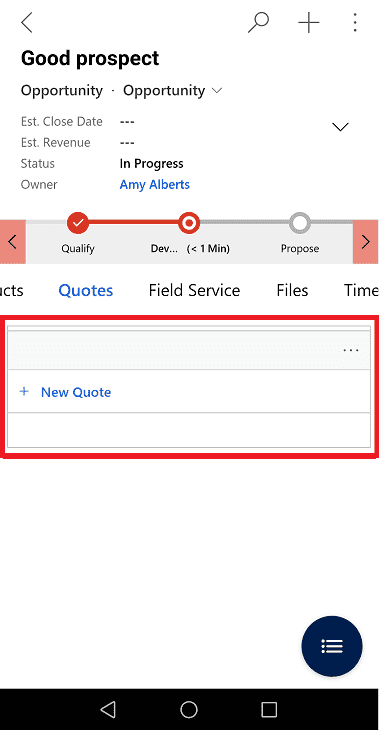
List views optimized for model-driven apps on mobile: The sort options have become more intuitive. The sort feature is now available at the top of the list and not in the command bar. You can now select the sort arrow to sort the list in ascending or descending arrow.
Print() screens in a canvas app: This feature was long-requested by the Microsoft community. It is a valuable tool to be able to print information in a familiar format that encompasses all everything they need. By using the new print() function, you can open the current screen of your app in the default print screen. You can also save the screen as a PDF through your browser.
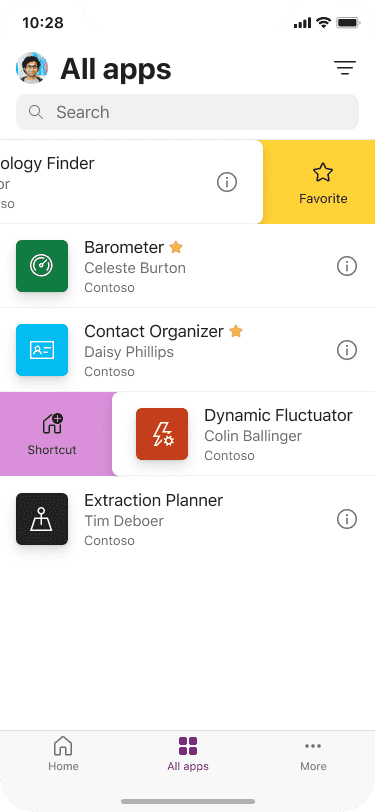
Improved apps discovery and selection in Power Apps mobile: In the Power Apps mobile apps list, you can now favourite or pin apps using a swipe function. This reduces clicks by making the apps more readily available.
Features to be Released to General Availability
Define sequential measurements for specific spaces and areas: Makes audits easier by defining aspects that need to be measured e.g. heights, widths, volumes, masses, areas, and distances. Business logic can then be run on top of those measurements.
Define sequential measurements for specific spaces and areas: The Map component in Power Apps can now be used to plan the best route between two destinations. The route planning will be able to consider factors such as typical road speeds and traffic to provide the optimal route.
Use mixed-reality components in no- or low-connectivity scenarios with caching and offline support: The already impressive View in 3D and View in MR components can now be used in low- and no-connectivity areas. The components will cache important information so that it can be used even when your connection is shaky or non-existent.
Visualize multiple mixed-reality models in a single space: Another improvement to the Mixed Reality component is the ability to view multiple models at once. This feature could be utilised to plan layouts and communicate to customers how products work together. It also makes it possible to do more complex planning scenarios, such as laying out a room in such a way that you still meet building requirements.
Intelligent authoring experience with Power Apps Studio: It can be a long process for a self-taught user of Power Apps to master everything. Microsoft makes it easier by brining in AI. To simplify the use of Microsoft Power Fx, the feature will enable makers to use natural language to type in expected behaviour or input a desired format, and Power Apps will automatically generate formulas for makers to apply.
Support for themes across Power Apps: Keeping themes standard across platforms is important as Microsoft platforms such as SharePoint and Teams start to host apps. This feature will be built on over time to create powerful custom theme editors that can generate solution-aware themes.
Reinvented maker experience for configuring model-driven apps for offline use: It isn’t always a given that you will have access to the internet, so Microsoft is making the way you create model-driven apps that can be used offline much easier.
Organize business logic in your app with components: Having multiple copies of the same logic can become tiresome as they get out of sync. With this future update, common logic can be placed into a component and shared within the app as well as across other apps. This reduces the amount of maintenance that must be done.
Open-source Power Fx empowers low code everywhere: Less to do with Power Apps and more to do with coder everywhere, Microsoft is becoming available for anyone to use as open source. Not only does this empower low code users, but it also will allow the language to become stronger as the developer community exchanges ideas and improvements.
Manage everything about solutions and tables in a modern way: All the features available in the classic experience will now also be available in the modern experience. This negates the need for the classic maker experience which will be slowly phased out.
Collaborate easily with commenting across Microsoft Power Platform: When collaborating in the Power Platform, you need to rely on external applications such as Teams to communicate. Microsoft is going to add the ability to comment into the Power platform to streamline communication.
Code component improvements: Power Apps is a great low-code option for amateurs. Regardless, Microsoft are committed to making their app as widely useable as possible. The result is the extension of the platform to make it easier for professional developers tp build and extend Power Apps with strong performance.
Enjoy smoother mixed-reality experiences with performance improvements for complex models: The Mixed Reality component will be upgraded to make using the component faster and smoother to improve the overall performance of your App.
With the constant and pointed upgrades, using Power Apps has never been so rewarding. Use the skills test to determine your level of learning and see if you need to attend our beginner, intermediate, or advanced course. To learn the best way to utilise Power Apps, come join us at one of courses.
































