
Recent Searches
Category

Microsoft Power BI

Category

Microsoft Copilot Courses

Category

AI for Business

Category

Microsoft Windows 11 Courses

Category

Microsoft 365

Category

Microsoft Excel

Category

Excel Specialist

Category

Microsoft Project

Category

R Programming

Category

Python

Category

Power Apps

Category

SQL

Category

SharePoint

Category

Microsoft Teams

Category

Power Automate

Category

Microsoft Visio

Category

Microsoft PowerPoint

Category

Microsoft Word

Category

Microsoft Outlook

Category

Adobe InDesign Courses

Category

Adobe Photoshop Courses

Category

Adobe Illustrator Courses

Category

Adobe Premiere Pro Training

Category

Adobe After Effects Training

Category

Adobe Acrobat Courses

Category

Adobe Captivate Training

Category

Adobe Animate Training

Category

Canva Courses

Category

HTML Courses

Category

WordPress

Category

Professional Development

Category

Microsoft Access

Category

Webinars

Course

Power BI Beginner

Course

Copilot for M365

Course

Windows 11 End User Course

Course

Excel Beginner

Course

Financial Modelling

Course

Project Beginner

Course

R Programming Beginner

Course

Python Beginner

Course

Power Apps Beginner

Course

SQL Beginner

Course

SharePoint Beginner

Course

Teams Essentials

Course

Visio Essentials

Course

PowerPoint Level 1

Course

Word Intermediate

Course

Word Beginner

Course

Word Advanced

Course

Microsoft Outlook Beginner to Intermediate

Course

InDesign Lite

Course

Photoshop Lite

Course

Illustrator Training Intro

Course

Premiere Training Intro

Course

After Effects Training Intro

Course

Acrobat Essentials

Course

Captivate Training

Course

Animate Training Intro

Course

Canva AI

Course

HTML Training Intro

Course

Achieving Leadership & Success

Course

Microsoft Access Essentials

Course

Copilot for M365 On Demand

Course

Power BI Intermediate

Course

Copilot for Word

Course

ChatGPT Beginner

Course

Microsoft 365 Beginner

Course

Excel Intermediate

Course

Analysis and Dashboards

Course

Project Intermediate

Course

R Programming Intermediate

Course

Python Intermediate

Course

Power Apps Intermediate

Course

SQL Intermediate

Course

SharePoint Intermediate

Course

PowerPoint Level 2

Course

InDesign Training Intro

Course

Photoshop Training Intro

Course

Acrobat Forms

Course

Anger Management & Negotiation Skills

Course

Copilot for M365 Live Online

Course

Power BI Advanced

Course

Copilot for Excel

Course

AI Prompting Fundamentals

Course

Microsoft 365 Intermediate

Course

Excel Advanced

Course

Excel VBA

Course

Project Advanced

Course

R Programming Advanced

Course

Python Advanced

Course

Power Apps Intermediate | Power Automate + Power BI Integration

Course

SharePoint Advanced (Site Owner)

Course

InDesign Training Advanced

Course

Assertiveness & Confidence

Course

Microsoft Access Advanced

Course

Power BI DAX

Course

Copilot for PowerPoint

Course

Excel Expert

Course

Machine Learning in R

Course

Power Apps Advanced

Course

SharePoint Advanced (Document Governance)

Course

Building Resilience

Course

Copilot for Outlook and Teams

Course

Coaching and Mentoring

Course

Illustrator Training Advanced

Course

Premiere Basics Training

Course

Advanced After Effects Training

Course

Canva Beginners

Course

WordPress Essentials

Course

Communications

Course

AI for Business Leaders and Managers

Course

Photoshop Training Advanced

Course

Advanced Premiere Training

Course

Canva Intermediate

Course

Communications & Quality Client Service Training

Course

InDesign Interactivity Training

Course

Canva Advanced

Course

Critical Thinking and Problem Solving

Course

InDesign Accessibility Training

Course

Cultural Diversity in the Workplace

Course

Microsoft Outlook Advanced

Course

Embracing Change

Course

SQL Advanced

Course

Growing Emotional Intelligence

Course

Planner Premium

Course

Minute Taking

Course

Excel Tables and Pivot Tables

Course

Power Automate Beginner

Course

Performance Management

Course

Data Transformation with Power Query

Course

Excel Macro Mastery

Course

Power Automate Intermediate

Course

Persuasion and Negotiation Skills

Course

Power BI Desktop Advanced Reporting

Course

Presentation Skills and Public Speaking

Course

Data Visualisation with Power BI Desktop

Course

Practical Project Management

Course

Respect, Equity and Diversity (RED)

Course

Resumé Writing and Interview Skills

Course

Stress Management

Course

Team Leadership, Management and Development

Course

Time Management Intensive

Course

Train the Trainer

Course

Write Effective Business Documents

Course

Dealing with Difficult People

Course

Managing Difficult Conversations

Course

Managing the Virtual Workplace

Course

Customer Service Training

Course

Technical Writing

Why you need Power Automate

Brianna Higgins | Sep 13, 2022

What is Power Automate and why do you need it? 

Power Automate is a service that allows its users to design and automate workflows, by seamlessly connecting to over 275 external data sources known as connectors. Both businesses and individuals can program previously repetitive tasks by creating ‘flows’ that are initiated by certain actions. This ultimately saves time and improves efficiency, by allowing users to better allocate their time to more important tasks. 
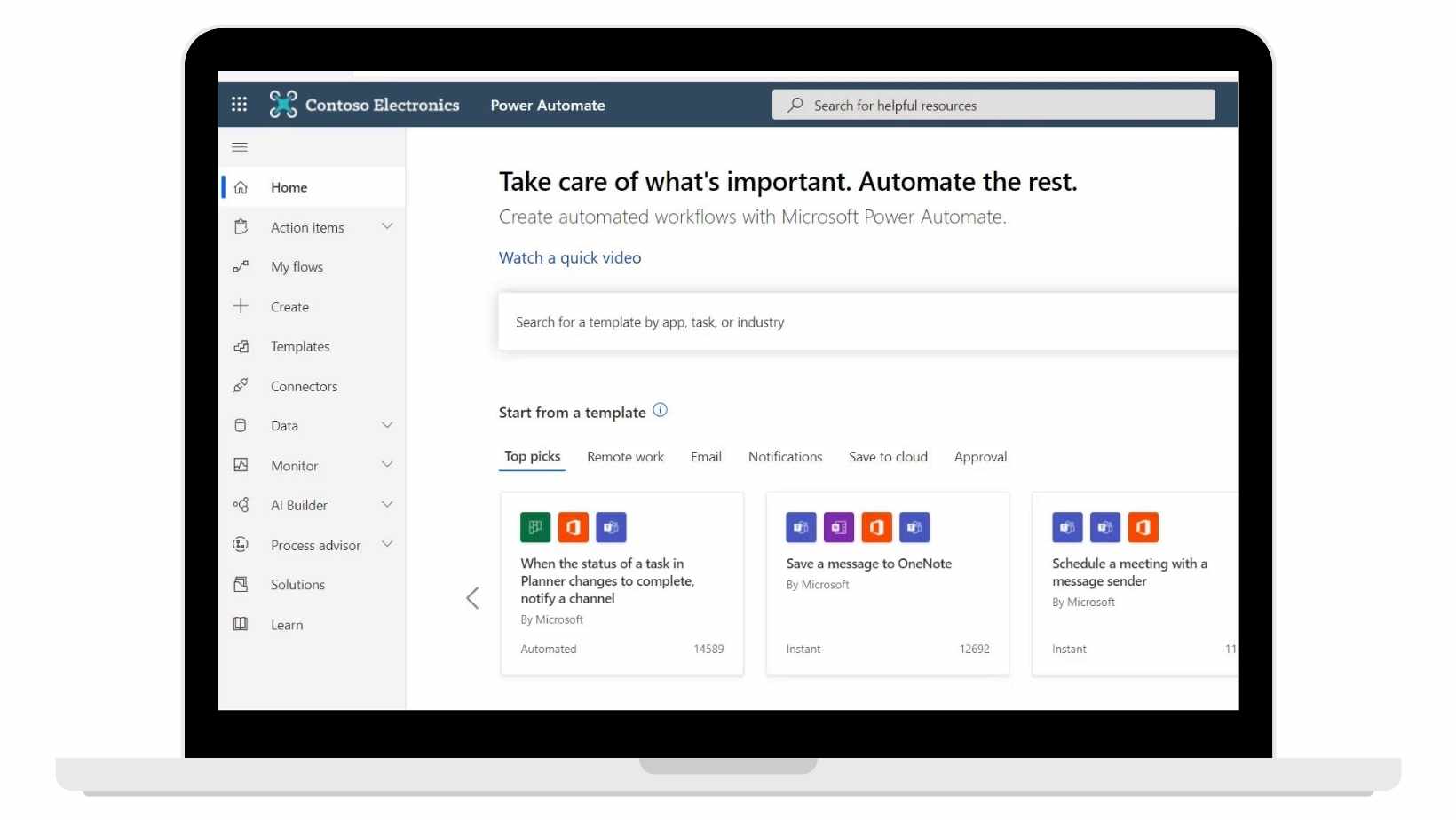
 power automate


The Power Automate package comes with a diverse range of pre-made templates which can be implemented at the click of a button. Or, if you are more familiar with the platform, you can build your own custom flows for more complex and personalised automation.
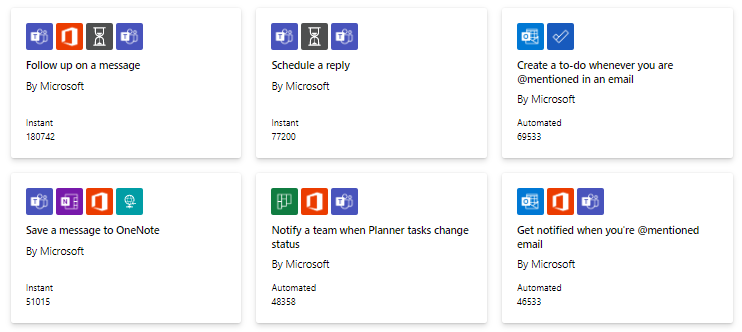


power automate flow templates
Power Automate Flow Templates


So how can you take advantage of this platform? We have provided some industry-specific use cases to give you an overview of the diverse capabilities this tool offers. Simple examples should inspire you to automate all those mundane repetitive tasks which take up so much of your day.


Marketing

Automatically track and manage social media presence

Keep your team updated when you get mentioned on social media, keeping an archive of customer sentiment.


Automate the creation of email lists

Capture, store and organise data from surveys, email campaigns, and more — without all the tedious aspect of manual copy-and-pasting.  

Sales

Automate digital sign-offs

Instead of back-and-forth emails, use Power Automate with a signature app like DocuSign to get things signed quickly and easily.

Onboard new vendors

Automate new vendor onboarding processes.

Notify new leads

Instead of manually tracking leads, Power Automate can notify you of new Dynamics 365 or Salesforce opportunities as they come in.

HR

HR onboarding process

Automate the onboarding process, which can be especially laborious when there is multiple documentation verification required. 


Productivity

Automatically store email attachments

How much time have you spent trawling your email for that file or presentation? Power Automate makes it easy to automatically store a copy of all your email attachments for quick reference and organization.
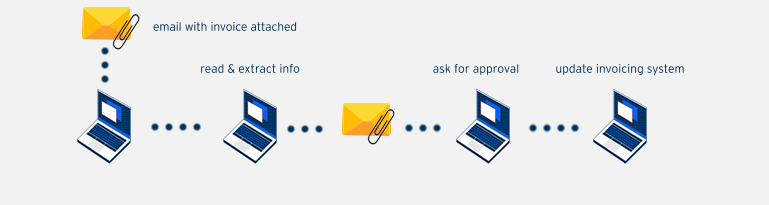


The illustration above shows a typical procedure for receiving and processing invoices. With Power Automate, you have the ability to filter emails with attachments and a subject line that includes "invoice". The invoice can be saved automatically, and the information can be interpreted and stored using AI capabilities. An approval form can then be triggered and emailed to relevant managers to get approval. Once approved the invoicing system is updated automatically! 


Get notified when data sources are updated

Ensure you're working with the latest information by using automated notifications whenever your SharePoint lists or cloud-based files and folders are updated.


Automate manager approval email requests

Avoid bottlenecks in your processes with built-in escalation options and automated triggers to ensure approvals requests are turned around quickly.

Automate manager approval email requests

Get a push alert when you get an email from your boss or key client. 


Scanning emails & appointment setting

Avoid bottlenecks in your processes by automating an email scan and setting up appointments. 


Summary

Save time today by implementing Power Automate into your organisation. And remember, Power Automate is free if you already hold an Office 365 license!

Want to learn how to use Power Automate? View our Power Automate Beginner and Intermediate courses. 

Trusted Nationwide by Leading Organisations

at Nexacu, we're proud to be the trusted training partner for hundreds of leading organisations accross Australia and New Zealand. From government departments to top corporates, we help teams upskill and succeed everyday

  • 400+ companies rely on Nexacu for team training
  • Trusted by federal, state, and local government agencies
  • Delivering training across 9 countries

Why Nexacu?

Books Icon

Step by Step Courseware

Custom workbook included with a step by step exercises

Facility Image 2
Facility Image 3
Facility Image 1

Refresh Icon

Free Refresher

Resit your course for free within 6 Months

More than 1,300 Business trust Nexacu

Trusted by Business

Procured by Government

Procured by Goverment

Reviews Not Found

Valued by Individuals
















