Recent Searches
Category

Microsoft Power BI

Category

Microsoft Copilot Courses

Category

AI for Business

Category

Microsoft Windows 11 Courses

Category

Microsoft 365

Category

Microsoft Excel

Category

Excel Specialist

Category

Microsoft Project

Category

R Programming

Category

Python

Category

Power Apps

Category

SQL

Category

SharePoint

Category

Microsoft Teams

Category

Power Automate

Category

Microsoft Visio

Category

Microsoft PowerPoint

Category

Microsoft Word

Category

Microsoft Outlook

Category

Adobe InDesign Courses

Category

Adobe Photoshop Courses

Category

Adobe Illustrator Courses

Category

Adobe Premiere Pro Training

Category

Adobe After Effects Training

Category

Adobe Acrobat Courses

Category

Adobe Captivate Training

Category

Adobe Animate Training

Category

Canva Courses

Category

HTML Courses

Category

WordPress

Category

Professional Development

Category

Microsoft Access

Category

Webinars

Course

Power BI Beginner

Course

Copilot for M365

Course

Windows 11 End User Course

Course

Excel Beginner

Course

Financial Modelling

Course

Project Beginner

Course

R Programming Beginner

Course

Python Beginner

Course

Power Apps Beginner

Course

SQL Beginner

Course

SharePoint Beginner

Course

Teams Essentials

Course

Visio Essentials

Course

PowerPoint Level 1

Course

Word Intermediate

Course

Word Beginner

Course

Word Advanced

Course

Microsoft Outlook Beginner to Intermediate

Course

InDesign Lite

Course

Photoshop Lite

Course

Illustrator Training Intro

Course

Premiere Training Intro

Course

After Effects Training Intro

Course

Acrobat Essentials

Course

Captivate Training

Course

Animate Training Intro

Course

Canva AI

Course

HTML Training Intro

Course

Achieving Leadership & Success

Course

Microsoft Access Essentials

Course

Copilot for M365 On Demand

Course

Power BI Intermediate

Course

Copilot for Word

Course

ChatGPT Beginner

Course

Microsoft 365 Beginner

Course

Excel Intermediate

Course

Analysis and Dashboards

Course

Project Intermediate

Course

R Programming Intermediate

Course

Python Intermediate

Course

Power Apps Intermediate

Course

SQL Intermediate

Course

SharePoint Intermediate

Course

PowerPoint Level 2

Course

InDesign Training Intro

Course

Photoshop Training Intro

Course

Acrobat Forms

Course

Anger Management & Negotiation Skills

Course

Copilot for M365 Live Online

Course

Power BI Advanced

Course

Copilot for Excel

Course

AI Prompting Fundamentals

Course

Microsoft 365 Intermediate

Course

Excel Advanced

Course

Excel VBA

Course

Project Advanced

Course

R Programming Advanced

Course

Python Advanced

Course

Power Apps Intermediate | Power Automate + Power BI Integration

Course

SharePoint Advanced (Site Owner)

Course

InDesign Training Advanced

Course

Assertiveness & Confidence

Course

Microsoft Access Advanced

Course

Power BI DAX

Course

Copilot for PowerPoint

Course

Excel Expert

Course

Machine Learning in R

Course

Power Apps Advanced

Course

SharePoint Advanced (Document Governance)

Course

Building Resilience

Course

Copilot for Outlook and Teams

Course

Coaching and Mentoring

Course

Illustrator Training Advanced

Course

Premiere Basics Training

Course

Advanced After Effects Training

Course

Canva Beginners

Course

WordPress Essentials

Course

Communications

Course

AI for Business Leaders and Managers

Course

Photoshop Training Advanced

Course

Advanced Premiere Training

Course

Canva Intermediate

Course

Communications & Quality Client Service Training

Course

InDesign Interactivity Training

Course

Canva Advanced

Course

Critical Thinking and Problem Solving

Course

InDesign Accessibility Training

Course

Cultural Diversity in the Workplace

Course

Microsoft Outlook Advanced

Course

Embracing Change

Course

SQL Advanced

Course

Growing Emotional Intelligence

Course

Planner Premium

Course

Minute Taking

Course

Excel Tables and Pivot Tables

Course

Power Automate Beginner

Course

Performance Management

Course

Data Transformation with Power Query

Course

Excel Macro Mastery

Course

Power Automate Intermediate

Course

Persuasion and Negotiation Skills

Course

Power BI Desktop Advanced Reporting

Course

Presentation Skills and Public Speaking

Course

Data Visualisation with Power BI Desktop

Course

Practical Project Management

Course

Respect, Equity and Diversity (RED)

Course

Resumé Writing and Interview Skills

Course

Stress Management

Course

Team Leadership, Management and Development

Course

Time Management Intensive

Course

Train the Trainer

Course

Write Effective Business Documents

Course

Dealing with Difficult People

Course

Managing Difficult Conversations

Course

Managing the Virtual Workplace

Course

Customer Service Training

Course

Technical Writing

O365

How to organise a party with Microsoft

Microsoft forms is a dynamic tool for anybody and everybody. Learn how to use Microsoft forms to make planning group events a breeze.

Sharepoint Banner Image
What is "Visualize the list" in SharePoint?

Recently Microsoft has announced further information about the Visualize list feature that will be available in Microsoft Lists (aka SharePoint Lists). We'll break down what this means and how you'll be able to use it.

Person holding phone and paper with charts
Office 365 – the productivity powerhouse

The team at Microsoft is always implementing new tools to make sure your important data is properly integrated into your digital systems. Read on for three simple, yet smart features that help make this happen.
Microsoft Sway icon
Getting to know Microsoft Sway

Chances are you have not heard of Microsoft’s Sway before, so we’ve put together a quick guide as to what the program is and how you can best use it for your business.

Business man on phone looking at Productivity written on wall
8 ways to use Microsoft Flow

Microsoft Flow is a versatile tool, providing streamlined business solutions to its users.
 

Tips for higher adoption rates for end-user training
Encourage higher adoption rates with end-user training

Encourage higher adoption rates with end-user training.  Knowing who your end-users are and what skills gaps exist, you can gain significant productivity and outcome improvements with the right training course.
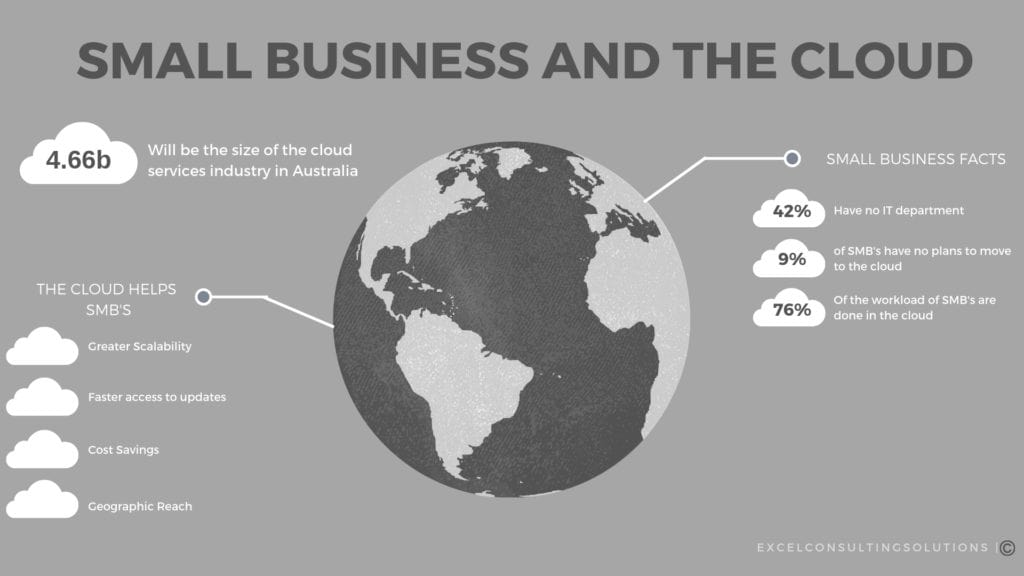
Small business and the cloud infographic
Stay Competitive with the Cloud

The past 25 years has seen a progression of people needing to be in the office less and less. It’s no longer the only place where work can be done. Email has replaced the post room, mobiles have replaced fixed line phones, laptops have replaced desktops and all the while all of these options have become more accessible and more efficient.

Cloud computing is the obvious next step in this progression. With more businesses that are set up remotely, cloud computing allows companies the freedom to compete with larger organisations with less of the resources. Or rather, more efficient resources.
Remote Working
Why Remote Workers Outperform Office Workers

Office workers find it more difficult to concentrate at their desks. Read why companies are opting for remote work and how you can begin to start integrating it in your business today.

Power BI Integration with Office 365 Part I

For our next series on Power BI our trainer Matt has put together a comprehensive guide on seamless Power BI Integration with Office 365. So, this follows along from last weeks series on Power BI Dashboard creation. For example, using Power BI integrations with Office 365 you will be able to create more powerful data driven dashboards.

Team at desk fist bump
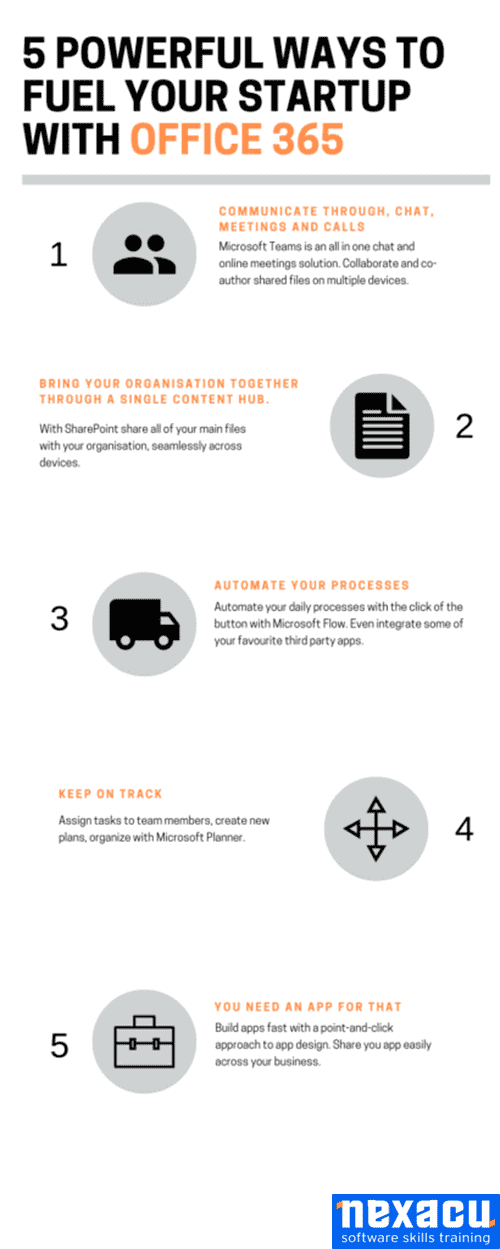
Office 365 – What you need to know

Microsoft Office 365 in a general sense is an integrated platform of services. Read below for our take on the positives and negatives of Office 365.

Screenshot of Windows File Explorer
Office 365 Capabilities

With the constant updates and upgrades to the Office 365 platform it can be easy to lose touch with some of the most effective Office 365 capabilities. Here’s a rundown of some of our top Office 365 functionalities.
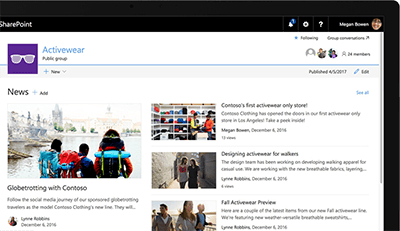
Screenshot of SharePoint
Guide to less familiar Microsoft Products

Most people have heard of the core office products such as Excel, Word and PowerPoint. Today, we want to give you a flavour of the other applications we offer and regularly teach.
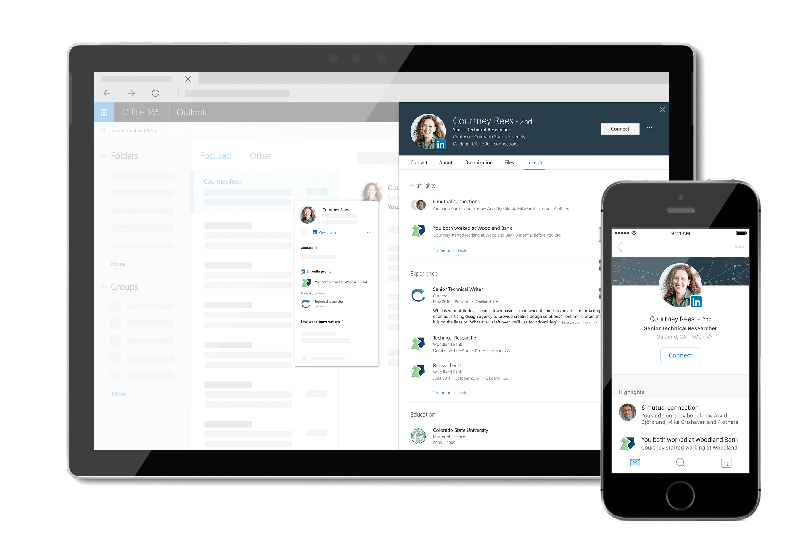
Screenshot of LinkedIn on tablet and mobile devices
Improve Your Relationships with Office 365 & LinkedIn

An important update you may have missed last year was the integration between LinkedIn and Office 365. In regards to both personal and professional development as a company and as an individual. These relatively new Office 365 updates you may have missed allow you to view information from LinkedIn profiles from Outlook, OneDrive and SharePoint in Office 365.

The importance of Office 365
Top Business Features in Office 365

Office 365 has become such a baseline application in the last couple of years that many businesses and corporations have switched over.


Topics

SQL
css

Trusted Nationwide by Leading Organisations

at Nexacu, we're proud to be the trusted training partner for hundreds of leading organisations accross Australia and New Zealand. From government departments to top corporates, we help teams upskill and succeed everyday

  • 400+ companies rely on Nexacu for team training
  • Trusted by federal, state, and local government agencies
  • Delivering training across 9 countries

Why Nexacu?

Books Icon

Step by Step Courseware

Custom workbook included with a step by step exercises

Facility Image 2
Facility Image 3
Facility Image 1

Refresh Icon

Free Refresher

Resit your course for free within 6 Months

More than 1,300 Business trust Nexacu

Trusted by Business

Procured by Government

Procured by Goverment

Reviews Not Found

Valued by Individuals